EasyManua.ls Logo

Sansui SC-5100 - Recording Dolby FM Broadcasts

Sansui SC-5100
49 pages
Print Icon
To Next Page IconTo Next Page
To Previous Page IconTo Previous Page
Loading...
34
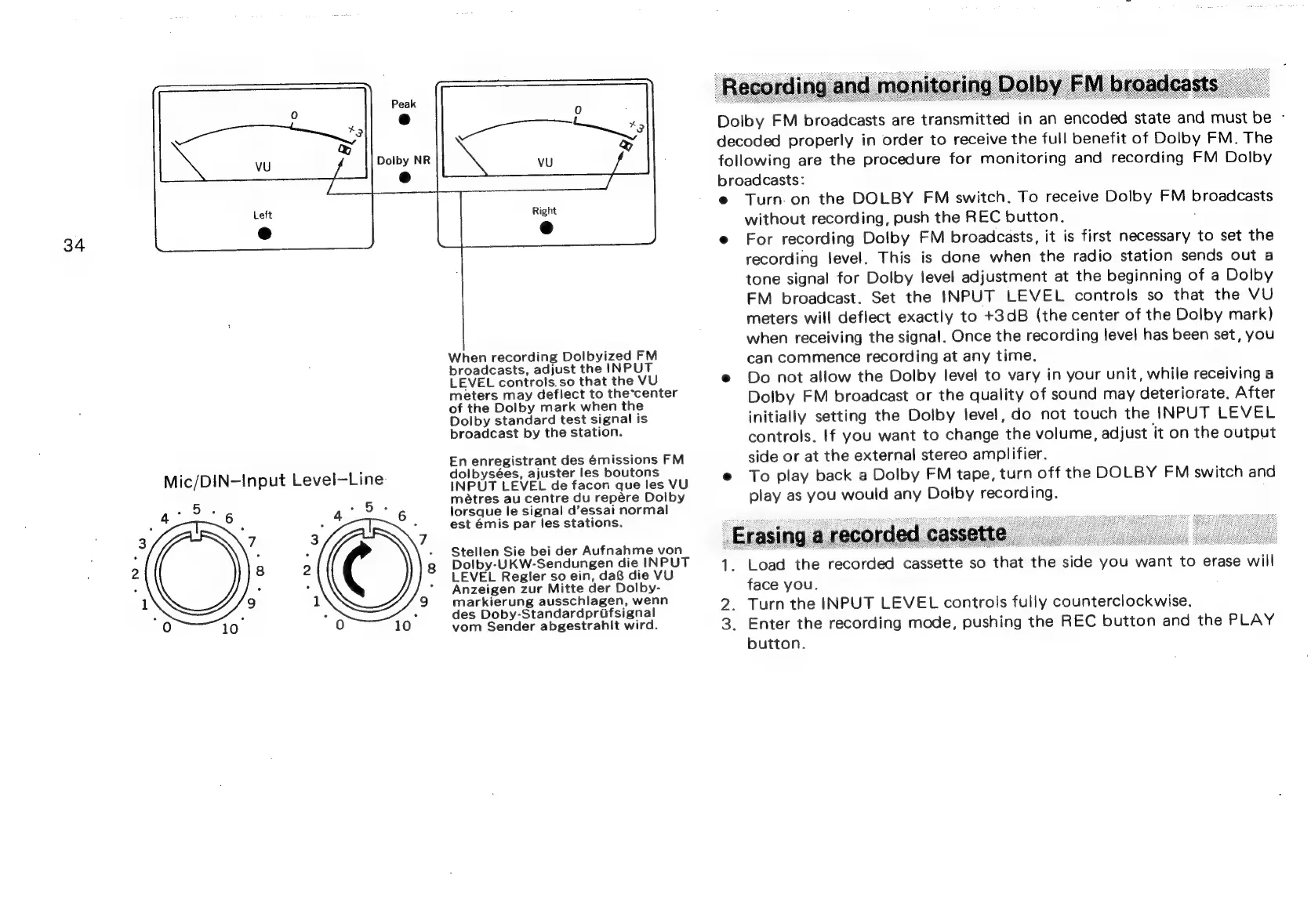
Mic/DIN-Input
Level—Line
When
recording
Dolbyized
FM
broadcasts,
adjust
the
INPUT
LEVEL
controls.so
that
the
VU
meters
may
deflect
to
the*center
of
the
Dolby
mark
when
the
Dolby
standard
test
signal
is
broadcast
by
the
station.
En
enregistrant
des
émissions
FM
dolbysées,
ajuster
les
boutons
INPUT
LEVEL
de
facon
que
les
VU
métres
au
centre
du
repére
Dolby
lorsque
le
signal
d’essai
normal
est
émis
par
les
stations.
Stellen
Sie
bei
der
Aufnahme
von
Dolby-UKW-Sendungen
die
INPUT
LEVEL
Regler
so
ein,
da8
die
VU
Anzeigen
zur
Mitte
der
Dolby-
markierung
ausschlagen,
wenn
des
Doby-Standardprifsignal
vom
Sender
abgestrahlt
wird.
Dolby
FM
broadcasts
are
transmitted
in
an
encoded
state
and
must
be
-
decoded
properly
in
order
to
receive
the
full
benefit
of
Dolby
FM.
The
following
are
the
procedure
for
monitoring
and
recording
FM
Dolby
broadcasts:
Turn.
on
the
DOLBY
FM
switch.
To
receive
Dolby
FM
broadcasts
without
recording,
push
the
REC
button.
:
For
recording
Dolby
FM
broadcasts,
it
is
first
necessary
to
set
the
recording
level.
This
is
done
when
the
radio
station
sends
out
a
tone
signal
for
Dolby
level
adjustment
at
the
beginning
of
a
Dolby
FM
broadcast.
Set
the
INPUT
LEVEL
controls
so
that
the
VU
meters
will
deflect
exactly
to
+3dB
(the
center
of
the
Dolby
mark)
when
receiving
the
signal.
Once
the
recording
level
has
been
set,
you
can
commence
recording
at
any
time.
Do
not
allow
the
Dolby
level
to
vary
in
your
unit,
while
receiving
a
Dolby
FM
broadcast
or
the
quality
of
sound
may
deteriorate.
After
initially
setting
the
Dolby
level,
do
not
touch
the
INPUT
LEVEL
controls.
If
you
want
to
change
the
volume,
adjust
jt
on
the
output
side
or
at
the
external
stereo
amplifier.
To
play
back
a
Dolby
FM
tape,
turn
off
the
DOLBY
FM
switch
and
play
as
you
would
any
Dolby
recording.
Load
the
recorded
cassette
so
that
the
side
you
want
to
erase
will
face
you.
Turn
the
INPUT
LEVEL
controls
fully
counterclockwise.
Enter
the
recording
mode,
pushing
the
REC
button
and
the
PLAY
button.

Related product manuals