23
ENGLISH
12
POWER
CHANNEL
MENU
ENTER
AUTO
TRACKING
SLOW
PAUSE/STILL
STOP
PLAY
REW/
REC/OTR
SKIP
SEARCH
3
45
6
789
0
/F.FWD
SET
SLOW
TIMER REC TV MONI.
CALL
TV/VCR
AUDIO
SPEED
EJECT
COUNT
RESET
ZERO
RETURN
INPUT
SELECT
INDEX
CANCEL
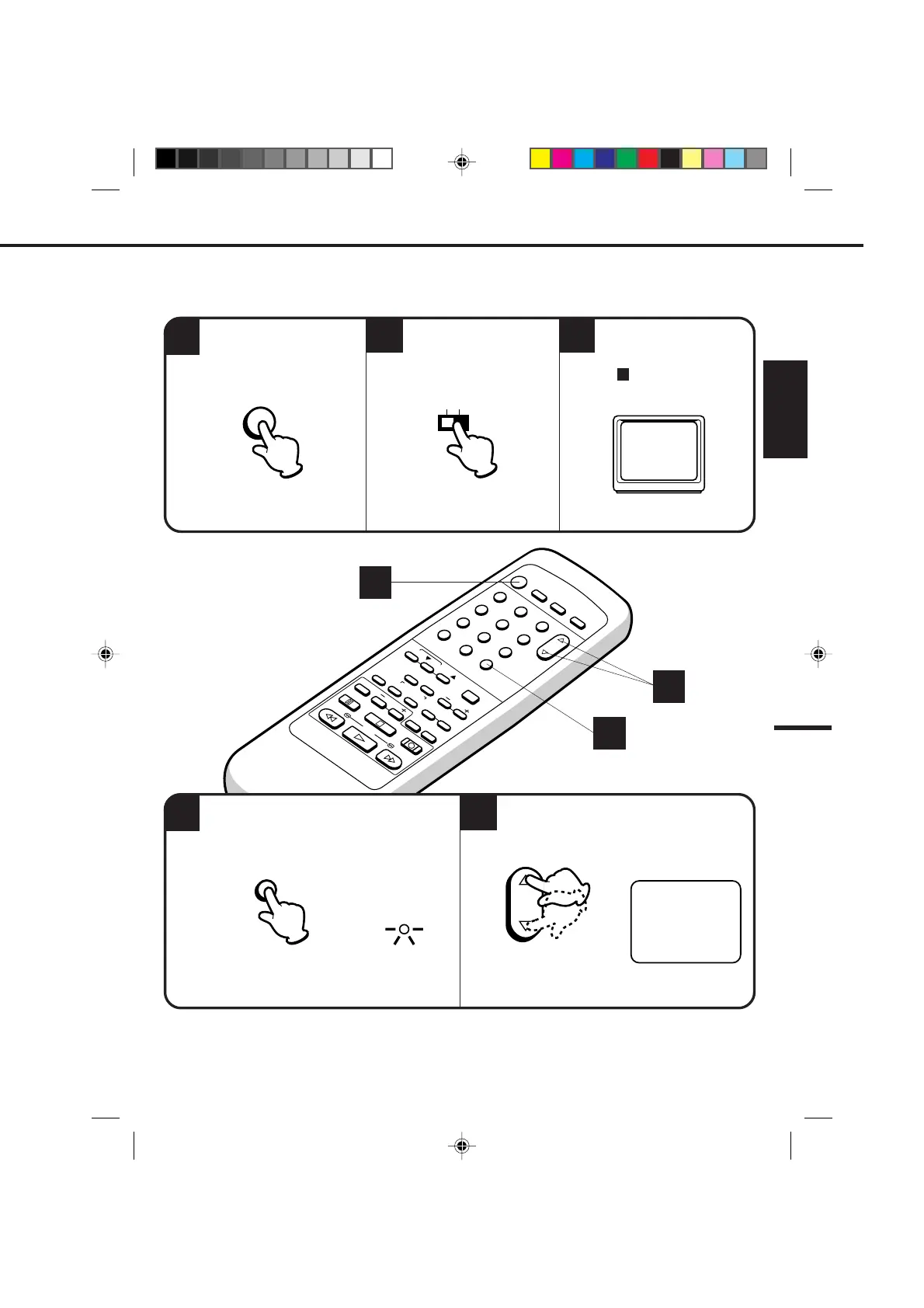
SETTING THE VIDEO CHANNEL
1
4
23
When a TV is connected with the 75 ohm coaxial cable only.
5
Turn ON the VCR POWER
button.
Set the 3/4 Channel
selector switch (Rear of the
VCR) to CH 3 or 4.
Turn ON the TV and set to
CH 3 or 4 to correspond
with the channel selected
in .
2
3
OR
4
For a push-button TV tuner
If CH 3 or 4 corresponding to the video channel cannot be tuned on your TV, proceed as follows: set the VCR 3/4
channel selector and the TV to CH 3 or 4, play back a prerecorded tape and tune the TV to receive a sharp color
picture from the video cassette recorder. Refer to your TV owner's manual for details.
To view playback of a recorded tape, or to watch a program selected by the VCR's channel selector, the TV
must be set to channel 3 or 4 (video channel).
POWER
34
CH
TV/VCR
Press the TV/VCR selector button to select the
VCR position.
Select any channel to receive a TV station in
your area.
TV/VCR
The channel number will appear on the screen about
4 seconds.
1
4
5
CHANNEL
The TV/VCR indicator will light.
4C94001A/E/P20-29 08*12*99, 11:4123


 To Next Page