30
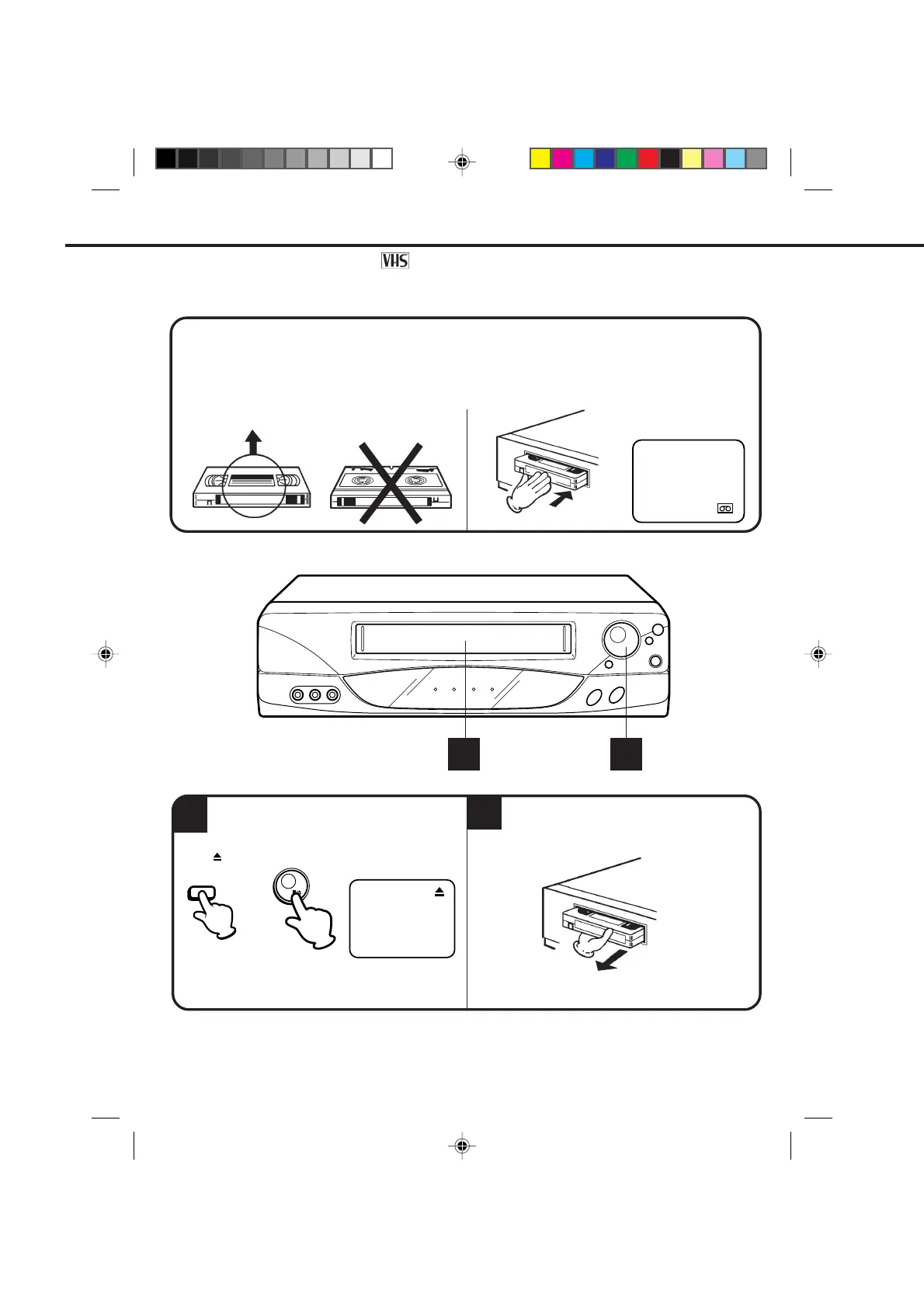
LOADING
UNLOADING
1
2
Use only video cassette tapes marked .
LOADING AND UNLOADING VIDEO CASSETTE TAPES
Push the center of the tape until it is automatically retracted.
AUTOMATIC POWER ON
The VCR will turn on automatically and the POWER indicator will light.
AUTOMATIC PLAY
When loading a cassette tape without the erase prevention tab, playback will start immediately.
Insert the cassette with its labeled side facing you.
An inverted cassette cannot be inserted.
To unload a cassette, press the EJECT button
on the remote control, or press the STOP/EJECT
button on the VCR twice. The first press will stop
Pull the cassette out.
12
the tape in any mode. The second press will eject the
tape. "
" will appear on the screen about 4 seconds.
AUTOMATIC EJECT
If the VCR automatically rewinds the tape to the
beginning (AUTO REWIND FEATURE), the tape will
be ejected automatically (See the NOTE on page 37).
OR
NOTES: • Always eject the tape when not in use.
• The cassette can be ejected even if the VCR is turn off.
STOP/
EJECT
EJECT
4C94001A/E/P30-37 08*12*99, 11:3930


 To Next Page