40
12
POWER
CHANNEL
MENU
ENTER
AUTO
TRACKING
SLOW
PAUSE/STILL
STOP
PLAY
REW/
REC/OTR
SKIP
SEARCH
3
45
6
789
0
/F.FWD
SET
SLOW
TIMER REC TV MONI.
CALL
TV/VCR
AUDIO
SPEED
EJECT
COUNT
RESET
ZERO
RETURN
INPUT
SELECT
INDEX
CANCEL
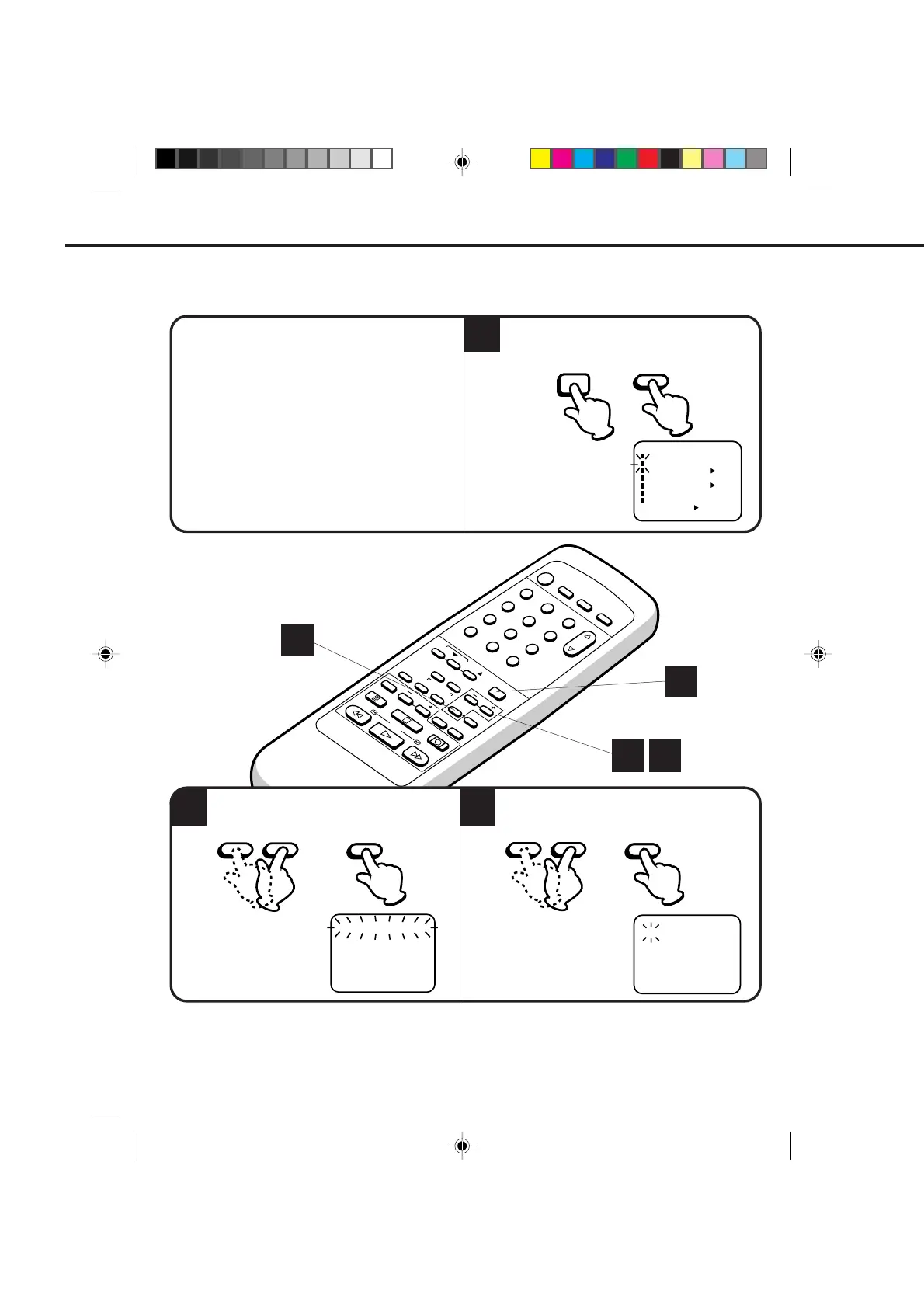
Press the MENU button. Check the TIMER REC
SET option is selected, then press the ENTER
button.
Timer recording can be programmed on-screen with the remote control. The built-in timer allows automatic
unattended recording of up to 8 programs within 1 month.
EXAMPLE: Program a timer recording for the 26th day, channel 125 (CATV), 11:00 - 11:30 PM on timer program
number 1. (Tape speed: SLP)
Turn on the TV and set to the video channel 3 or 4.
Press the TV/VCR selector button to select the VCR
mode.
Load a video cassette with the erase prevention tab
intact. The VCR will automatically turn on.
Check that the clock and date are correct (see page
25).
Press the SET + or – button to select the date,
then press the ENTER button.
•
•
•
•
CHECK BEFORE YOU BEGIN
32
1
When a TV is connected with an audio/video cable,
turn the TV and this VCR on and select the video
input mode on the TV.
SETTING THE TIMER RECORDING
MENU
ENTER
– SET +
ENTER
2 3
1
1
Press the SET + or – button to select one of the
program line, then press the ENTER button.
ENTER
– SET +
〈
+
/
–
/ENTER/CANCEL/MENU
〉
DATE START END CH
––––– ––:–– ––:–– –– –
––––– ––:–– ––:–– –– –
––––– ––:–– ––:–– –– –
––––– ––:–– ––:–– –– –
––––– ––:–– ––:–– –– –
––––– ––:–– ––:–– –– –
––––– ––:–– ––:–– –– –
––––– ––:–– ––:–– –– –
〈+/–/ENTER/MENU〉
MENU
CLOCK SET
TIMER REC SET
ON OFF
ON OFF
AUTO REPEAT
CH SET UP
SAP
LANGUAGE/IDIOMA/LANGUE
ON OFF
NO NOISE BACKGROUND
---
-:--
-:--
-:--
-:--
---
-:--
-:-- ---
-:-- -:-- ---
-:-- -:-- ---
-:-- -:-- ---
-:-- -:-- ---
-:-- -:-- ---
------ -
------ -
------ -
-
------ -
------ -
------ -
------ -
26(WE)
〈
+/-/ENTER/CANCEL/MENU
〉
START
END
DATE
CH
NOTE: To record from external source set the channel to "L". "L" will appear next to CH 125 (or 69).
4C94001A/E/P38-43 08*12*99, 11:3840



 To Next Page