39
ENGLISH
12
POWER
CHANNEL
MENU
ENTER
AUTO
TRACKING
SLOW
PAUSE/STILL
STOP
PLAY
REW/
REC/OTR
SKIP
SEARCH
3
45
6
789
0
/F.FWD
SET
SLOW
TIMER REC TV MONI.
CALL
TV/VCR
AUDIO
SPEED
EJECT
COUNT
RESET
ZERO
RETURN
INPUT
SELECT
INDEX
CANCEL
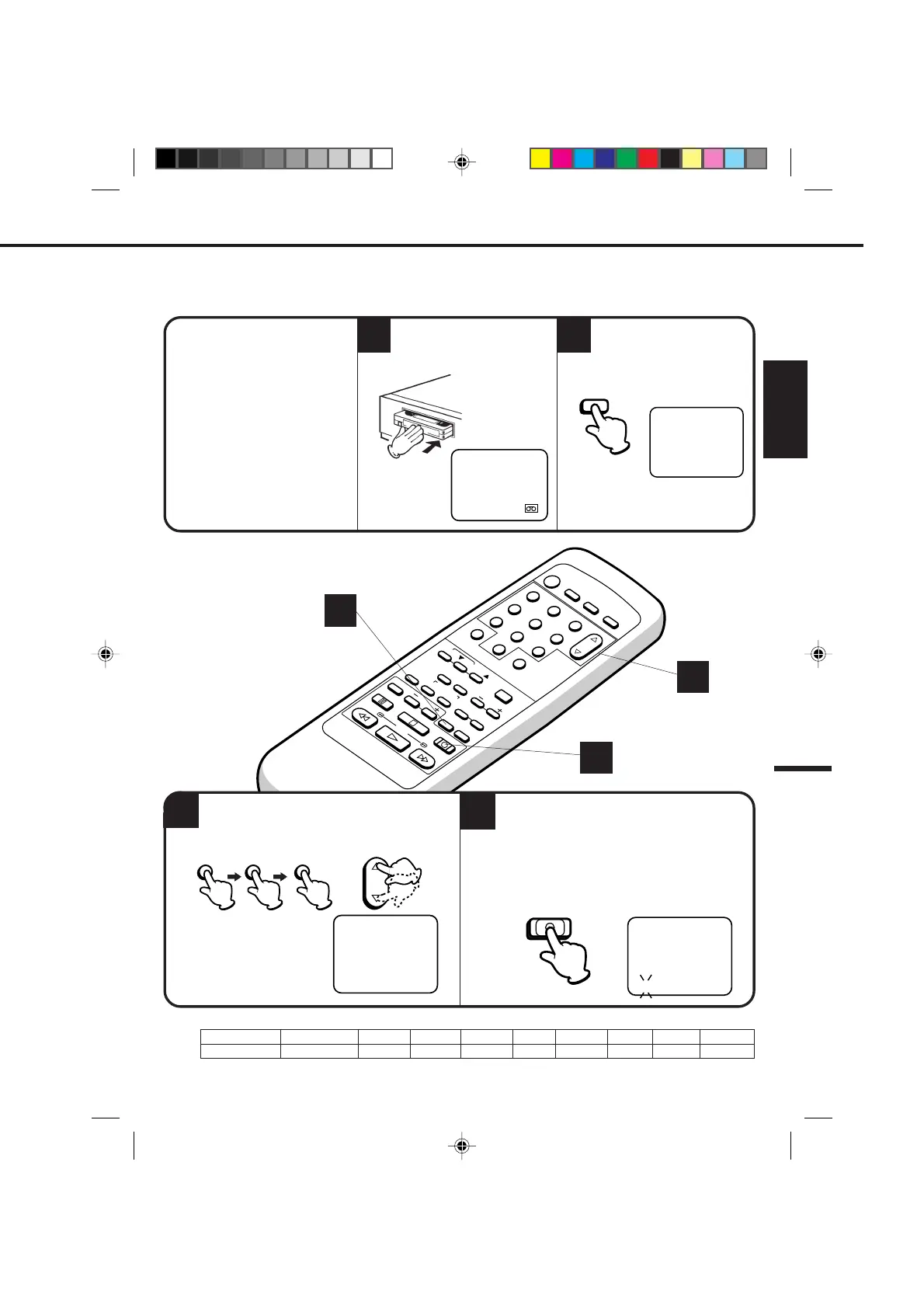
ONE-TOUCH TIMER RECORDING (OTR)
The one-touch timer recording feature provides a simple and convenient way to make a timed recording.
2
1
CHECK BEFORE YOU BEGIN
• Turn ON the TV and set to the
video channel 3 or 4.
• Turn on the VCR POWER button.
When a TV is connected with an
audio/video cable, turn the TV on
and select the video input mode on
the TV.
4
3
Press
Recording time
4 times
1:30
5 times
2:00
6 times
3:00
7 times
4:00
3 times
1:00
twice
0:30
once
NORMAL REC
9 times
NORMAL REC
8 times
5:00
Press the REC/OTR button to begin recording.
Press the button again to stop recording after
30 minutes. Each additional press of the REC/
OTR button will increase recording time as shown in
the chart below, up to a maximum of 5 hours. The
OTR and recording time will appear on screen about
4 seconds.
Load a cassette tape with the
erase prevention tab intact.
Press the SPEED selector
button to select the desired
tape speed SP, LP or SLP.
REC/OTR
EXAMPLE: One-touch timer recording for 30 minutes.
3
4
2
NOTES: • Press the REC/OTR button to increase the time needed for recording (See the chart below).
The counter and SP, LP or SLP
will appear on the screen about 4
seconds.
SPEED
•To cancel OTR, press the STOP button or turn off the power.
Press the direct channel selection buttons or
the CHANNEL ▲ or ▼ button to select the
channel to be recorded.
125
CHANNEL
CH 125
The channel number will
appear on the screen about
4 seconds.
OR
4C94001A/E/P38-43 08*12*99, 11:3839


 To Next Page