28
12
POWER
CHANNEL
MENU
ENTER
AUTO
TRACKING
SLOW
PAUSE/STILL
STOP
PLAY
REW/
REC/OTR
SKIP
SEARCH
3
45
6
789
0
/F.FWD
SET
SLOW
TIMER REC TV MONI.
CALL
TV/VCR
AUDIO
SPEED
EJECT
COUNT
RESET
ZERO
RETURN
INPUT
SELECT
INDEX
CANCEL
4
5
1
2
3
〈
+
/
–
/ENTER/MENU
〉
CH SET UP
TV CATV
AUTO CH MEMORY
ADD/DELETE
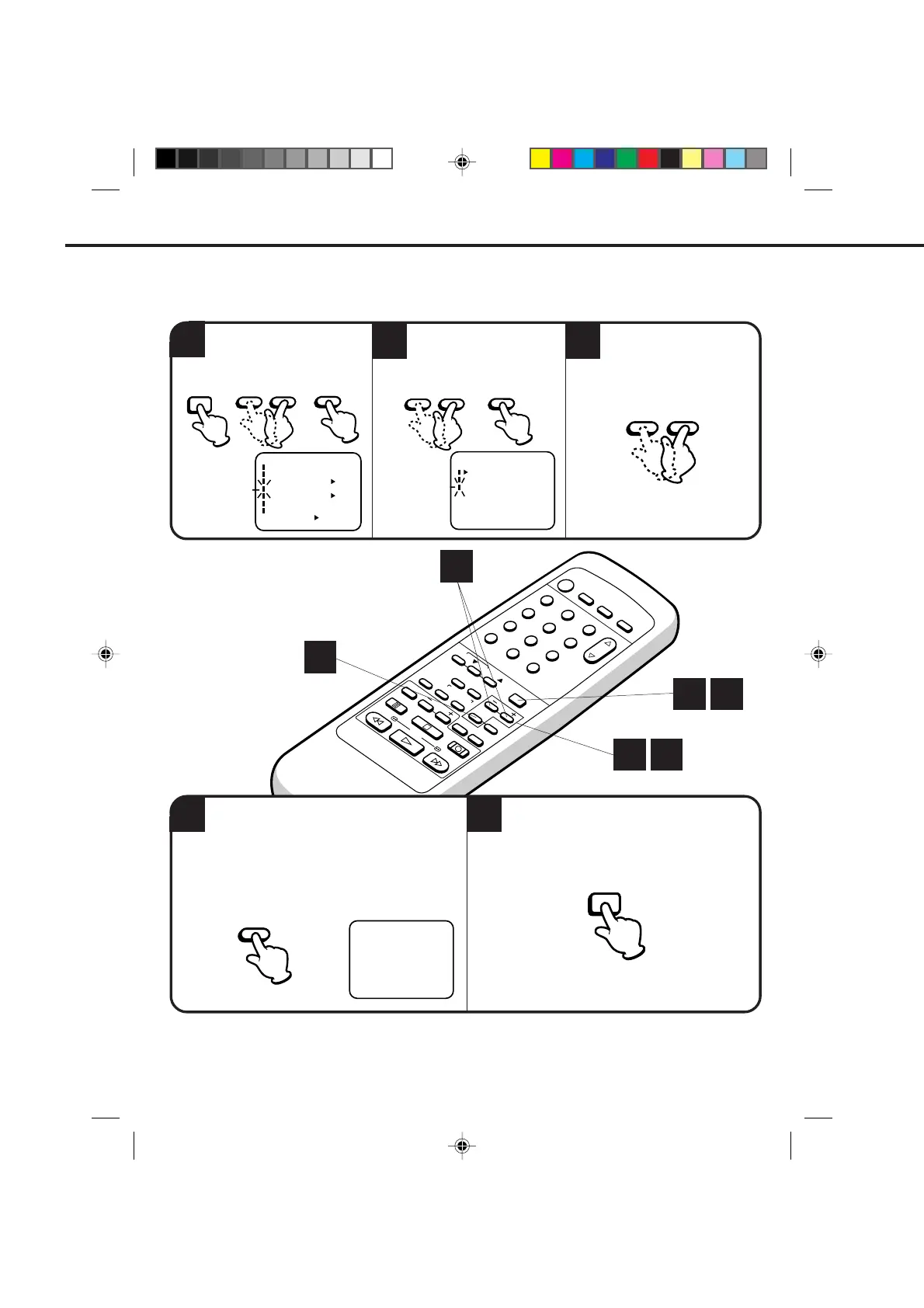
TO ADD/DELETE CHANNELS
Press the MENU button three times after adding
or deleting all of the desired channels, to return
to normal TV viewing.
Press the MENU button.
Press the SET + or – button to
select the CH SET UP option,
then press the ENTER button.
Press the SET + or – button
to select the ADD/DELETE
mode, then press the ENTER
button.
Select the desired channels
to be memorized or deleted
using the SET + or – button.
SETTING THE CHANNELS (CONTINUED)
1 5
1 2
3
4
〈
+
/
–
/ENTER/MENU
〉
ADD CH 002
Press the ENTER button if you wish to DELETE
the channel from memory.
Press the ENTER button if you wish to ADD the
unmemorized channel.
Repeat Steps 3 and 4 for each channel to be
added or deleted.
〈+/–/ENTER/MENU〉
MENU
CLOCK SET
TIMER REC SET
ON OFF
ON OFF
AUTO REPEAT
CH SET UP
SAP
LANGUAGE/IDIOMA/LANGUE
ON OFF
NO NOISE BACKGROUND
– SET +MENU
ENTER
– SET +
ENTER
– SET +
ENTER
MENU
4C94001A/E/P20-29 08*12*99, 11:4128


 To Next Page