3.SYSTEM DESCRIPTION
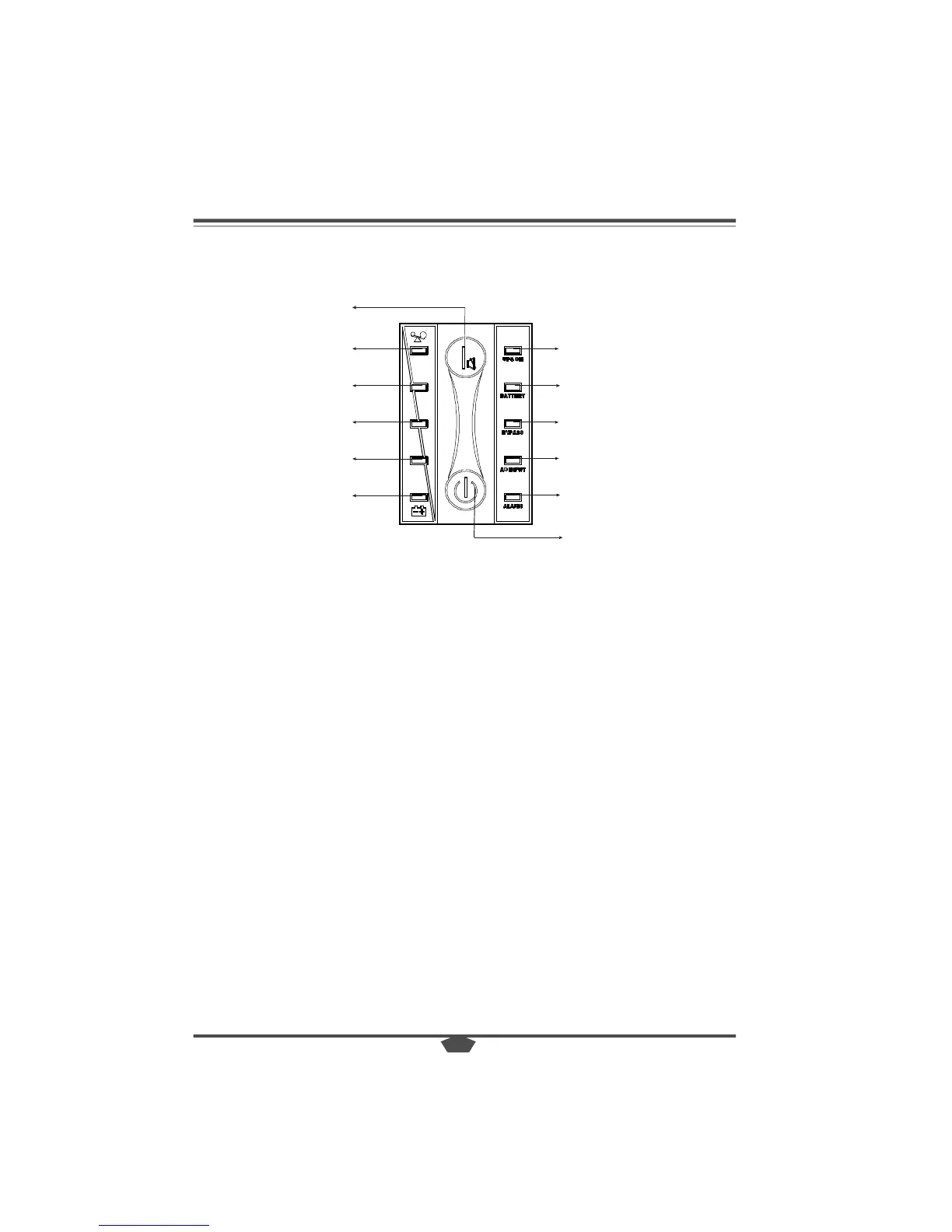
ON-SWITCH
● The UPS can be turned on by pressing ON-SWITCH button for 1 second.
● An acoustic alarm can be deactivated by pressing ON-SWITCH button again in
battery mode.
● To perform self-diagnosis, by Pressing ON-SWITCH again in utility power mode.
STANDBY-SWITCH
● The inverter can be turned off by pressing STANDBY-SWITCH. The output can be
provided by the mains power via the BYPASS.
AC INPUT LED
● Lights up when the mains power is available.
● Blinks and the BATTERY-LED lights up at the same time when the mains power
is out of tolerance.
● Blinks when the input polarity of the live conductor(L) and the neutral conductor
(N) of site wiring reversed.
UPS ON LED
● Lights up when output power is supplied by the mains power via the inverter.
BATTERY LED
● Lights up when the mains power fails and the inverter is powered by the batteries.
BYPASS LED
● Lights up when output power is provided by the mains power via the bypass.
ALARM LED
● Lights up when the UPS system is in fault condition, at the same time, the acoustic
alarm beeps continuously or beeps every second according to the different fault
conditions.
3.1 DISPLAY PANEL
The power control and the operating indicators are located on the front panel of the
UPS .
ALARM LED
INDICATOR 1
INDICATOR 2
INDICATOR 3
INDICATOR 4
INDICATOR 5



 To Next Page