INTRODUCTION
11
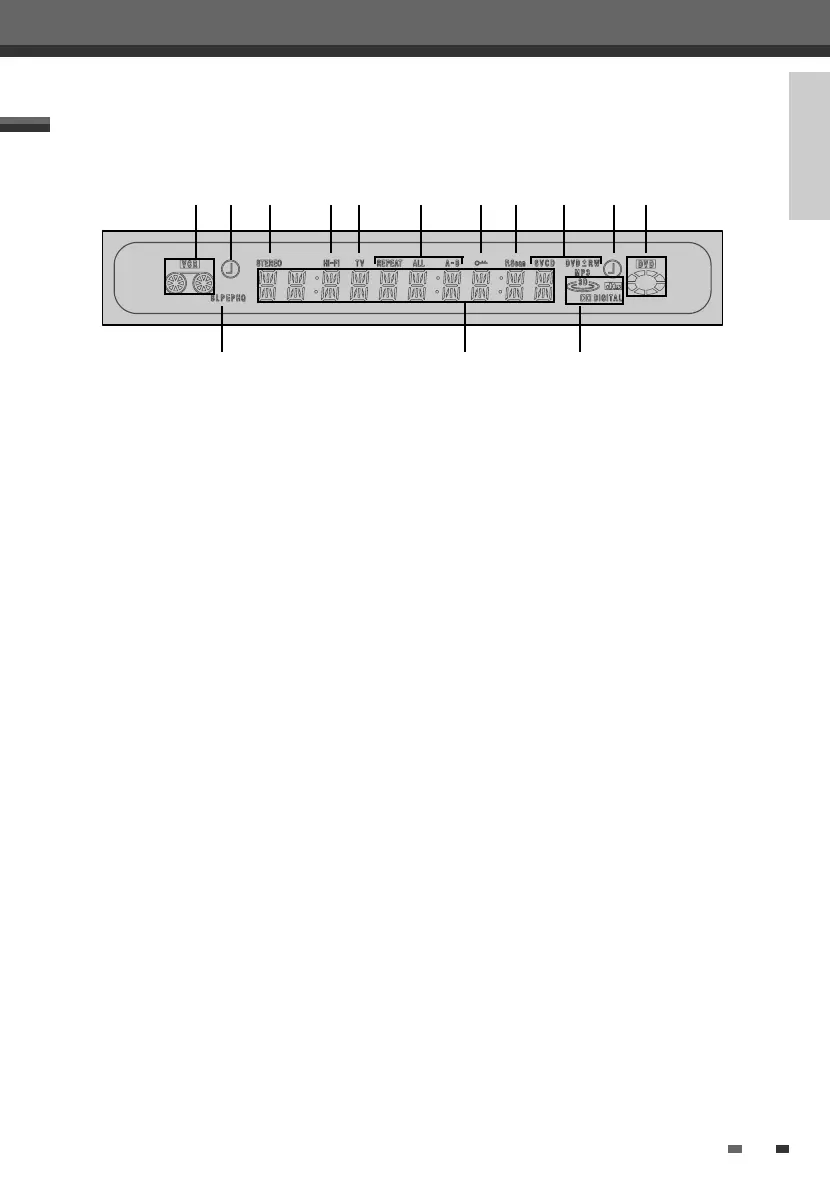
Front Panel Display
! Indicates a VHS tape is inserted in the VCR deck.
@ Circle : Indicates the VCR is recording.
Clock : Indicates a VCR Timer Recording is set.
# Indicates that a stereo broadcast is being
received.
$ Indicates when the DVD Recorder+VCR is playing
or recording a tape with Hi-Fi sound.
% Indicates the DVD Recorder+VCR is in TV mode
(as set by the [TV/DVD] button).
^ Indicates the current Repeat mode.
& Indicates when the DVD Recorder+VCR is locked.
* Indicates when the DVD Recorder+VCR is
outputting the video signal in Progressive Scan
mode.
(
Disc Type indicators
Indicates the type of disc loaded.
) Circle : Indicates a DVD+R(+RW) is recording.
Clock : Indicates a DVD Timer recording is set.
1 Indicates a disc is inserted in the DVD deck.
2 Indicates the current Recording mode.
3
Front Panel Display Message
Indicates clock, total playing time, elapsed time,
remaining time, title number, chapter/track
number, channel, VCR counter, etc.
4 DTS: Indicates a DVD is playing with a DTS
soundtrack.
Dolby : Indicates a DVD is playing with a Dolby
Digital soundtrack.
! @ # $ % ^ & * ( ) 1
2 3 4
Identification of Controls
DF-L78E1P-SB 2005.5.20 4:17 PM ˘ ` 11 mac001 1200DPI 90LPI


 To Next Page