INTRODUCTION
13
Identification of Controls
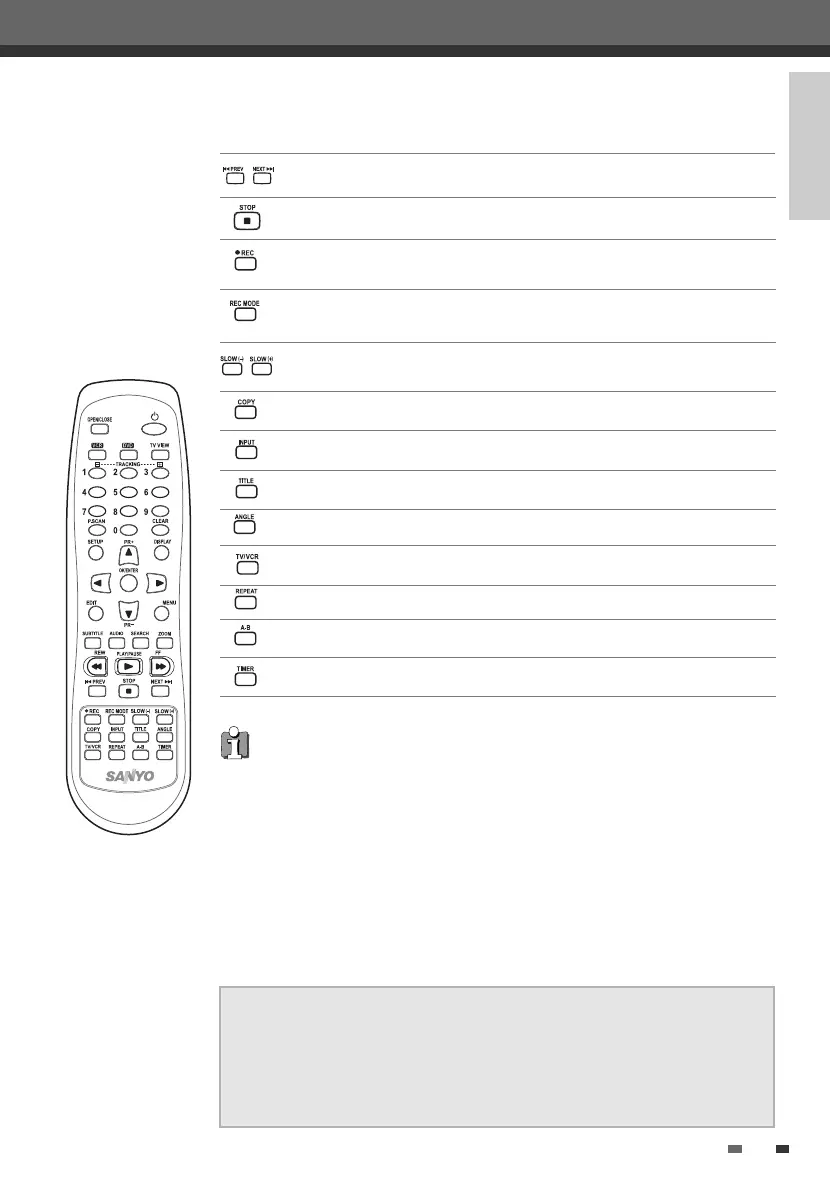
Switches between the DVD Recorder+VCR tuner and your TV tuner.
Stops playback or recording.
Skips to the next or previous chapter/track.
Increases or decreases the slow motion speed when playing a DVD or VHS
tape.
Switches the DVD Recorder+VCR input to Tuner, AV1, AV2 or AVF.
Displays a disc’s Title menu, if available.
Selects Recording mode: - DVD : HQ (1hr), SP (2hrs), EP (4hrs) or SLP (6hrs).
- VCR : SP or LP.
Copies from DVD to VCR (or from VCR to DVD).
Displays the Timer Recording menu.
Starts recording. Press repeatedly to set the recording time. For more
details, Refer to One Touch Record (OTR) on page 44.
Selects a DVD camera angle, if available.
Repeats the current chapter, track, title or the entire disc.
Repeats playback between two points (A and B).
Progressive Scan Mode
• If your TV supports Progressive Scan, you can view high quality video by setting the
DVD Recorder+VCR to Progressive Scan mode. If your TV does not support
Progressive Scan, do NOT change to Progressive Scan mode.
If you do so accidentally, press and hold the [P.SCAN] button for 3 seconds to
restore normal viewing.
• When video output mode is changed from RGB to Interlace or Progressive (Scart 1)
must not be correct color for Component video.
• As component outputs have their own Jacks on the back side, change the TV input
into Component input, after connecting the component cables from the DVD
Recorder+VCR to TV.
• Changing from Interlace or Progressive to RGB, should be the opposite of above.
CONSUMERS SHOULD NOTE THAT NOT ALL HIGH DEFINITION TELEVISION SETS
ARE FULLY COMPATIBLE WITH THIS PRODUCT AND MAY CAUSE ARTIFACTS TO
BE DISPLAYED IN THE PICTURE. IN CASE OF 525 PROGRESSIVE SCAN PICTURE
PROBLEMS, IT IS RECOMMENDED THAT THE USER SWITCH THE CONNECTION
TO THE 'STANDARD DEFINITION' OUTPUT. IF THERE ARE QUESTIONS REGARDING
OUR TV SET COMPATIBILITY 'WITH THIS MODEL 525p DVD PLAYER, PLEASE
CONTACT OUR CUSTOMER SERVICE CENTER.
DF-L78E1P-SB 2005.5.20 4:17 PM ˘ ` 13 mac001 1200DPI 90LPI


 To Next Page