EasyManua.ls Logo

Sanyo MDF-U730 - Temperature Setting and Offset

Sanyo MDF-U730
37 pages
Print Icon
To Next Page IconTo Next Page
To Previous Page IconTo Previous Page
Loading...
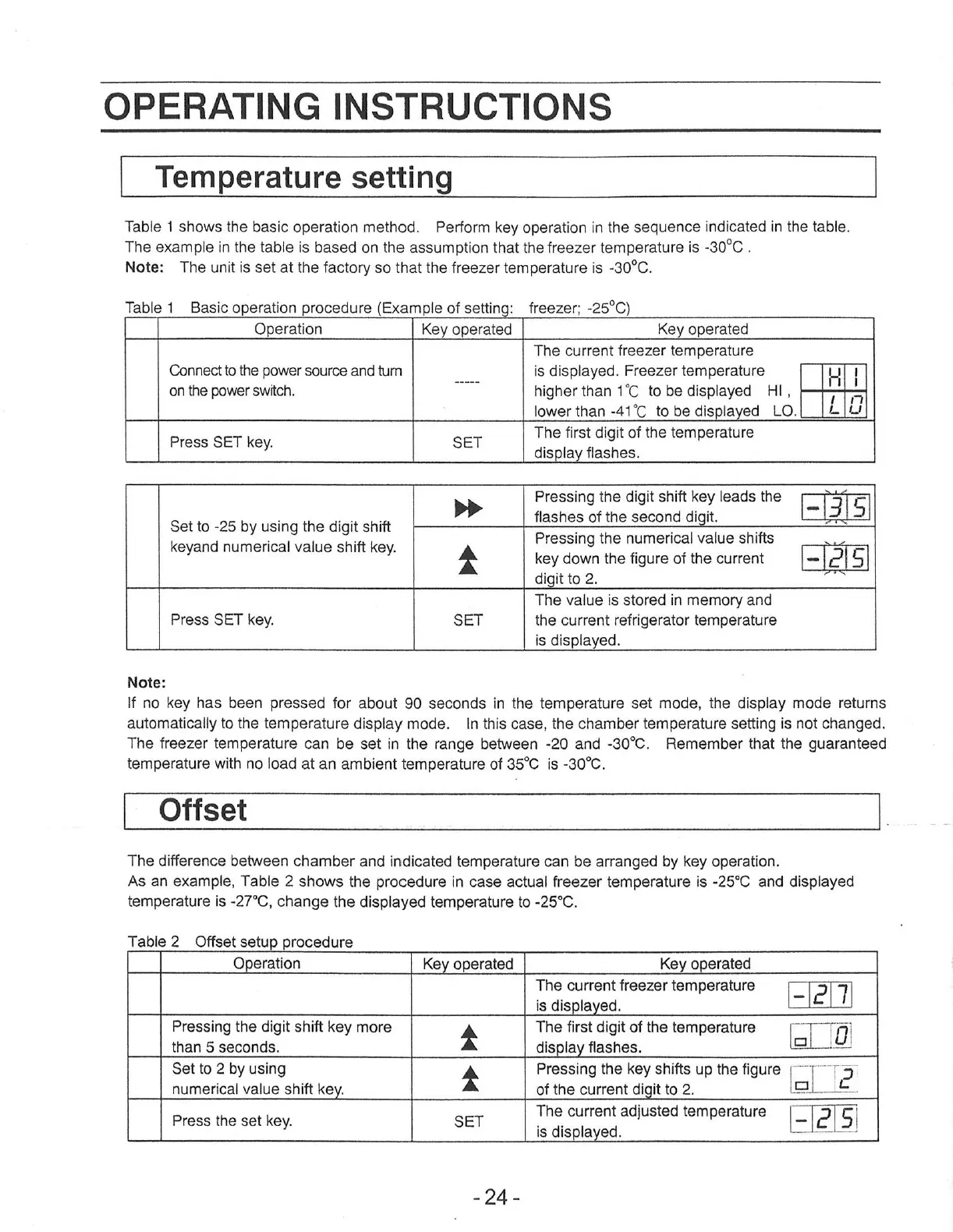
OPERATING
INSTRUCTIONS
Temperature
setting
Table
1
shows
the
basic
operation
method.
Perform
key
operation
in
the
sequence
indicated
in
the
table.
The
example
in
the
table
is
based
on
the
assumption
that
the
freezer
temperature
is
-30°C
.
Note:
The
unit
is
set
at
the
factory
so
that
the
freezer
temperature
is
-30°C.
Table
1
Basic
operation
procedure
(Example
of
setting:
freezer;
-25°C)
Operation
Key
operated
Key
operated
The
current
freezer
temperature
Connect
to
the
power
source
and
tum
is
displayed.
Freezer
temperature
m
on
the
power
switch
|
7
higher
than
1°C
to
be
displayed
HI,
=
lower
than
-41°C_to
be
displayed
LO.
|
Press
SET
key
SET
The
first
digit
of
the
temperature
display
flashes.
Pressing
the
digit shift
key
leads
the
bp
MEJEİ
Set
to
-25 by
using
the
digit
shift
Nasties
of
thersecond
digt:
Pressing
the
numerical
value
shifts
keyandnumerica!
value'shiftkey:
À
key
down
the
figure
of
the
current
digit
to
2.
The
value
is
stored
in
memory
and
Press
SET
key.
SET
the
current
refrigerator
temperature
is
displayed.
Note:
If
no
key
has
been
pressed
for
about
90
seconds
in
the
temperature
set
mode,
the
display
mode
returns
automatically
to
the
temperature
display
mode.
In
this
case,
the
chamber
temperature
setting
is
not
changed.
The
freezer
temperature
can
be
set
in
the
range
between
-20
and
-30°C.
Remember
that
the
guaranteed
temperature
with
no
load
at
an
ambient
temperature
of
35°C
is
-30°C.
Offset
The
difference
between
chamber
and
indicated
temperature
can
be
arranged
by
key
operation.
As
an
example,
Table
2
shows
the
procedure
in
case
actual
freezer
temperature
is
-25°C
and
displayed
temperature
is
-27°C,
change
the
displayed
temperature
to
-25°C.
Table
2
Offset
setup
procedure
Operation
Key
operated
Key
operated
The
current freezer
temperature
is
displayed.
+27
Pressing
the
digit
shift
key
more
4
The
first
digit
of
the
temperature
[TT]
than
5
seconds.
display
flashes.
m
Set
to
2
by
using
А
Pressing
the
key
shifts
up
the
figure
|
E
5
numerical
value
shift
key.
of
the
current
digit
to
2.
(ELE
Press
the
set
key.
SET
The
current
adjusted
temperature
2
5
is
displayed.
-24-

Other manuals for Sanyo MDF-U730

Related product manuals