EasyManua.ls Logo

Sanyo PLC-XK2200 - User Manual

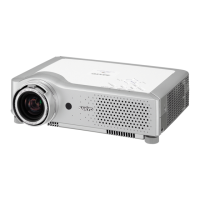
Sanyo PLC-XK2200
137 pages
Print Icon
To Next Page IconTo Next Page
Loading...
Owners Manual
Multimedia Projector
MODEL PLC-XK2200
PLC-XK2600
Network Supported
Wired LAN
Refer to the Owner's Manuals below
for details about network function.
Network Set-up and Operation

Table of Contents

Other manuals for Sanyo PLC-XK2200

Questions and Answers

  • J
    Jennifer FosterAug 10, 2025
    Why won't my Sanyo PLC-XK2200 Projector turn on, and the power light is blinking?
    • H
      htuckerAug 10, 2025
      If your Sanyo Projector cannot be turned on and you see the POWER indicator blinking, it's likely due to a high internal temperature. Allow the projector to cool down until the POWER indicator stops blinking. Once the temperature returns to normal, you should be able to turn it on.
  • C
    Colleen HolmesAug 15, 2025
    What to do if my Sanyo PLC-XK2200 Projector cannot be turned on due to detection of an abnormal condition?
    • K
      Kayla PollardAug 16, 2025
      If your Sanyo Projector does not turn on and you suspect an abnormal condition, unplug the AC power cord, then plug it back in. If the projector turns off again, unplug the AC power cord and contact the dealer or the service center for service and checkup.
  • A
    Abigail ObrienAug 22, 2025
    How to turn on Sanyo PLC-XK2200 Projector?
    • S
      Suzanne CochranAug 22, 2025
      Your Sanyo Projector is probably in stand-by mode. Press the ON/STAND-BY button to turn on the projector.
  • D
    Douglas JonesAug 28, 2025
    Why Sanyo PLC-XK2200 Projector cannot be turned on until cooling is completed?
    • A
      Anthony Garcia VAug 28, 2025
      If your Sanyo Projector cannot be turned on until cooling is completed, it means the projection lamp is cooling down. Wait until cooling is completed and the POWER indicator stops blinking.
  • J
    Joanna ThomasSep 3, 2025
    What to do if Sanyo PLC-XK2200 Projector may have an iris module operational error?
    • J
      Julia EllisonSep 3, 2025
      Check the iris module and peripheral circuit. If needed, replace the iris module in your Sanyo Projector.

Summary

Features and Design

Security Functions

Helps ensure security with Key lock and PIN code lock functions.

Safety Instructions

General Operation and Electrical Safety

Covers safe projector operation, ventilation, handling, and electrical safety.

Servicing, Lamp, and Component Warnings

Details warnings about servicing, electrical shock, and lamp components.

Installation Procedures

Connecting Video and Audio Sources

Details connecting computers, video equipment, and component/RGB devices.

Basic Operation

Powering On and Off

Step-by-step guide for turning the projector on and off, including direct power options.

Computer Input

PC Image Adjustment and Storage

Covers PC adjustment, storage, reset, and image mode selection.

Video Input

Setting Menu

Auto Setup and Security Configuration

Manages auto setup functions and security settings like Key Lock and PIN Code.

Maintenance and Cleaning

Warning Indicators and Filter Maintenance

Interprets warning indicators and guides filter replacement/reset procedures.

Lamp Replacement and Handling

Provides steps for lamp replacement and safety precautions for handling.

Troubleshooting Guide

Resolving Power and Image Issues

Troubleshoots no power, no image, distorted image, and display problems.

Network Safety Instructions

Projector Operation Via Networks

Warnings about fire/accident risks from projector failure or incorrect network installation.

Network Requirements

Network Installation Flow

Step 1: LAN Connection and Configuration

Connects the projector to LAN and sets up network configuration via browser.

Chapter 2 Setup Procedures

Connecting to the LAN Line

Connects the projector to the LAN connection terminal using a shielded LAN cable.

Network Configuration Setup

Configures Wired LAN network settings via the projector menu and browser.

Network PIN Code Security

Chapter 3 Basic Setting and Operation

Login and Setting Page Navigation

Guides accessing projector settings via web browser and navigating the interface.

E-mail Setting

SNMP Setting

Chapter 4 Controlling the Projector

Power Control and Status Monitoring

Remotely controls power and monitors projector status via web browser.

Use of Telnet

Telnet Control Procedures

Guides on using Telnet application to control the projector via command line.

Web Browser Setting

Q&A: Installation and Access

Troubleshooting Web Browser Access Issues

Addresses problems like setting page not appearing or incorrect network configuration.

Q&A: Operation

Web Browser Control Issues

Troubleshoots web browser control problems like power, settings, and page display speed.

Q&A: Network and IP Addressing

Firmware Update Procedure

Sanyo PLC-XK2200 Specifications

General IconGeneral
Resolution1024 x 768 (XGA)
Contrast Ratio400:1
Display Type3LCD
Aspect Ratio4:3
Lamp Life2000 hours (Normal Mode) / 3000 hours (Eco Mode)
Projection Size30" to 300"
Lamp TypeUHP
Input PortsVGA, S-Video, Composite
Output PortsVGA
Operating Temperature5 to 35 °C
Noise Level35 dB

Related product manuals