MOTOROLA HD/SD SET TOP BOX (STB)
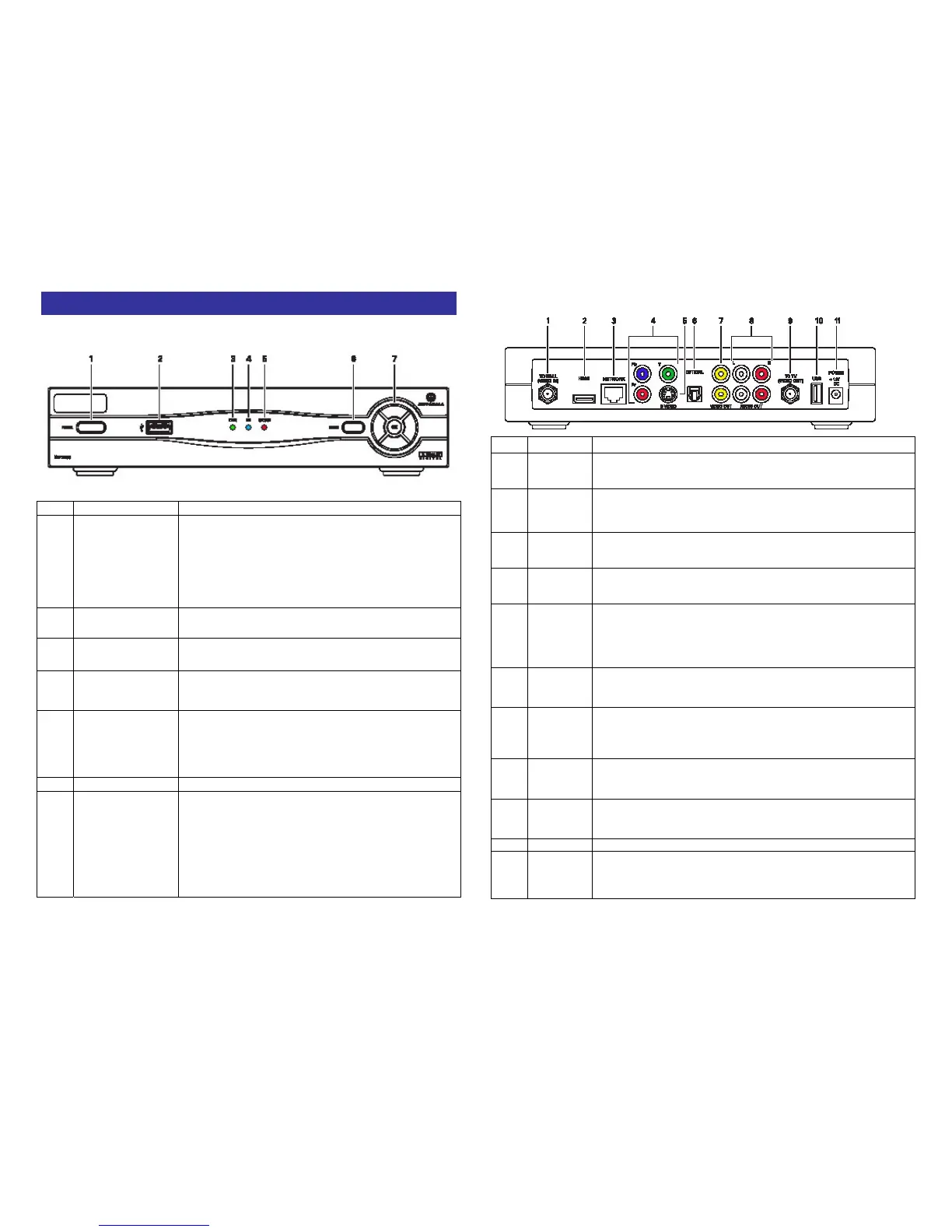
Front Panel
KEY ITEM FUNCTION
1 POWER
If held for less than five seconds, turns the Max
set-top box on or off
If held for five seconds or longer, restarts the
set-top box
Lights Green when the Max set-top box is on
2 USB USB 2.0 connector
3 LINK Lights green when receiving a stream
4 HD
Lights blue when receiving a high-definition
program
5 RECORD
Lights red when you are recording a program
with the
DTVR. *** Applies to VIP 1216 only - not the
1200
6 MENU Displays the Home Page
7
Up and Down
arrow keys
Left and right
arrow keys
OK
Changes the channel up and down
Moves through the on-screen program guide and
menu
Selects channels or menu options
Rear Panel
KEY
ITEM FUNCTION
1 TO WALL
Coaxial input (VIDEO IN)
2 HDMI
Connects to a high-definition TV or home theatre receiver with
an HDMI input (for a DVI input, use an HDMI-to-DVI adapter)
3 NETWORK
Ethernet 10/100Base-T RJ-45 port
4 Y Pb Pr
RCA-type component video outputs to an HDTV
5 S-VIDEO
High quality video output to a VCR or TV that accepts S-Video. It
carries video only; you must also connect to the TV or home
theatre receiver for audio.
6 OPTICAL
S/PDIF audio output to a digital home theatre receiver
7
VIDEO
OUT
RCA-type video outputs to a TV, VCR, DVD recorder, or other
device
8
AUDIO
OUT
Left and right RCA-type stereo audio outputs L and R
9 TO TV
Coaxial output to a TV or VCR (VIDEO OUT)
10 USB USB 2.0 connector
11
POWER
+12 DC
Connector for the DC power adapter


 To Next Page