42 PERFECTA 64 M SATEL
6. Tap “Next”.
7. Enable / disable the push notifications of the alarm system events. If you enable the push
notifications, select the events about which you want to be informed.
8. If you want to watch video from IP cameras in the application, configure the camera
settings. If you do not want to use the application to watch video from IP cameras, tap
“Done”.
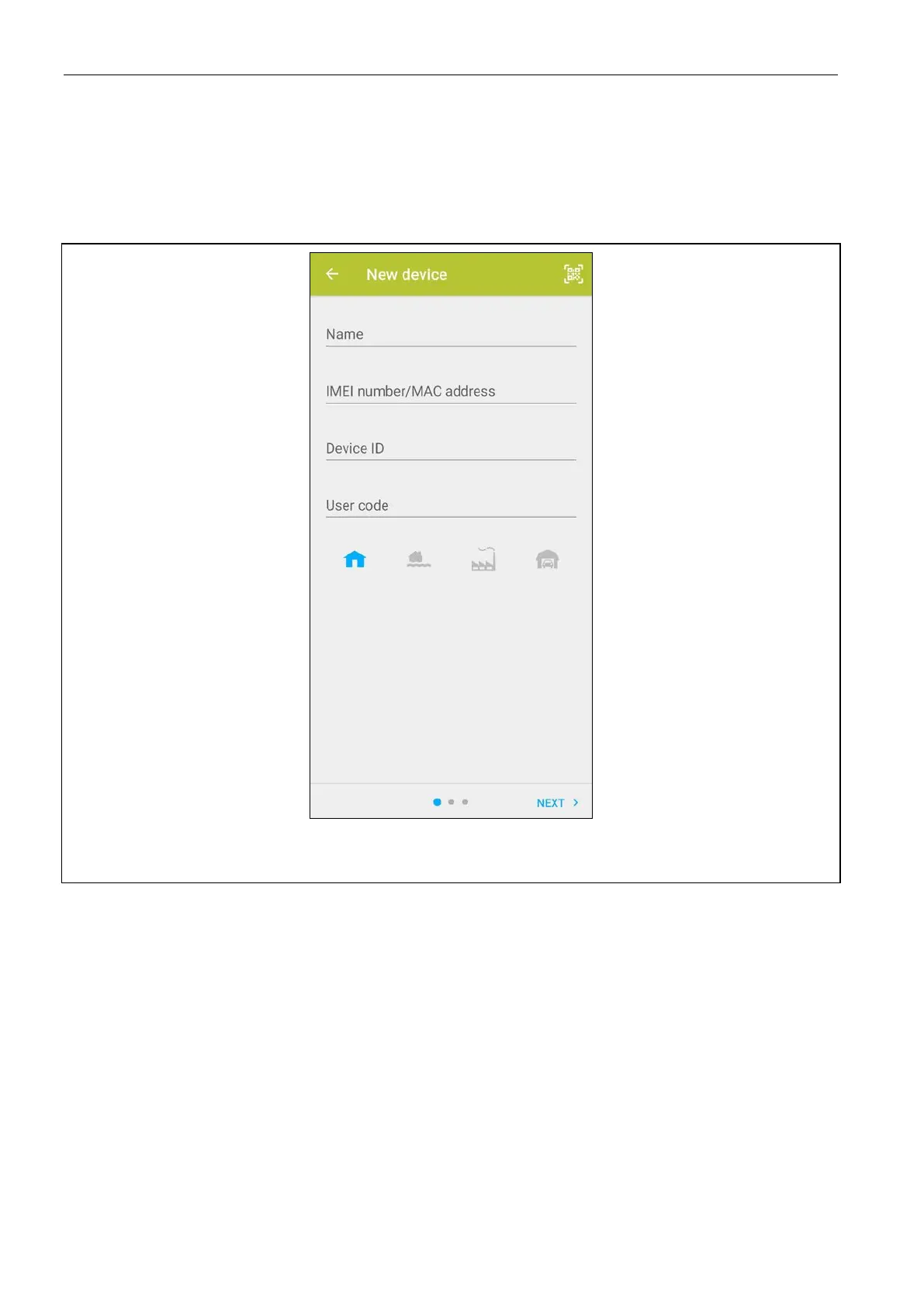
Fig. 4. PERFECTA CONTROL application (Android): the screen for adding a new alarm
system.
10.1.2 Adding a new alarm system without using the QR code (Android)
1. Enter the name (it will help you identify the alarm system while using the application).
2. Enter the control panel’s IMEI number.
3. Enter the control panel’s ID number (the individual identification number for the purpose of
communication via the SATEL server).
4. Enter your user code.
5. Select the icon that will be displayed next to the name on the list of alarm systems.
6. Tap “Next”.
7. Enable / disable the push notifications of the alarm system events. If you enable the push
notifications, select the events about which you want to be informed.
8. If you want to watch video from IP cameras in the application, configure the camera
settings. If you do not want to use the application to watch video from IP cameras, tap
“Done”.


 To Next Page