SATEL PERFECTA 64 M 43
10.2 First start of PERFECTA CONTROL (iOS)
1. Decide if you want the application to send notifications. You will proceed to the next step.
2. Decide if you want the access to the application to be password-protected. You will
proceed to the next step.
3. The tutorial will be displayed. Tap “Skip” to skip it.
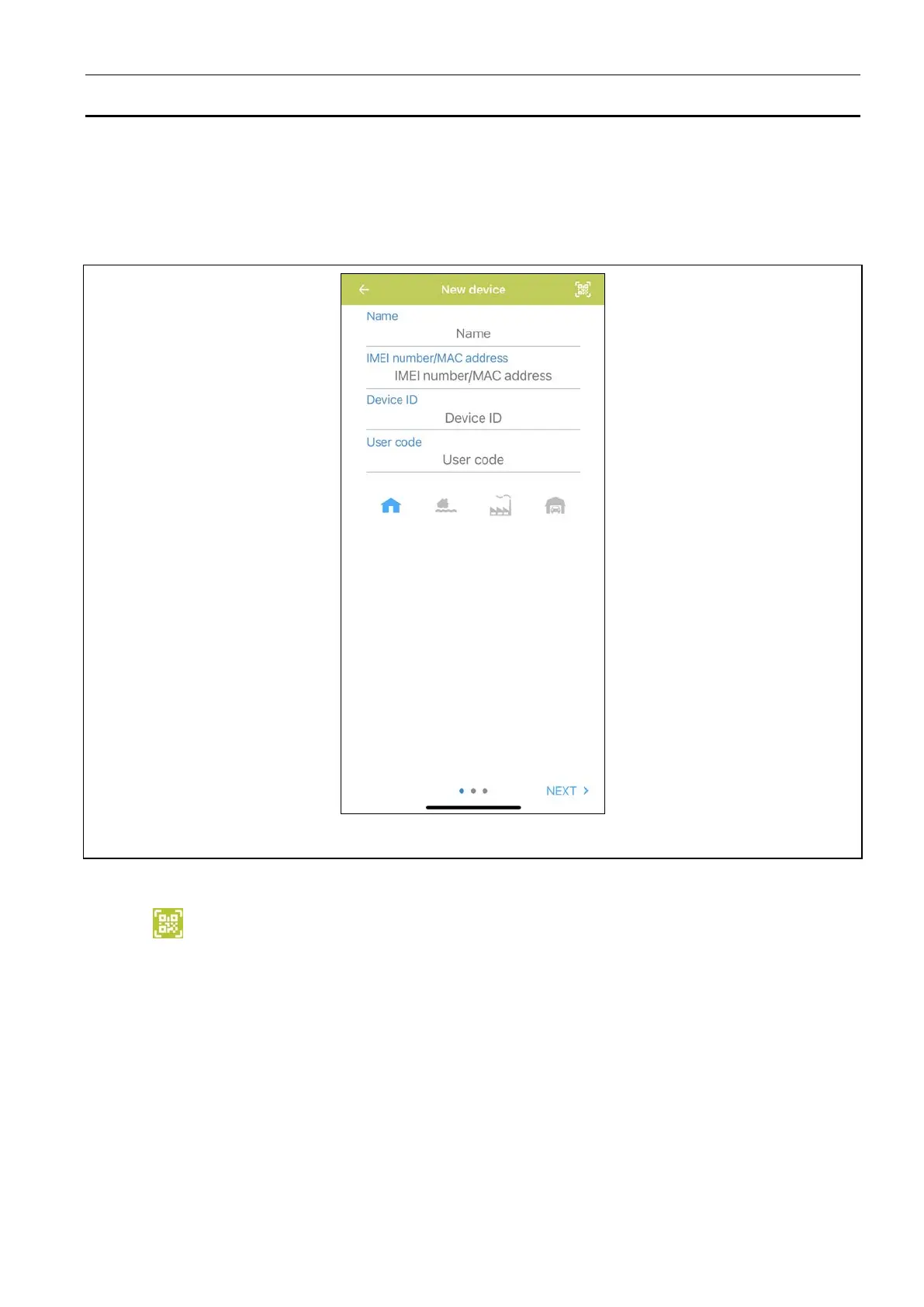
4. The screen for adding a new alarm system will be displayed (Fig. 5).
Fig. 5. PERFECTA CONTROL application (iOS): the screen for adding a new alarm system.
10.2.1 Adding a new alarm system by using the QR code (iOS)
1. Tap .
2. Allow the application to access the camera.
3. Scan the QR code.
4. Enter the password protecting the QR code and tap “OK”. The name of the system and
the control panel’s IMEI number and ID number will be entered.
5. Enter your user code.
6. Select the icon that will be displayed next to the name on the list of alarm systems.
7. Tap “Next”.
8. Enable / disable the push notifications of the alarm system events. If you enable the push
notifications, select the events about which you want to be informed.
9. If you want to watch video from IP cameras in the application, configure the camera
settings. If you do not want to use the application to watch video from IP cameras, tap
“Done”.


 To Next Page