Section Two
16
www.Satloc.com Falcon User Manual, Rev A
2.1 ADJUSTING REGIONAL SETTINGS & PREFERENCES
Field Description and Navigation Path
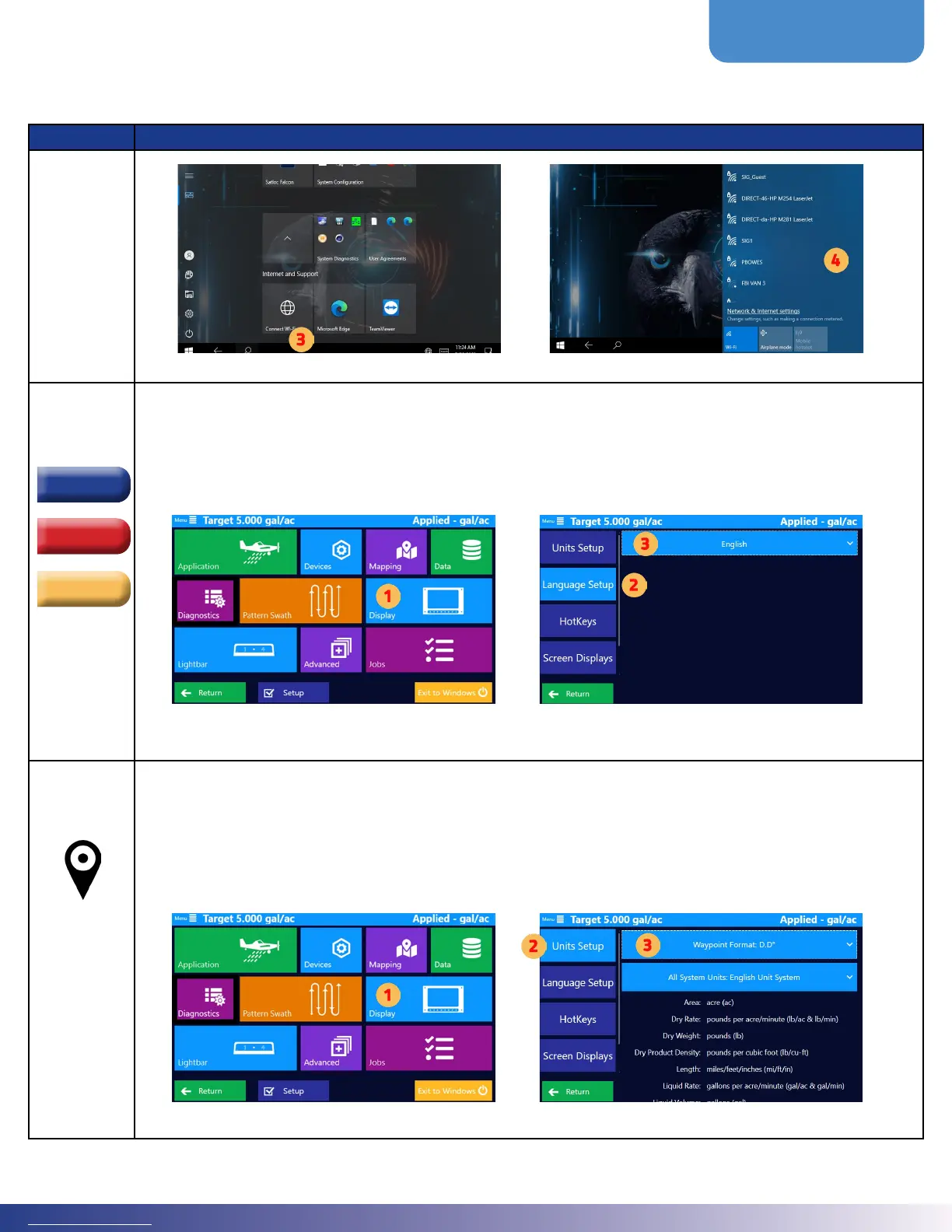
Language
ere are three language options in the dierent Falcon models.
• English
• Portuguese
• Spanish
Set the desired language format by navigating this path: Main Menu > Display > Language Setup
NOTE: If changing to a language other than English, it is recommended to restart the Falcon so that the text will
format within the dierent spaces. Aer the initial restart, the wording will properly t.
Coordinate
You can display GPS coordinates as one of the following:
D.D° - decimal degrees (default)
D° M.M - decimal minutes
D° M’ S.S - decimal seconds
Set the desired coordinate format by navigating this path: Main Menu > Display > Units Setup
Português
English
Español



 To Next Page