Section Two
21
www.Satloc.com Falcon User Manual, Rev A
2.5 DISPLAY SCREEN SETUP
Custom Displays for All Application Types
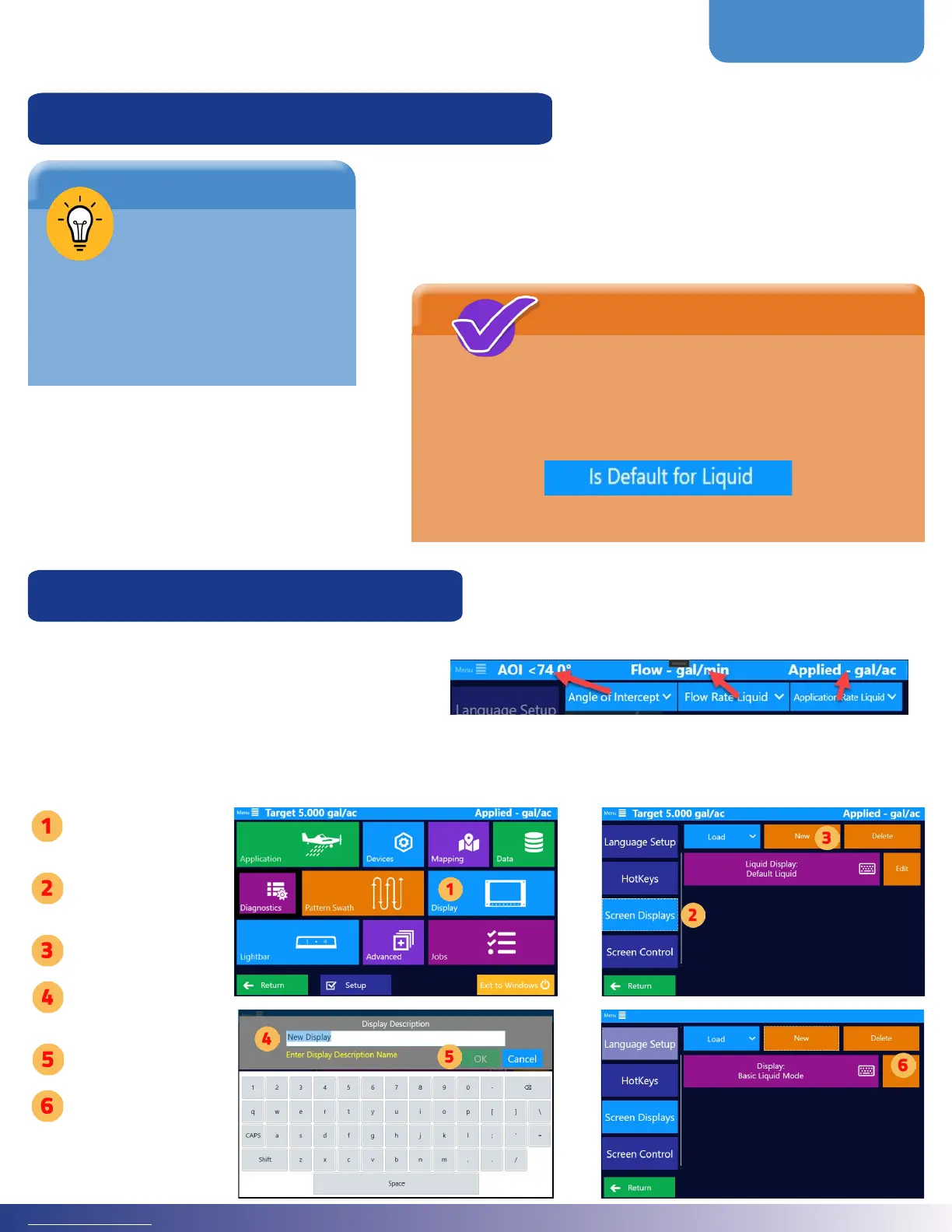
Top Display Customization
In the Top Display Area, three elds contain user-
selected information. is is editable from the screen
display menu and is part of the areas automatically
updated when Guidance Modes change. See right-
hand image to view an example of what the three elds
in the Top Display area might look like.
Note: Once in ‘Edit’ mode, navigation back to the menus is disabled until clicking ‘Done Editing.’
Tap ‘Display’
Tap ‘Screen
Displays’
Tap ‘New’
Enter a display
description name.
Press ‘Ok.’
Tap ‘Edit’
It is ideal for each Guidance
Mode to have its own Display Setup.
To have a particular setup loaded upon a specic
Guidance Mode, select it to be that mode’s default.
Detailed instructions are located later in this section.
NOTE
Satloc recommends
setting up custom
Display Settings for all
likely application types (Liquid,
Dry Gate, etc.) and a Display
Setting for Ferrying.
TIP
Navigate to custom displays: Main Menu > Display > Screen Displays.
A pilot can enter and save multiple setups, so your name could be
specic. For example, “Bob’s Liquid” or “Liquid for Forestry.”



 To Next Page