Section Two
23
www.Satloc.com Falcon User Manual, Rev A
If the quantity of
settings/functions for
the Le Display extends
beyond the available space on the
Moving Map Screen, that area can
scroll with a nger swipe.
NOTE
e green
text is what
will be
edited when
‘Blank’ is
selected.
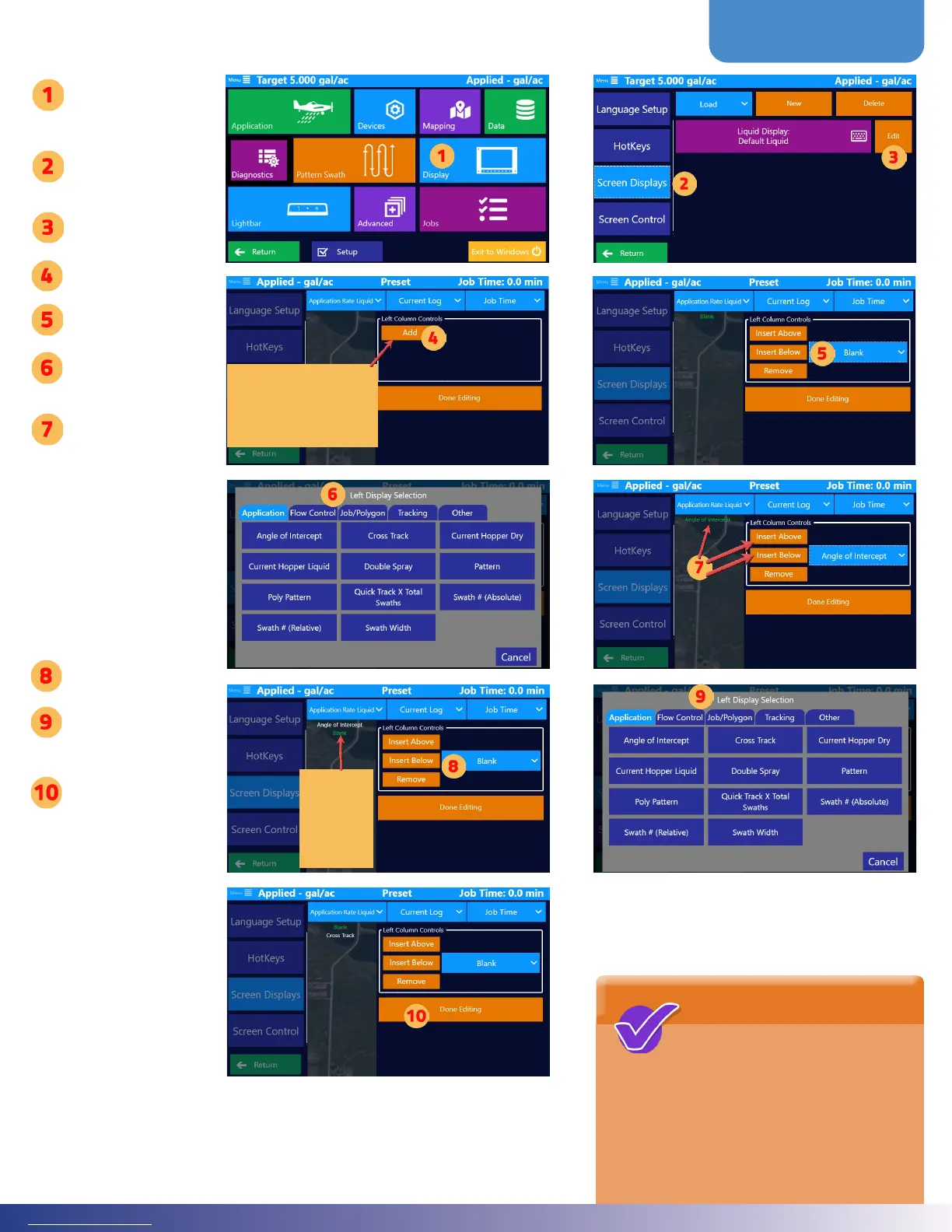
Tap ‘Display’
Tap ‘Screen
Displays’
Tap ‘Edit’
Tap ‘Add’
Select ‘Blank’
Choose Setting/
Function
Select ‘Insert
Above’ or Insert
Below’ to add
a new setting/
function.
(e green list is
the order of what
will appear on
the moving map
screen.)
Select ‘Blank’
Choose Setting/
Function
Tap ‘Done
Editing’ when
nished (Once
in edit mode,
navigation back
to the menus is
disabled until
selecting ‘Done
Editing’)
If you edit a current
display, the add button will
not appear. e screen will
look more like the image
in Step 7.



 To Next Page