Section Two
24
www.Satloc.com Falcon User Manual, Rev A
As explained earlier in Section 2.4, all Falcon models allow the user to specify what information is displayed on the
screen and lightbar, what buttons are available on the screen, and how to handle systems inputs specic to the immediate
mode of ying. ese modes are called Guidance Modes.
e beauty of this is whatever Guidance Mode is set for a particular application, those display settings will load when
selected. For example, if a default is set for liquid application, whenever the Falcon is in Liquid Application Guidance
Mode, this specic Screen Display will load.
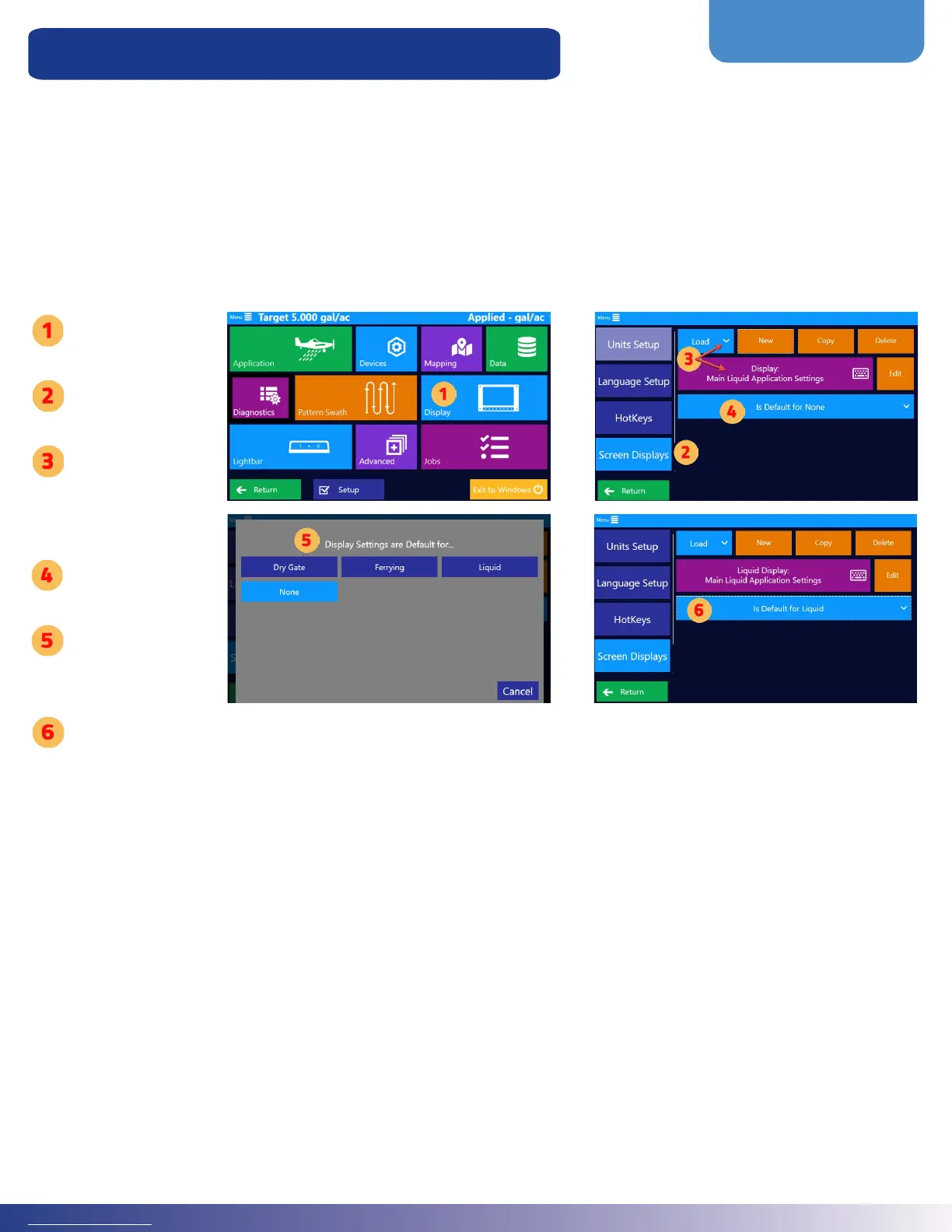
Follow the steps below to set a particular setup to be loaded with a specic Guidance Mode.
Setup Display to a Guidance Mode
Tap ‘Display’
Tap ‘Screen
Displays’
Load the
preferred display
for a particular
guidance mode
Select “Is Default
for ...” button
Tap the desired
application for the
default display
Verify that the
correct default is
set to the loaded
display



 To Next Page