Saia-Burgess Controls AG
User Manual Standby System │ Document 27-645 │ Edition ENG 02 │ 2017-04-26
Media Exchange
System overview
2-9
4
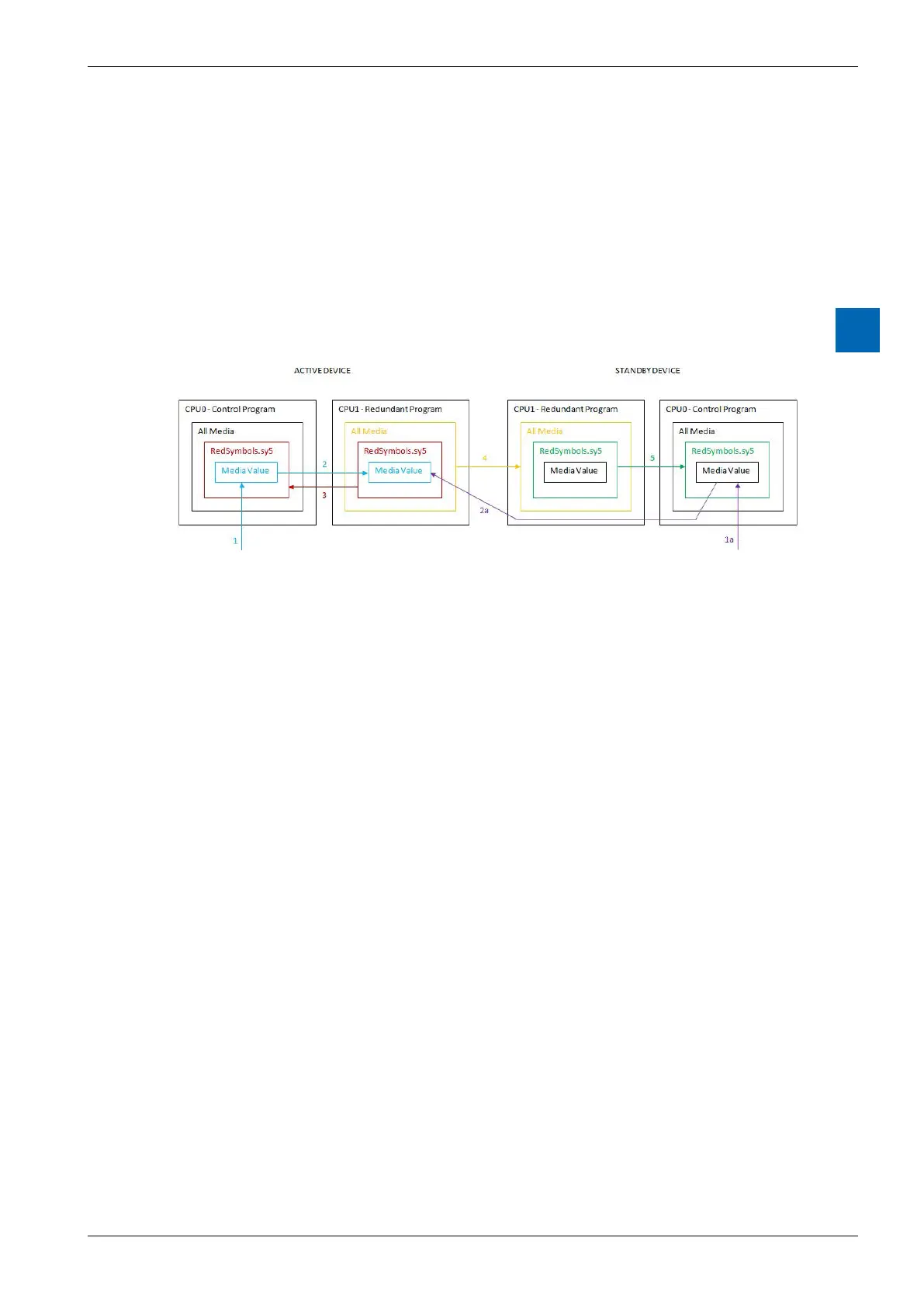
For the STANDBY CPU0 the process is almost the same:
in “RedSymbols.sy5”.
media in CPU1 of the ACTIVE device.
CPU1 of the STANDBY
device only when the media are copied from CPU1 of
the ACTIVE device in Step 4.
Separate symbol les
automatically when the project is created:
ToRedSymbolsPrimary.sy5
CPU1 from the Primary CPU0
ToRedSymbolsSecondary.sy5
CPU1 from the Secondary CPU0
FromRedSymbols.sy5
and the Secondary CPU1 from the Redundant
CPU1
The FromRedSymbols (from Redundant) are also transferred from the Active to
the Standby device. This allows processes in the Active CPU0 to be monitored by
the program in CPU0 of the Standby device. This is useful for SCADA control and
monitoring where each device is connected to its own SCADA system.
“Project Tree”. Synchronous transfer of the media values between CPU0 and
CPU1 is done automatically at the start/end of each cycle.



 To Next Page