Saia-Burgess Controls AG
User Manual Standby System │ Document 27-645 │ Edition ENG 02 │ 2017-04-26
Programming
Diagnostic
2-26
2
Forcing a switch-over using S-Bug
To test the switch-over, you can connect to the Active CPU1 with S-Bug, do a
“Stop” command, then “Instruction HALT”. This Halts the Active CPU1 and the
Standby CPU becomes Active. Note that the Standby CPU does not become Ac-
tive when the Active CPU goes into Stop - this is because you would not be able
to debug a program on the Active CPU1 without it causing a switch-over. (If the
Active CPU1 ever fails, it will always go into HALT and cause a switch-over.)
2.6.3 Switchover XOB 31
XOB 31, if present, is executed on CPU1 when the Standby PCD takes over con-
trol of the system and becomes the Active PCD.
2.6.4 System Symbols
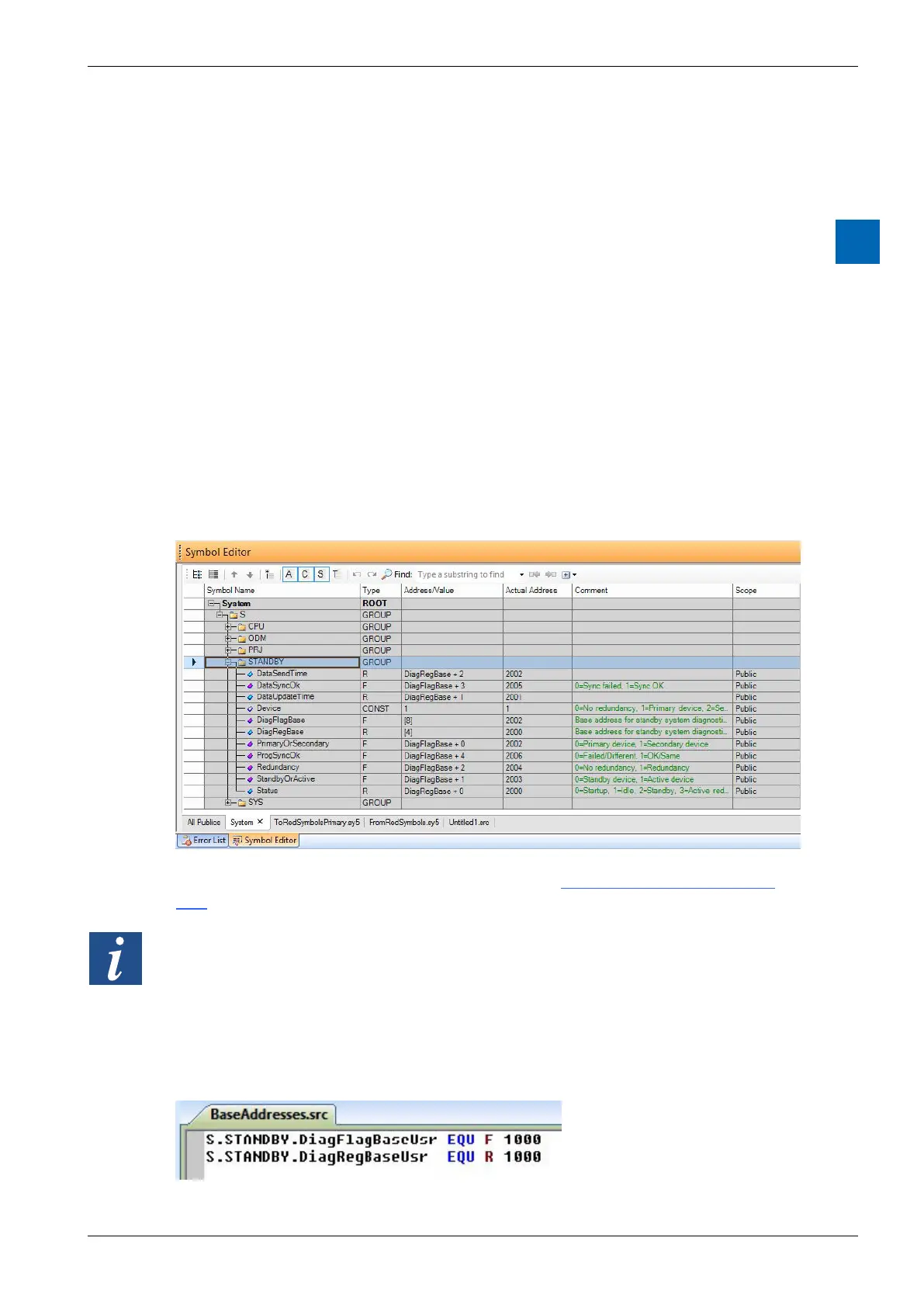
Each of the three redundancy devices has the following diagnostic System Sym-
section for more details.
The T668 RIOs also have diagnostic symbols, see Ether-SIO Diagnostic Exten-
sion.
By default, the diagnostic Flag and Register symbols have dynamic addresses
src” :



 To Next Page