IPM25 User Manual
18
rS232 Parameter (option)
This parameter allows the user to enable the RS232 output form the IPM25, by pressing
when prompted by
EnAbLEd? On the display, pressing will disable the RS232.
The output format is ASCII. The display value is passed to the RS232 port each time the display updates, with a
carriage return and line feed at the end of each data string. The string information is as follows:-
Baud Rate = 9600 baud
Stop bits = 1
Parity = None
Data bits = 8
Calibration Menu Parameters
SEnS 5.0 Parameter
The IPM25 is factory set to enable calibration with sensors generating an input signal of 5mV/V or less. In the majority
of cases it will not be necessary to read higher signal levels. If however, a higher sensitivity sensor is used with the
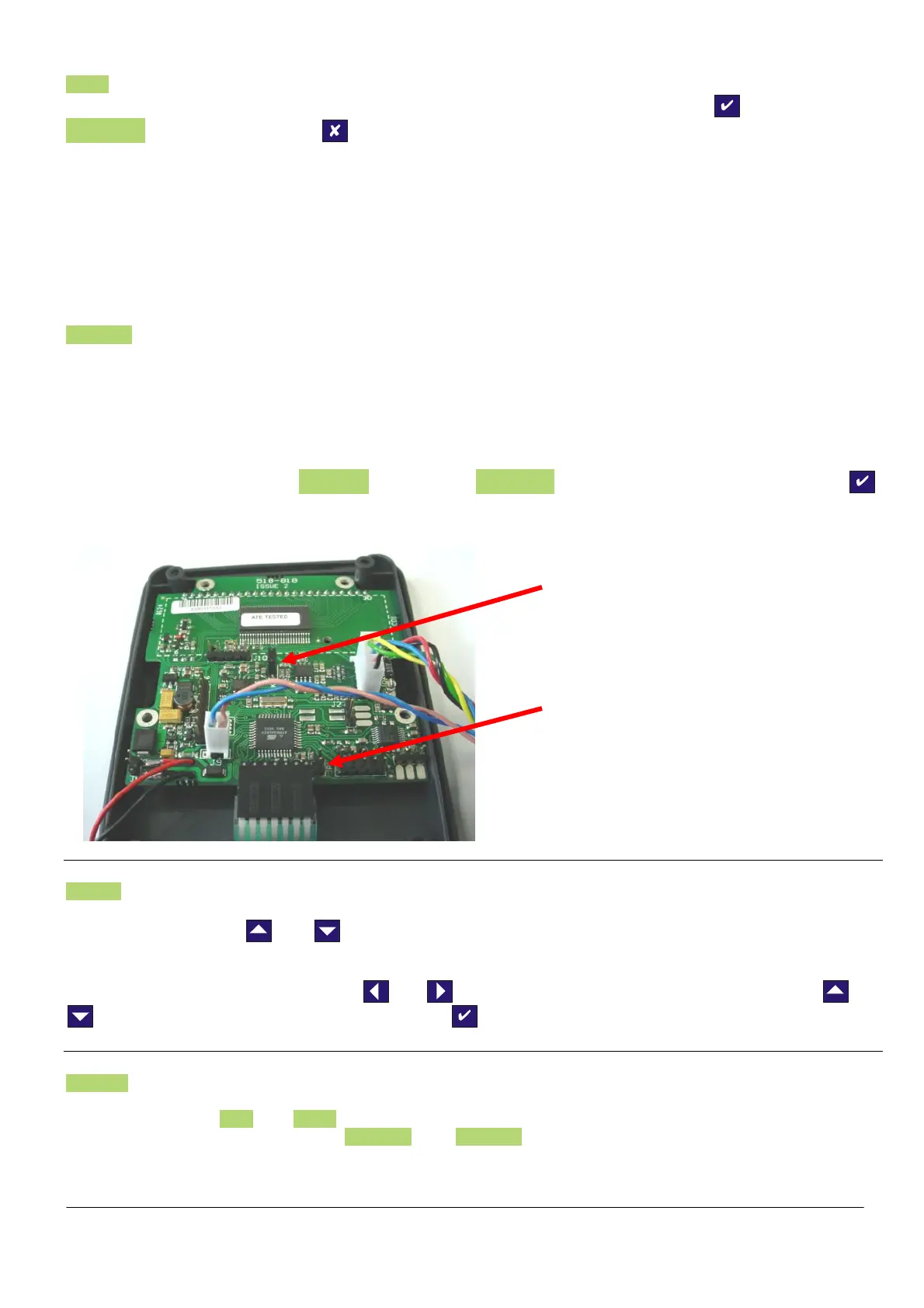
IPM25, it will be necessary to gain access to the internal PCB (you must turn the IPM25 off) to move link LK1 to JP1
(see picture below) to allow the IPM25 to accept sensitivities of up to 50mV/V. TEDS should only be used with 5mV/V
as 50mV/V is not factory calibrated.
Once this link has been moved, you will need to go back into the CALIBRATION MENU. When re entering the menu,
you will notice that the parameter SEnS 5.0 has changed to SEnS 50.0 to change the sensitivity to 50mV/V press ,
the IPM25 will now check the position of the link and change the sensitivity. It will now be necessary to re-calibrate any
sensors that you may previously have calibrated to this instrument.
SEt rES Parameter
This parameter enables the setting of two features on the IPM25. It allows you to set the decimal point position of the
display, by pressing the
and together, to move the point position (each press moves the decimal point
position, one place to the right).
It also allows for the setting of the display resolution or the number of display counts the display changes with an input
change. To change the resolution use the
and arrows to select a digit you want to change and the and
arrows to increment or decrement the digits. Press to accept the value.
CALibrAt Parameter (disabled when TEDS is enabled)
This parameter is used to calibrate and scale the IPM25 with a sensor. There are two basic methods of calibration
available. These are LiVE and tAbLE. There is also a third parameter, which can be used for maintenance and
recording purposes. This parameter is CAL VAL. The CAL VAL value can be viewed after a calibration has been
completed and will show the offset and gain figures from any stored calibration. If these figures are noted, they can be
used to re-enter at a later date, if calibration data is lost for any reason, or if the calibration data from a sensor needs
to be transferred to another IPM25.
Sensitivity link should be in
this position for use with
sensors, with sensitivities
<+/- 5mV/V
Sensitivity link should be
in this position for use
with sensors, with
sensitivities >+/-5mV/V



 To Next Page