- 22 -
www.SCEPTRE.com
SCEPTRE C27 FHD Display User Manual
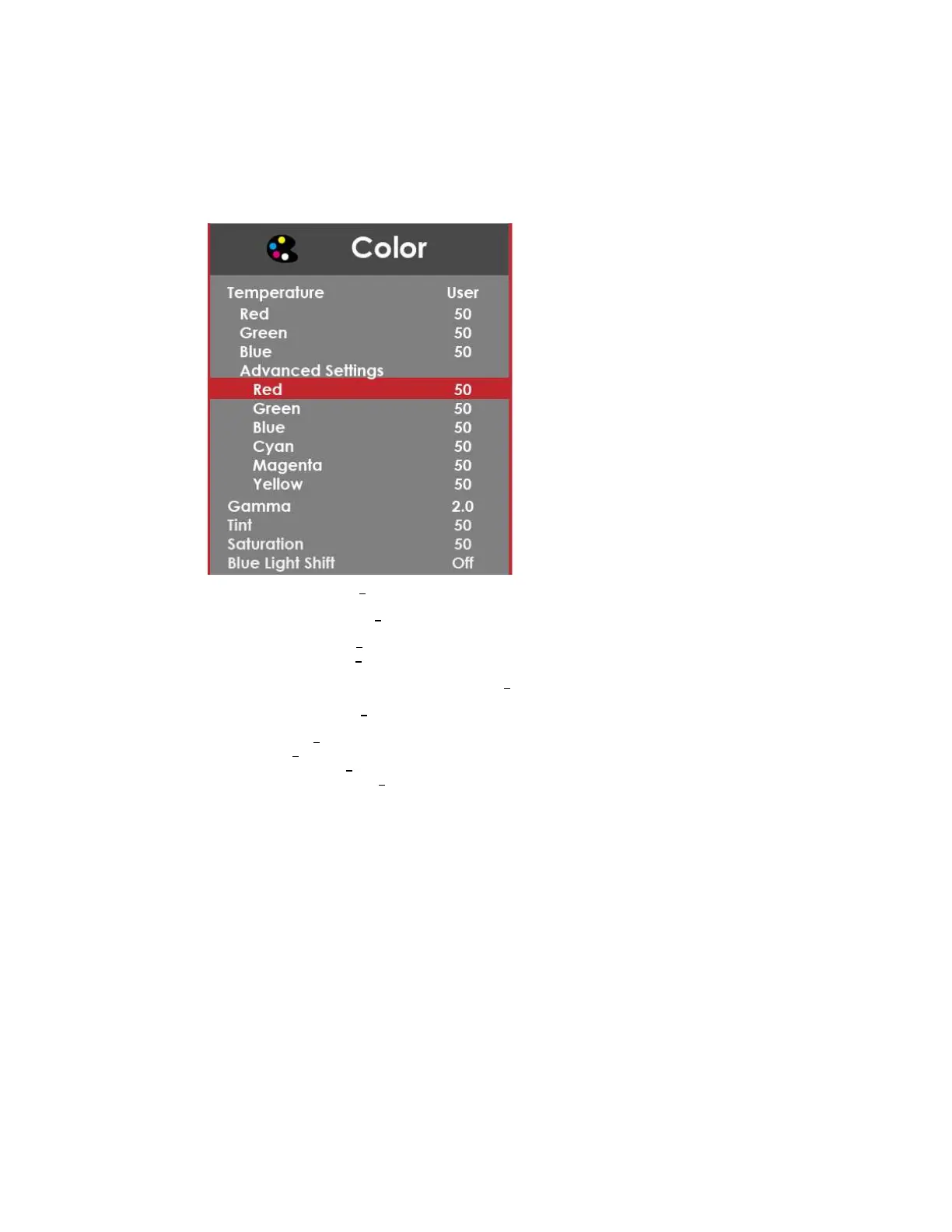
COLOR
1. TEMPERATURE
This option let users select different color temperatures of the
monitor.
a. NORMAL
This color temperature is for users who prefer a neutral white
balance.
b. COOL
This color temperature is for users who prefer a cool white balance.
c. USER
This color temperature is for users who would like to adjust the
RGB (red, green, blue) values manually.
i.
ADVANCE SETTINGS
This setting adjusts finer values
besides RGB going into cyan, magenta, and yellow.
d. WARM
This color temperature is for users who prefer a warm white
balance.
2. GAMMA
This option adjusts the gamma curve value of the monitor.
3. TINT
This option adjusts the tint of the entire monitor.
4. SATURATION
This option adjusts the color saturation of the entire monitor.
5. BLUE LIGHT SHIFT
This display mode filters out blue light for users who want blue
light protection.


 To Next Page
 Loading...