1
1
2
2
3
4
!CAUTION!
2.4 System Learning
(only possible with properly connected photocells or deactivation of this setting !)
1. Before proceeding to system learning, the remote coding process must be completed. After successfully coding in the remote
control, N-L appears on the display until the system learning has been completed.
2. Connect the Primary motor wires to M1 terminals and the Secondary motor wires to M2 terminals correctly. If only one gate is
installed, the motor wires must be connected to M1 terminals.
3. Set the function F2-1 for double gate system (factory setting); or set the function F2-2 for single gate system.
4. The photocell must be connected correctly as this is factory-activated in the menu. Otherwise system learning is not
possible!
5. The A-dimension and B-dimension of the motors must be strictly adhered to (see Porte installation manual).
6. Both gates must be closed and the motors locked again.
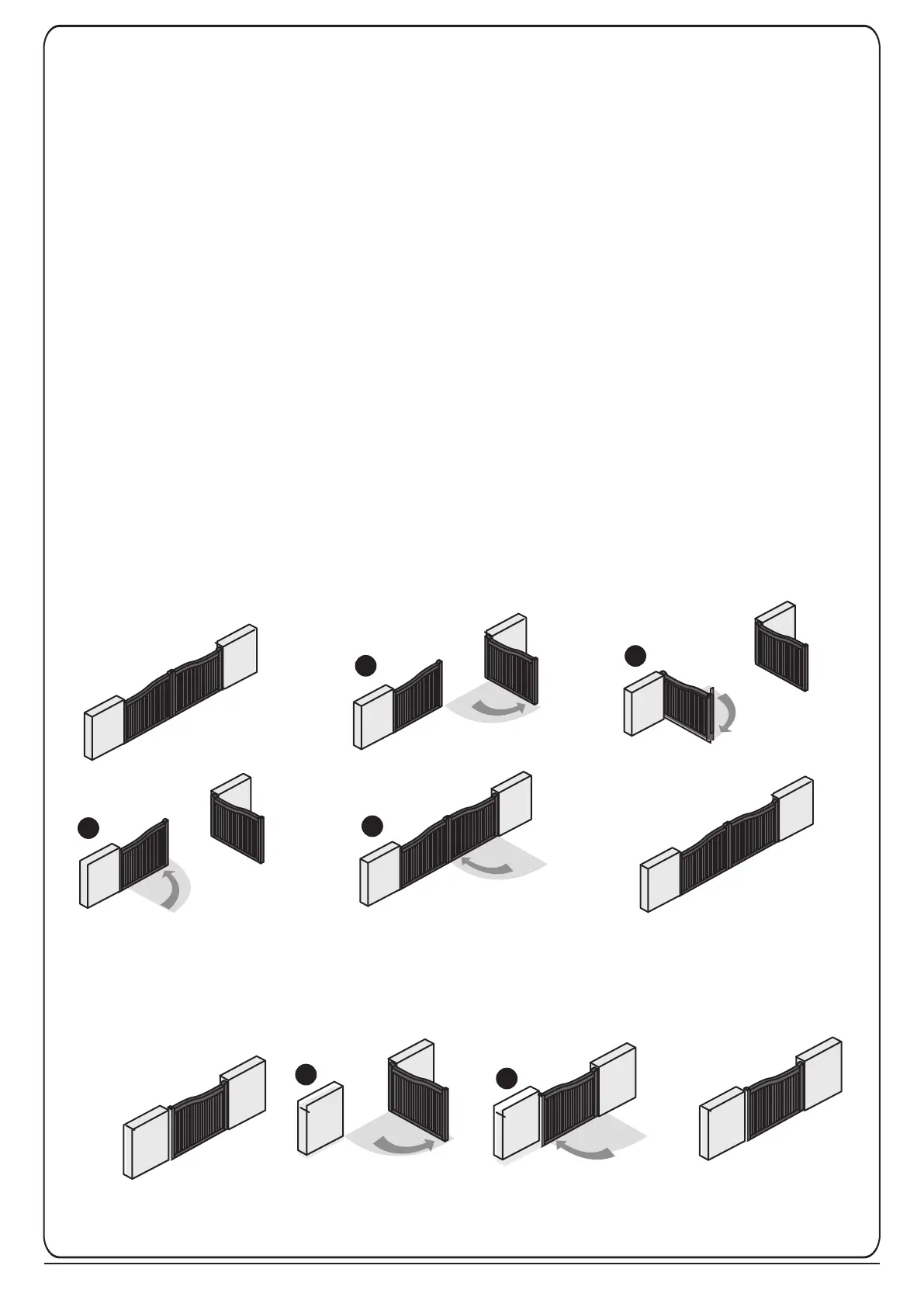
Press and hold the "UP+SET+DOWN" buttons on the motherboard for 3 seconds. The LED display shows LEA/ D-G. Press the
A-button on the remote to begin dual-gate system learning. If the single gate setting is activated, press the B-button for single-
gate system learning. The display now shows "ARN" and the motors will begin to retract.
Warning: The system learning will be interrupted if a resistance, such as uneven opening/closing / wobbling / jerking occurs.
Due to new European standards and guidelines, gate operators must be very sensitive to changes in their movement. The gate
must therefore be in perfect condition and have been serviced by a gate installation professional. The A and B dimension of
the motor arms must be strictly adhered to.
Note: To return the control board to the factory settings, press and hold “UP+DOWN” for 5 seconds. The LED display shows
“CLN” and factory settings have now been restored.
A. Dual-Leaf Gate
Beginning Position
Gate Closed
B. Single-Leaf Gate
End Position
Gate Closed
End Position
Gate Closed
Beginning Position
Gate Closed


 To Next Page