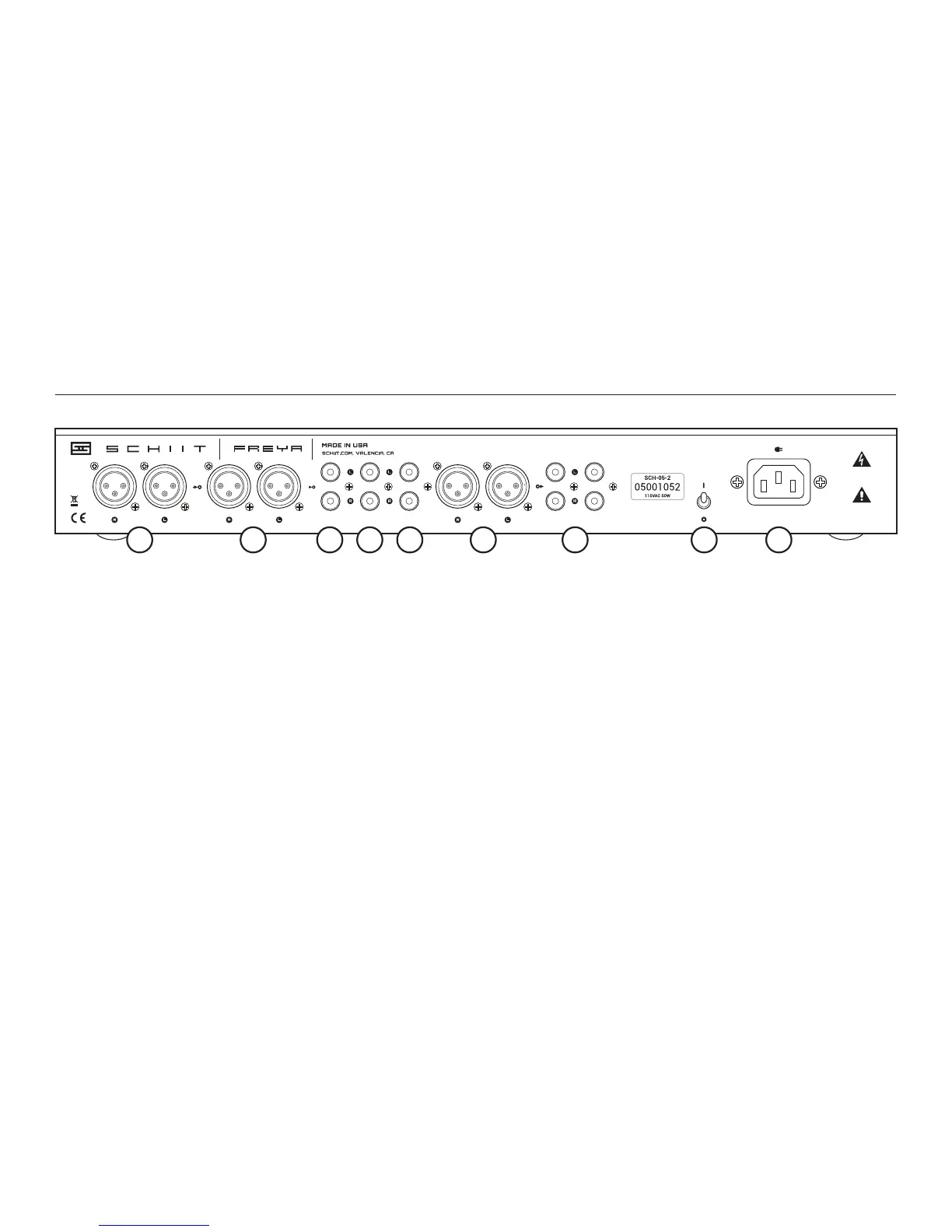
INPUT 1 INPUT 2 BAL OUT SE OUTSIN 3 IN 4 IN 5
CAUTION:
RISK OF ELECTRIC
SHOCK—DO NOT OPEN
NO USER
SERVICEABLE
PARTS INSIDE
3 Balanced Output
Connect to external power ampliers or
powered speakers that accept XLR
connections, using good XLR cables.
4 Single-Ended Output
Connect to external power ampliers or
powered speakers that accept RCA con-
nections, using high-quality RCA cables,
especially for longer runs.
1 Balanced Inputs
Freya offers two sets of balanced inputs.
Connect to your balanced sources using XLR
cables. You can select your source with the
front panel controls.
2 Single-Ended Inputs
Freya offers three sets of balanced inputs.
Connect your single-ended sources here
using good RCA cables. Note: Freya does
not convert single-ended to balanced,
except when using the tube gain stage.
Note2: Don’t panic—all of Freya’s outputs
work ne with all of its inputs, you’ll get
output from all of them with any input type.
5 Power Switch
Up for on, down for off. No tricks here.
6 Power Inlet
Plug the end of the supplied IEC cord in
here. You can also use fancy audiophile
types, but they won’t really do anything—
what about the thousands of feet of crap
copper cables in your walls, huh?
CONNECTIONS
1 2 3 4 51 2 2 6


 To Next Page