washMaster Installation guide
539715.AB Page 5 / 21 07.2019
Web configuration
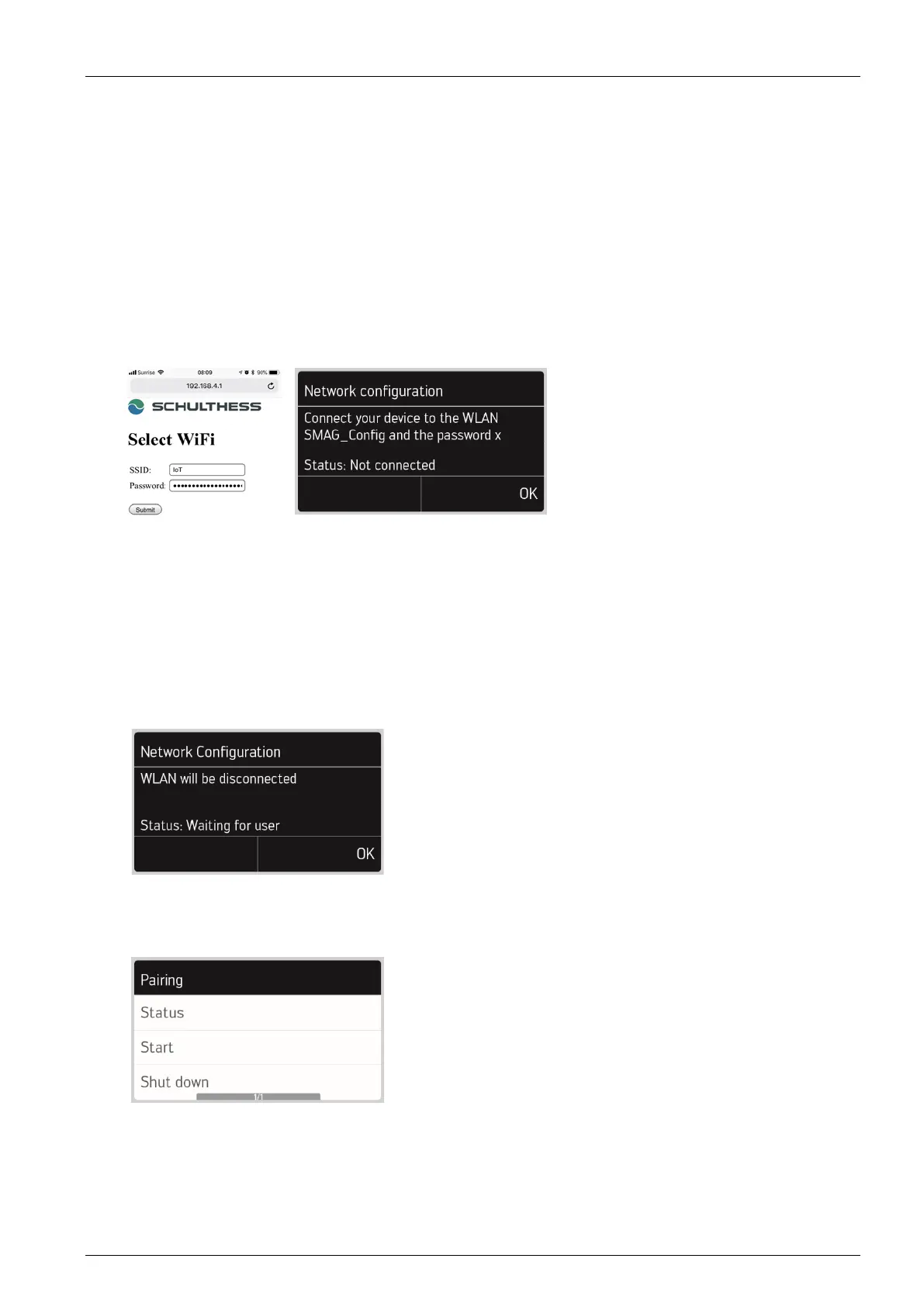
To establish the connection to the web, proceed as follows:
- Select Web Configuration. The machine starts a hotspot.
The SSID on the device is called “SMAG_Config_xxxxx”. The 5-digit number is part of the
MAC-Address.The associated WiFi password is shown on the display.
- Connect the tablet or smartphone to the hotspot and enter the password.
- In the browser, open page 192.168.4.1
- Enter the SSID and password of the WiFi router/Access Point in the input fields in the laundry
facility.
- Confirm the entry with “Submit”.
The status should then change to “Connected WLAN”.
If an error occurs, an error code is displayed. The exact error description can be found in the
table under “Status”.
BT Configuration
This option is not available.
Shut down
The WLAN connection is switched off.
2.2.2 Pairing
The following options can be selected in the pairing settings:



 To Next Page