5.2-22
005.050.01-EN
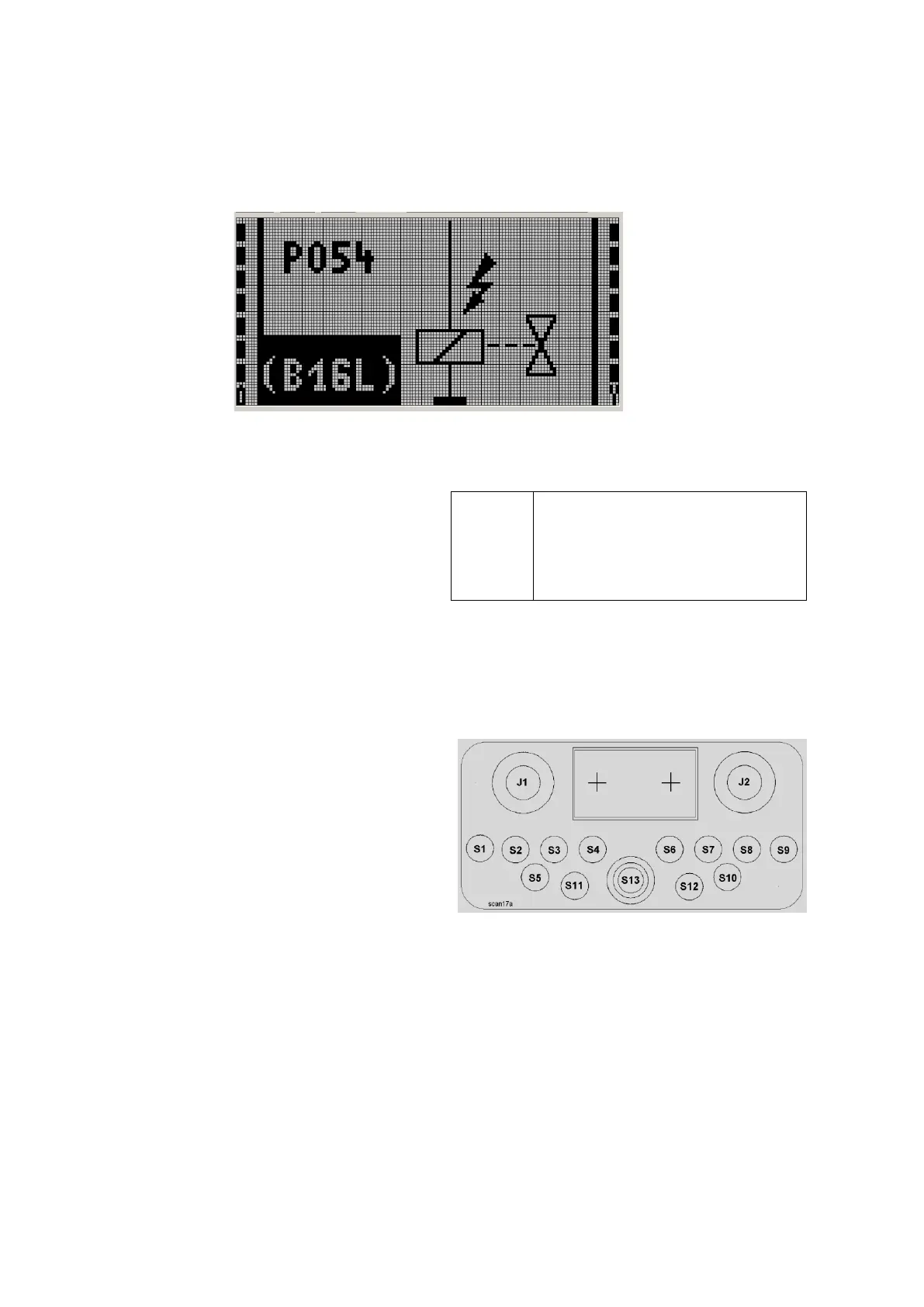
I 1 Additional text Fault symbol I 2
Fault code
10.3 FAULT MESSAGES
In the event of faults, the screen will change
automatically from the basic screen to the fault
screen which has always priority. The fault screen
is equally subdivided into several areas:
I 1 + I 2
The two display bars 1 and 2 for battery charge
and received signal strength have the same
function as in the basic screen.
Fault symbol
The "fault symbol" section on the right displays
the symbol (pictogram) pertaining to the de-
tected fault.
Additional text
Additional text is displayed together with certain
faults to provide the operator with more detailed
information.
Fault code
Each displayed fault is accompanied by the res-
pective fault code.* This code is shown in bright
letters on a dark background at the lower left of
the screen.
Even for automatically displayed
fault messages, pushbutton S 5
(Fig. 1) can be used for switch-
ing over between fault display
and data areas D 1 and D 2.
This can be useful for more information about
the fault cause and can be achieved by press-
ing the button repeatedly.
Fig. 1
* See description of the VECTOR control.


 To Next Page