6. Care and Maintenance
The user is not permitted to perform servicing of the device. In case of damage, contact the Service
Department.
If the
sciREADER CL2
device is handled according to the instructions, unexpected damage
should not occur.
Do not turn the device upside down; samples could fall into the workspace.
In the case that a sample falls into the workspace, immediately switch off the device. Take
off the user-servicing cover and remove the plate.
No further interventions in the device are permitted.
Procedure for taking off the user cover
Do not open the user-servicing cover if the device is turned on and the power cord plugged
into the wall outlet.
Unscrew the side screws on the device.
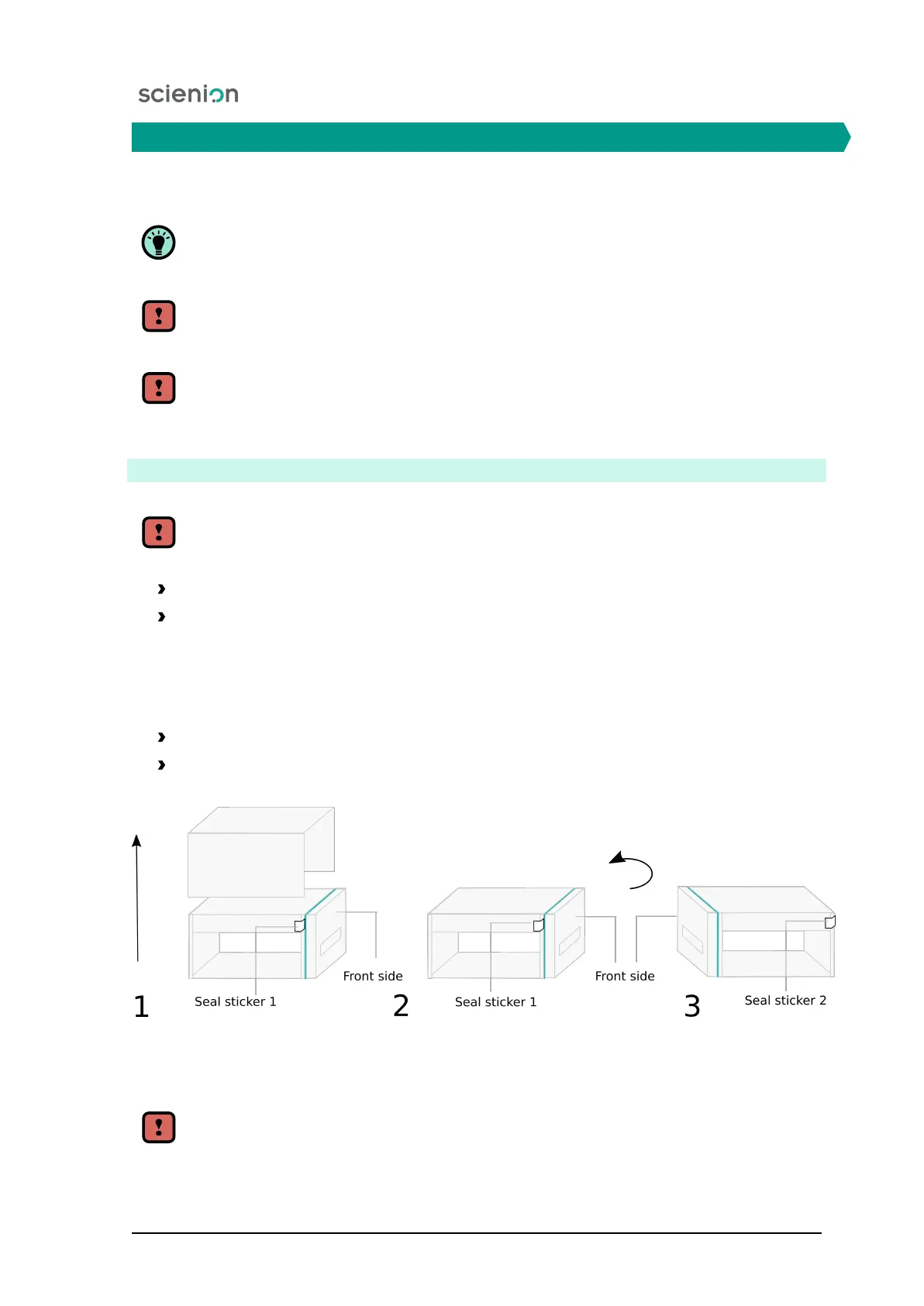
Take off the user-servicing cover (Figure 12).
After removing the user servicing cover, check whether seal stickers are placed on the sides; they should
not be damaged and be positioned at the specified places.
Verify the following locations of the seal stickers:
1. The sticker is located on the corner of the front side of the device.
2. The sticker is located on the corner of the back of the device.
Figure 12:
Depiction of the procedure for the removal of the user servicing cover and the
location of the stamp cover stickers.
Damage to the equipment during unauthorized handling may lead to loss of warranty.
Scienion AG, 2019, Original user manual, sciREADER CL2 20


 To Next Page