7. Troubleshooting
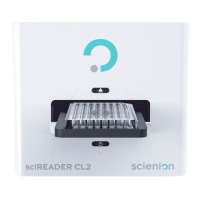
The operational functions and components of the
sciREADER CL2
are automatically initialized when
the device is turned on using the Power button.
The user is informed about the current state of the device by an indicator LED located on
the front of the device (Chapter 2 Description of the device and accessories).
Error states during the diagnostic test of the device are indicated by an error message in the
sciREADCL2 system.
The user is not authorized to perform service interventions on the
sciREADER CL2
device.
Error messages have only informative character in most cases. To resolve problems with the
device, contact the service support staff.
7.1. Error states caused by improper use of the device
Handling Samples
The user inserted a sample the wrong way.
Plate was inserted in wrong way in wrong way → Insert a plate in required direction.
Calibration plate was not inserted
- a test failure occurs while using the diagnostic software
→
Insert the calibration dish (Chapter 5 Device diagnostics, correct function check).
If the problem persists, contact service support.
Plate coming loose in the device - the plate becoming stuck while being incorrectly handled →
After turning off the device and disconnecting the power cord, take off the user-servicing cover
and remove the dish. Proceed according to the instructions described in Chapter 6 Care and
Maintenance.
Connecting the device
When using diagnostic software, it is necessary to ensure the proper connection of all the parts to the
PC and to switch on the device.
The device is not properly plugged in or switched on.
7.2. Hardware error messages
The user is not authorized to resolve the errors caused by hardware failure.
Scienion AG, 2019, Original user manual, sciREADER CL2 24


 To Next Page