5. Device diagnostics, correct function check
5.1. Autodiagnostics
The
sciREADER CL2
device is equipped with an autodiagnostic module. To verify that the device and
the software is functioning correctly, follow all given instructions.
Always perform diagnostic autotest after transporting the device.
For a basic check of the functioning of the device operation, perform an analysis of a Calibration plate.
Select Autodiagnostics autotest modul
Select the module by clicking the left mouse button on the tile
Autodiagnostics
on the
Application selection
screen. Before confirmation of the selection, the
tile will become highlighted in color. To use this module, you must to be logged
in.
Inserting Calibration plate into device
Ejection/Retraction of tray
Pressing the button triggers the Ejection/Retraction of the
microtiter plate tray.
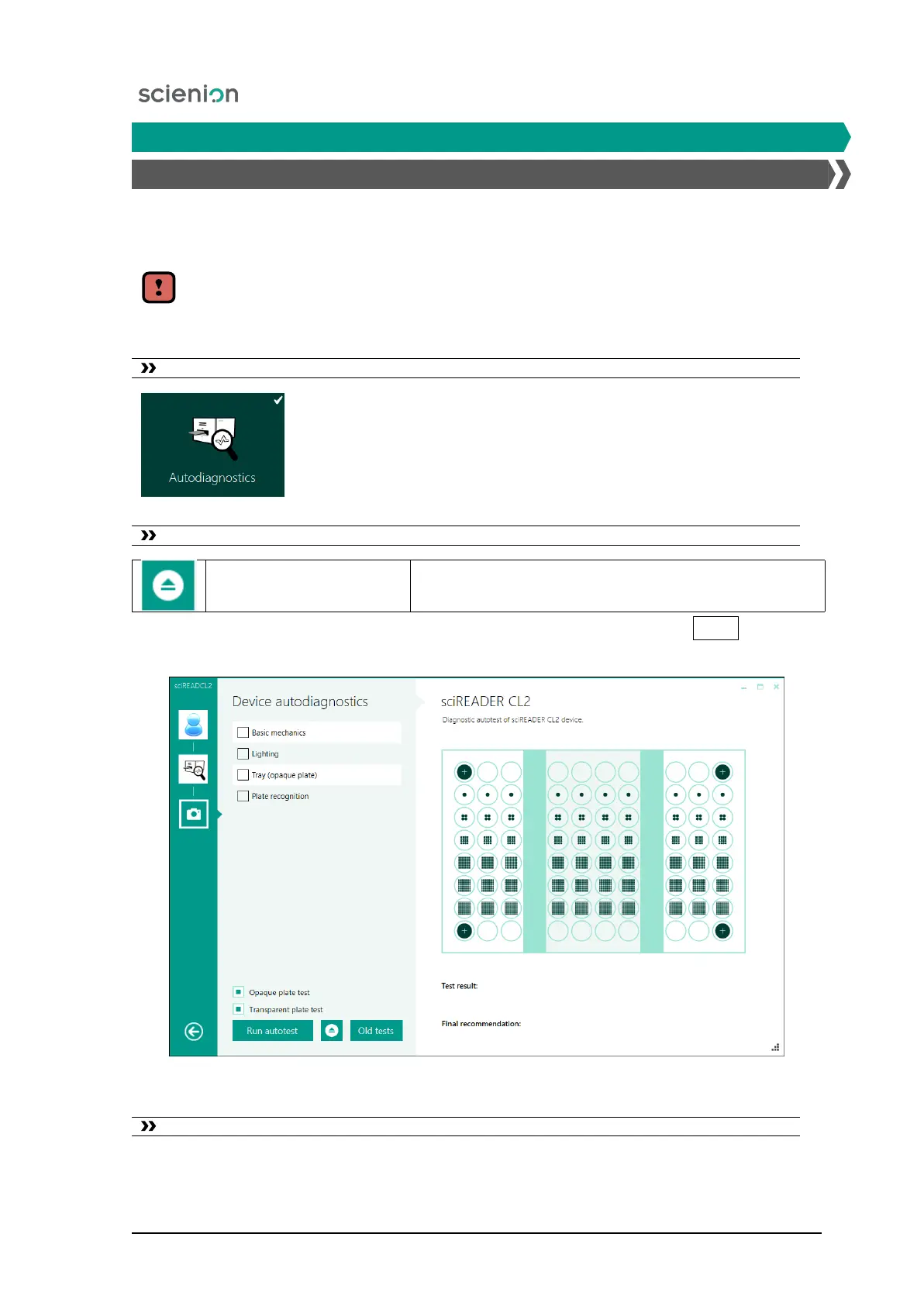
After ejecting the tray insert the plate into the lock template. After pressing the
Eject
button, the
tray will slide into the working area of the device (Figure 8).
Figure 8: The appearance of the screen - Device autotest.
Run the device autotest
Scienion AG, 2019, Original user manual, sciREADER CL2 16


 To Next Page