OEM Manual – CUBO
2
SMART
Pag. 16
8 User Interface and main Software features
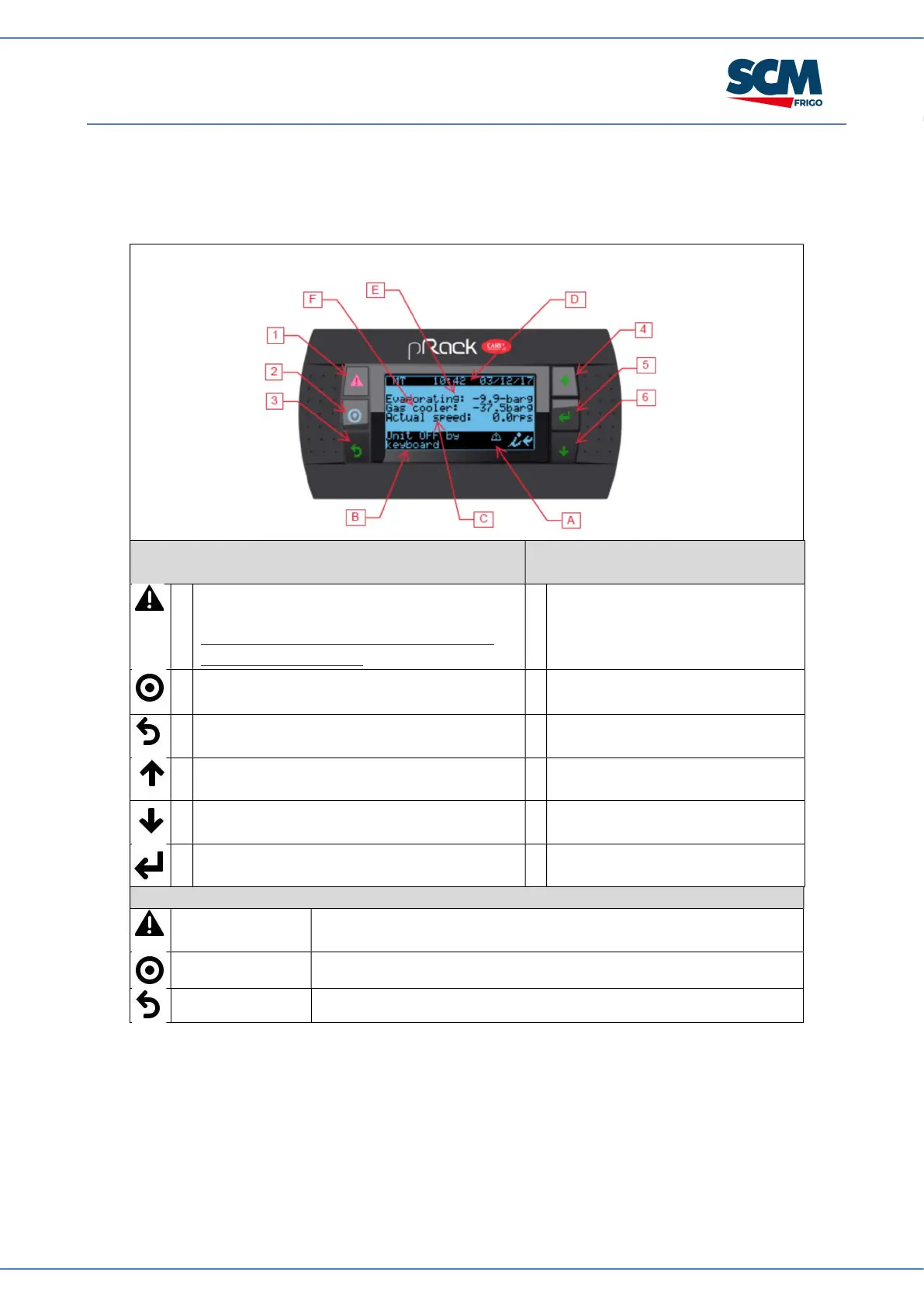
8.1 User Interface
Manufacturer PW: 1234
Button meaning
Display meaning
1
Shows active alarms list and accesses to
the alarm log.
If pressed for more than 5 sec., resets all
acknowledged alarms.
A
Active alarm preset and manual
operation.
2
Used to enter main mask tree. B
Unit status.
3
Return to back mask or higer level. C
Rotation speed of compressor
(rps)
4
Scroll a list upwards or increases the value
highlighted by the cursor.
D
Current Time and date.
5
Scroll a list downwards or decreases the
value highlighted by the cursor.
E
Operation Suction pressure (bar).
6
Enters in the selected submenu or confirms
the changed set values.
F
Outlet Gas Cooler pressure (bar).
Led color and meaning
Red / blinking Active alarm and not acknoledged
Steady : alarms acknowledged
Yellow / Fixed Controller actived
Green / Fixed Controller powered


 To Next Page