GB - 8
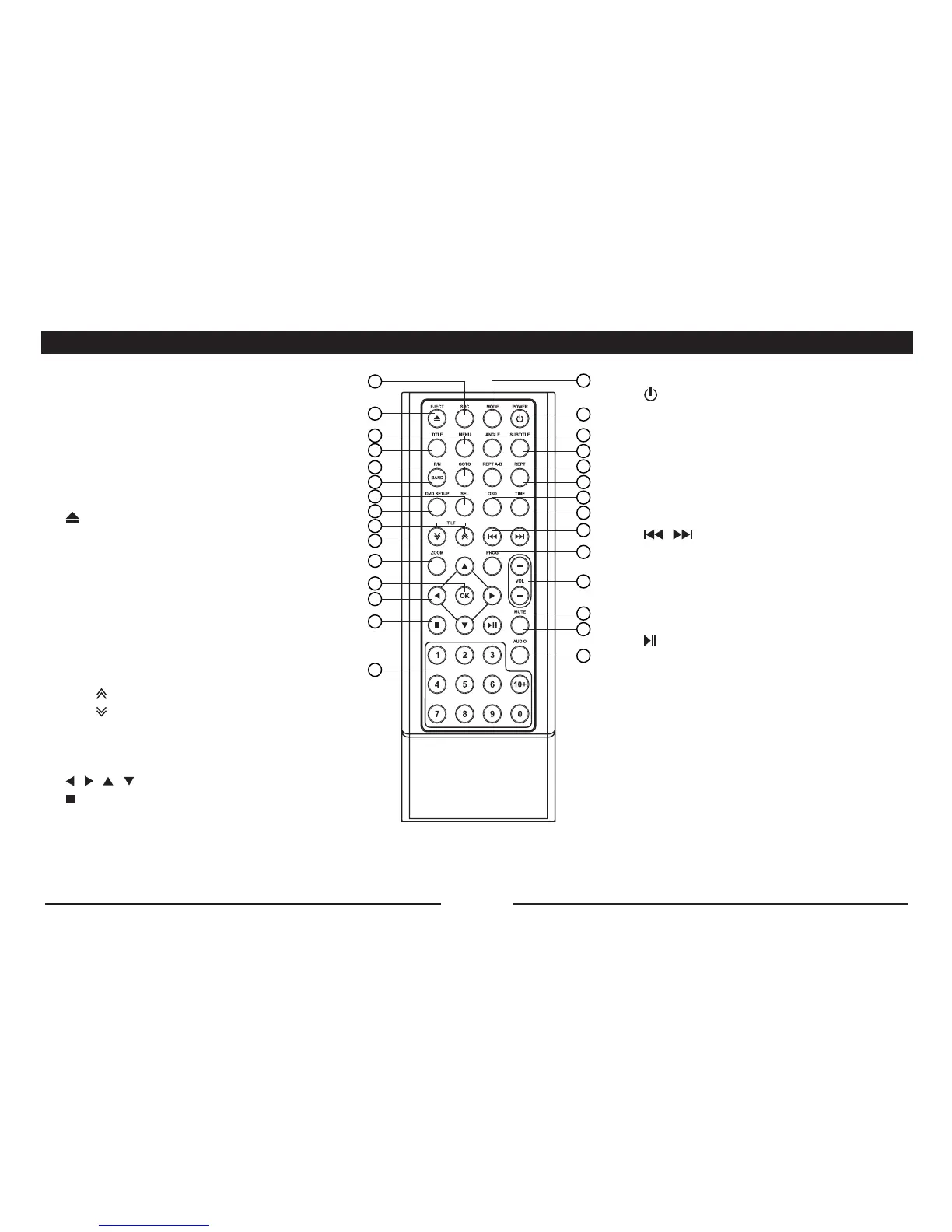
ReMote ContRoL
16
3
2
4
5
6
7
8
9
10
1
11
12
13
14
15
17
19
18
22
23
25
26
24
28
29
27
21
20
16. MODE: Enter source selection menu.
17. : Turn the unit on/off.
18. ANGLE (DVD mode).
19. SUBTITLE: select a subtitle language (DVD
mode).
20. REPT A-B: A-B repeat playback.
21. REPT: Repeat playback.
22. OSD: On Screen Display.
23. TIME: Time display.
24. / : In radio mode: Tuning.
InDVDmode:Pressbrieytochangechapter
or track, press and hold down to search
forward/backward.
25. PROG: Programmed playback.
26. VOL +/-: Adjust the volume.
27. : Play/Pause playback.
28. MUTE:-Pressbrieytoturnoffthesound
- Press for more than 2 seconds to
switch off the LCD display
29. AUDIO:
DVD mode: Select audio language
VCD mode: Select audio channel (MONO L/
MONO R/ STEREO).
1. SRC (SOURCE): Select one of the following
sources:
- Radio (“Band”)
- “DISC” (when a disc is inserted)
- “USB” (when a USB device is connected)
- SD/MMC card (“SD”) (when an SD/MMC card
is inserted).
- AUX (AV IN).
2. : Eject disc.
3. MENU (in DVD mode): Display the root menu.
PBC (in VCD mode): Playback control on/off.
4. TITLE (in DVD mode): Display the title menu.
5. GOTO: Search.
6. BAND: FM1->FM2->FM3->MW1->MW2.
P/N: TV color system PAL/NTSC/AUTO.
7. SEL: Enter the select menu to adjust the sound
effects and picture quality.
8. DVD SETUP
9. TILT : Close the panel.
10. TILT : Open the panel.
11. ZOOM (DVD/VCD mode): Increase/reduce the
picture size.
12. OK:Conrmselection.
13. / / / direction buttons.
14. : Stop playback/Return to list of files (in
MPEG4 mode).
15. 0 – 9, 10+ (number keys).


 To Next Page