16
• Reuse the test strip.
• Store the Analyzer and strips at extreme temperatures.
• Store the Analyzer and lipid test strips under humid or damp conditions without suitable protection.
• Open the chamber ap during the measurment.
Not following these precautions can lead to inaccurate results.
Getting a Drop of Blood
Sample type
• For Lipid testing : Only use fresh capillary whole blood or venous blood in heparin or an EDTA treated vacuum tube. The venous blood sample should be
used within 6 hours after collection.
- Fresh Capillary Whole Blood
- Venous Whole Blood
- Venous Blood - Serum
- Venous Blood - Plasma
Only professional use for venous blood.
• For Glucose testing : Only use fresh capillary whole blood.
Capillary Whole Blood
1. Wash your hands in warm, soapy water. Rinse well and dry
completely. Warming ngers can increase blood ow.
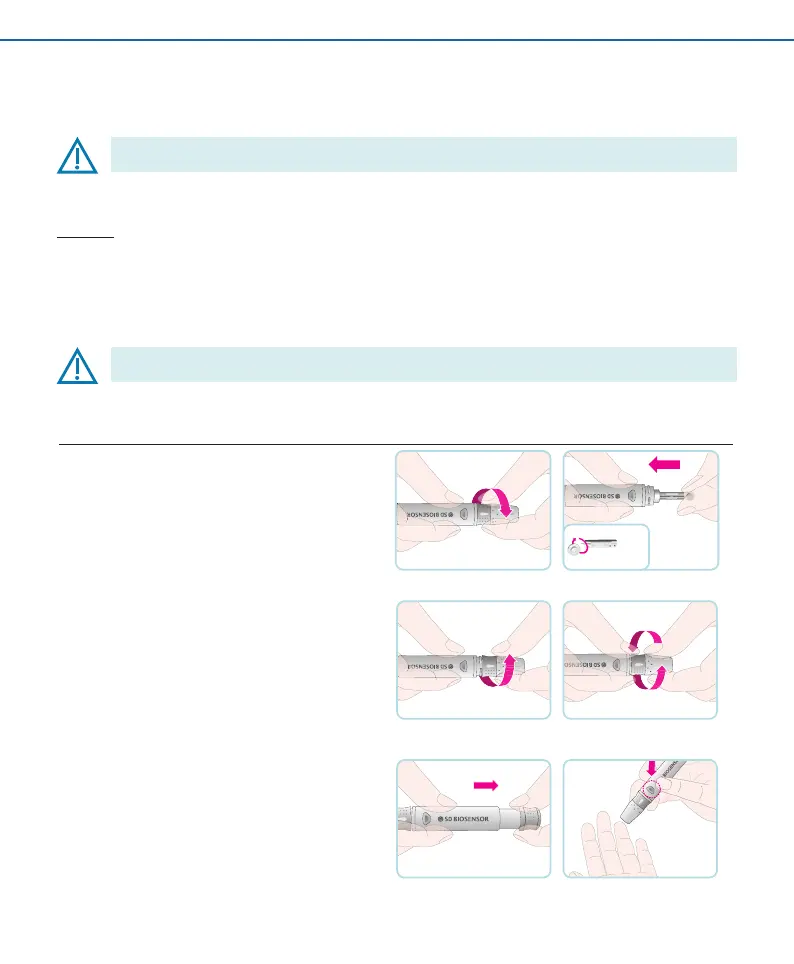
2. Turn the lancet insert cap counterclockwise to remove it, insert
the lancet into the lancing device holder and push down rmly
until it is fully seated. Twist the lancet protective disk until it
separates from the lancet.
3. Replace the cap and turn it clockwise, until it is snug. Adjust the
puncture depth setting by turning the comfort dial. The dial has
1 to 5 steps, and the higher the step number, the stronger the
blood sampling pressure on the puncture site.
The comport tip o ers 5 di erent levels of skin penetration.
• 1-2: for soft or thin skin
• 3: for average skin
• 4-5: for thick or callused skin
4. After cocking the lancing device back, hold the lancing device
rmly against the side of nger and then press the release
button.


 To Next Page