8
7. Accessories
Optional Accessories
STANDARD Micropipette 35µl
STANDARD Micropipette 10µl
STANDARD Ezi Tube+ 35µl
STANDARD Ezi Tube+ 10µl
STANDARD Lancets (30G)
STANDARD Lancing Device
STANDARD Safety Lancets (23G)
STANDARD Alchol Swab
STANDARD Thermal Printer (model: MPT-700)
STANDARD Thermal Printer (model: SPP-R200)
STANDARD Thermal Printer Cable
STANDARD Thermal Printer Paper (Nomal type)
STANDARD Thermal Printer Paper (Label type)
STANDARD Lipid Manegement Software
Universal Mini USB Cable
CHAPTER 2. Testing the STANDARD LipidoCare Analyzer
1. Operating the Analyzer
Before using the Analyzer for the rst time, perform the following steps:
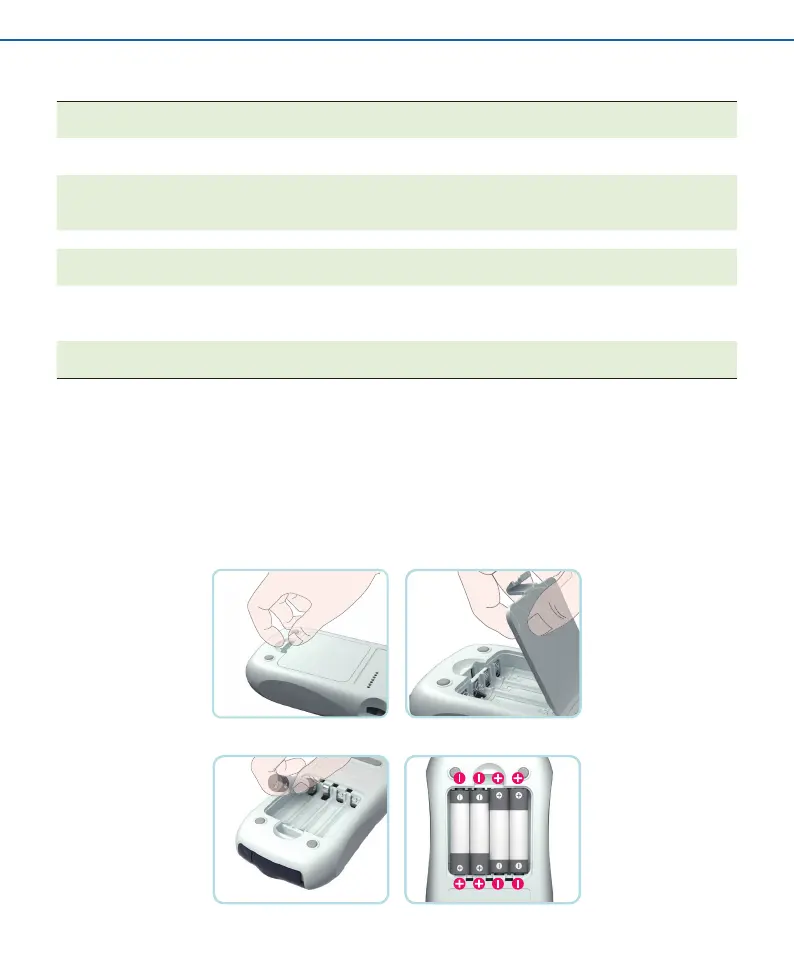
STEP 1. Insert batteries.
1. Ensure the Analyzer is switched o and turn it over.
2. Open the battery compartment lid by slightly pressing the tab towards the centre of the Analyzer.
3. Lift the lid upwards to remove it from the Analyzer.
4. Insert four batteries into the compartment according to the illustrations. Please note the orientation of the “+” (battery head) and “–” terminals ( at
end). Use only alkaline manganese batteries (1.5 V, AAA).


 To Next Page