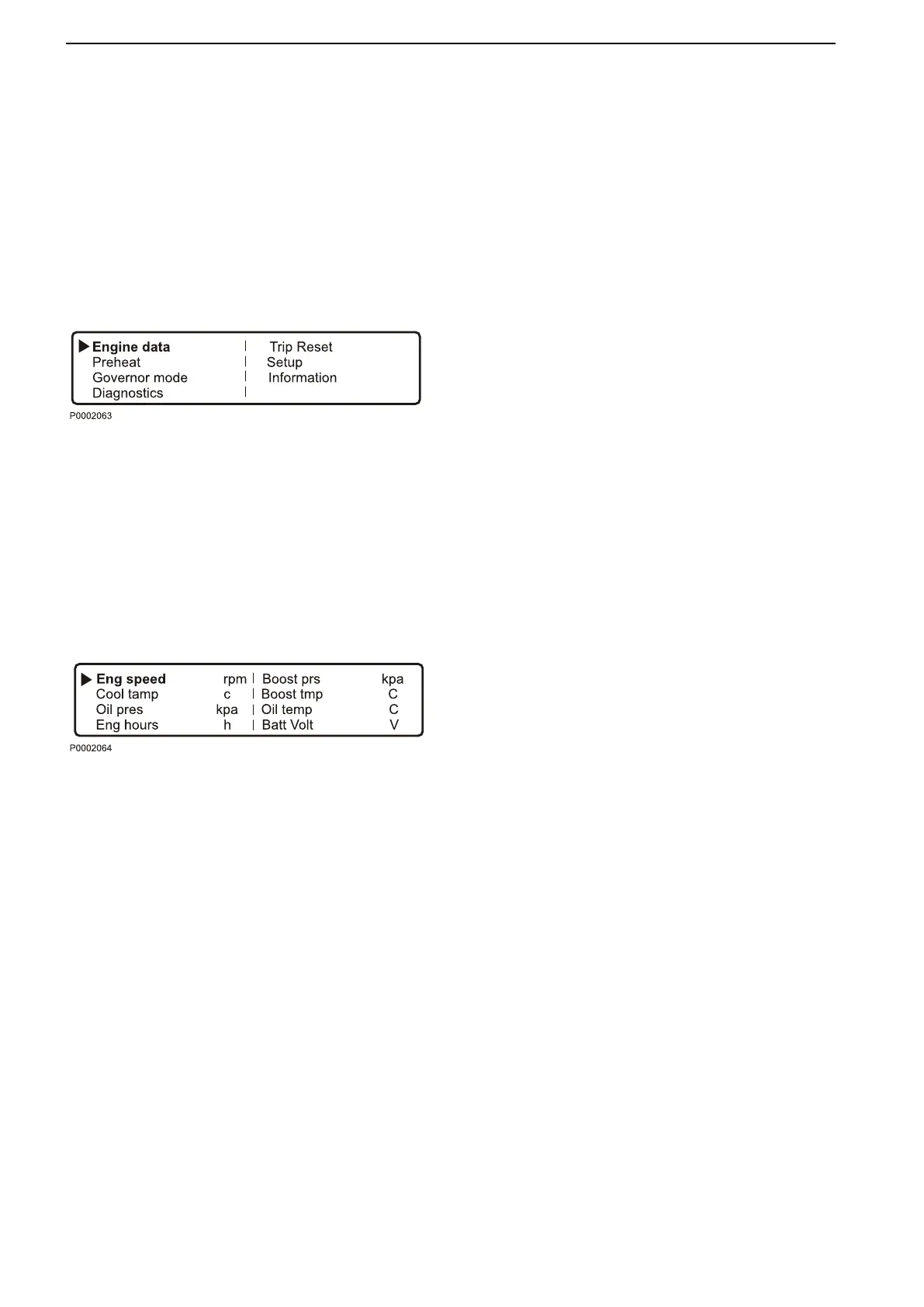
Menus
There
are
several
sub-menus
under each main menu.
There is not space for all the menu choices on the dis-
play. To scroll through the menus, use the 7 and 9 but-
tons on the display. Press the SEL button 8 to make a
selection. Refer to the illustration on the previous page.
NOTICE! The Setup menu can be used to select the
language that you want to use on the display.
Main menu
•
Engine data, current engine data
•
Preheat, manual activation of pre-heating. Must be
activated with temperatures below 0°C (32°F)
•
Governor mode. activation of droop
•
Diagnostics, shows fault codes as text
•
Trip reset, resets trip data
•
Setup, parameter setting
•
Information, shows the currently applicable hard/
software, data sets and engine identification for the
engine and DCU data
Engine data
shows relevant engine data.
•
Engine speed, can be controlled with the SPEED+
and SPEED– buttons (rpm)
•
Charge pressure (kPa)
•
Coolant temperature (°C)
•
Charge air temperature (°C)
•
Oil pressure (kPa)
•
Oil temperature (°C)
•
Engine hours (h)
•
Battery voltage (V)
•
Fuel consumption (l/h)
•
Instantaneous fuel consumption (trip fuel) (l)
Instruments and Controls
12 7748681 12-2011


 To Next Page