Instruments and Controls
DCU (Display Control Unit)
The DCU (Diesel Control System) control panel is
available as an optional accessory for the EMS
(Engine Management System) electronic control sys-
tem.
The DCU is a digital instrument panel which commu-
nicates with the engine
control unit. The DCU has sev-
eral functions, such as engine control, monitoring,
diagnostics, and parameter setting.
The menus in the DCU system can be used to check,
and in some cases to set, a number of different func-
tions in the EMS system.
NOTICE! Settings and what engine data that appears
in the display may vary depending on installation and
engine model.
NOTICE! The menus and illustrations shown here are
the English version. The language can be changed,
however; refer to the Setup menu.
Start
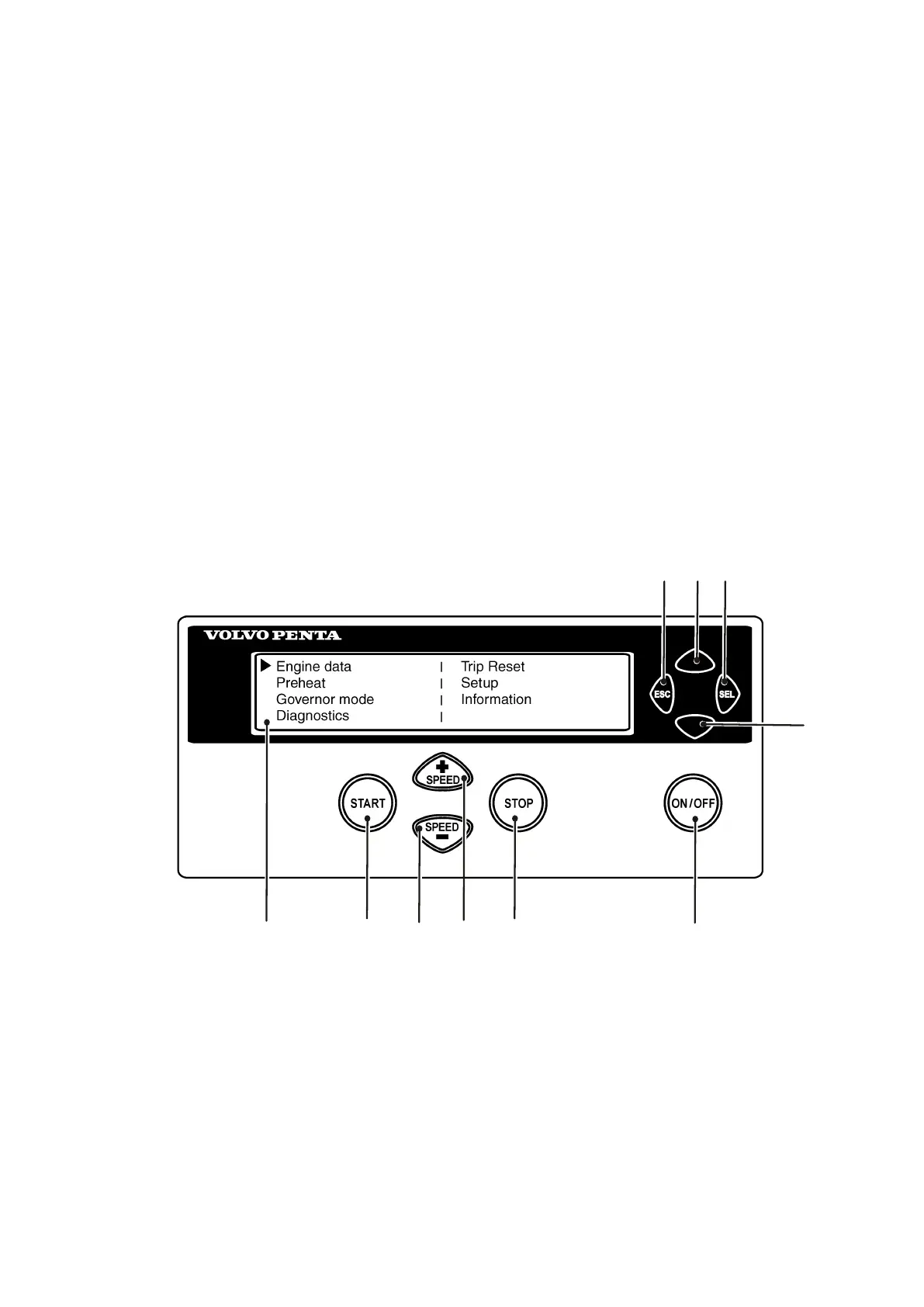
When the DCU panel is started, the “Engine Data” menu is displayed; press “ESC” to come to the main menu.
1 LED display 6 ON/OFF. Starts and stops the system
2 START. Starts the engine 7 Scroll downwards in menus
3 SPEED - . Reduces engine rpm 8 SEL. Selects in menus
4 SPEED +. Increases engine rpm 9 Scroll upwards in menus
5 STOP. Stops the engine 10 ESC. Return to previous menu selection
7748681 12-2011 11


 To Next Page