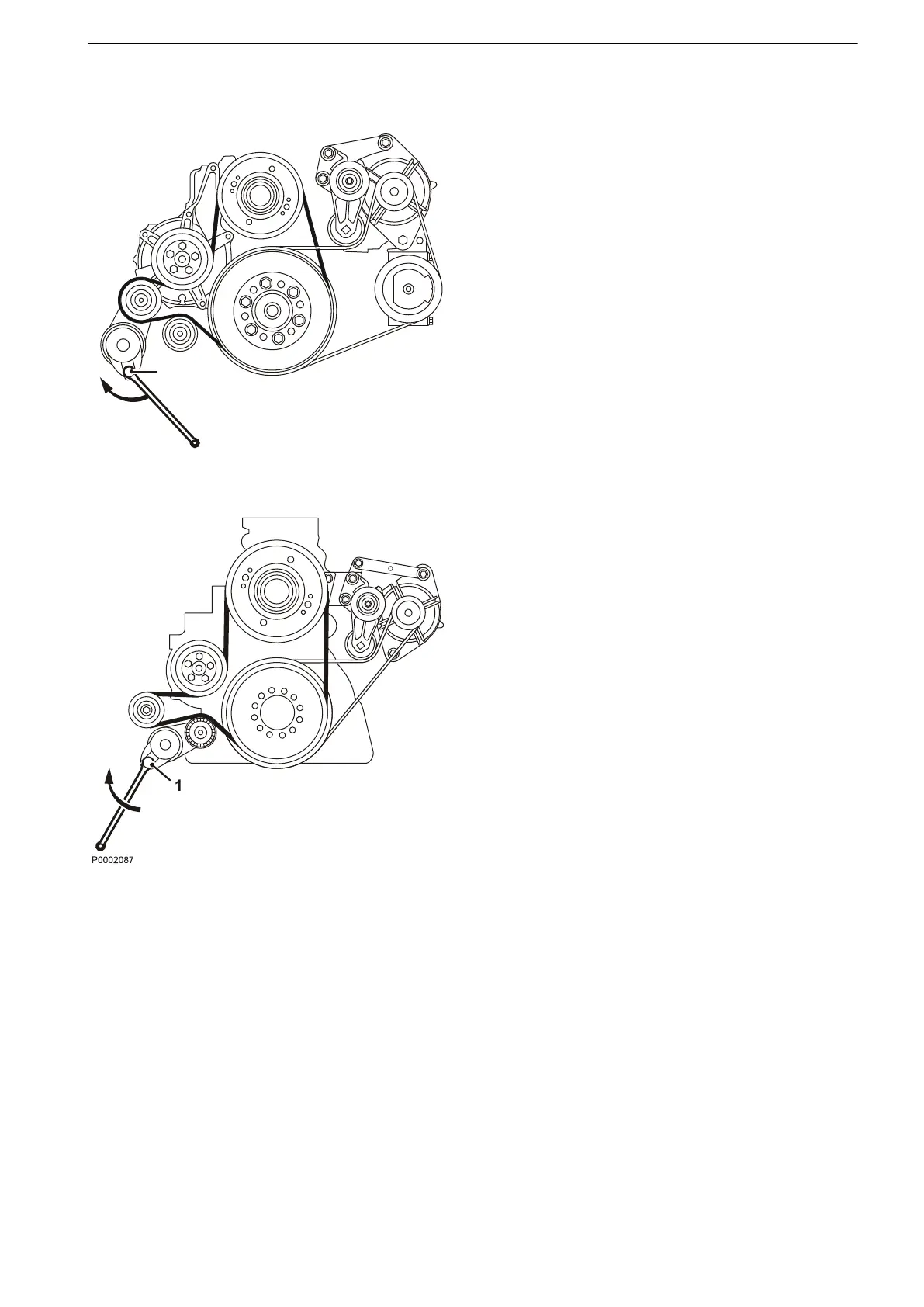
Drive Belt, Change
1 Disconnect
the main switch(es)
and check that the
engine is not connected to system voltage.
2 Remove the fan guard and fan ring round the cool-
ing fan.
3 Remove the belt guard.
4 Insert a 1/2” square wrench in the belt tensioner (1).
Lift the wrench and remove the drive belt.
5 Thread the drive belt round the fan and remove it.
6 Check that the pulleys are clean and undamaged.
7 Thread the new drive belt over the fan.
8 Lift the 1/2" wrench and install the new drive belt.
9 Install the belt guards.
10 Install the fan guard and fan ring round the cooling
fan.
11 Start the engine and do a function check.
TAD1640GE, TAD1641GE, TAD1642GE, TAD1650GE, TAD1651GE, TAD1641VE,
TAD1642VE, TAD1643VE, TAD1650VE
TWD1643GE
Maintenance
7748681 12-2011 61



 To Next Page