VERSO 50_v1.0.27_EN 33502027401_3_1 page 8/24
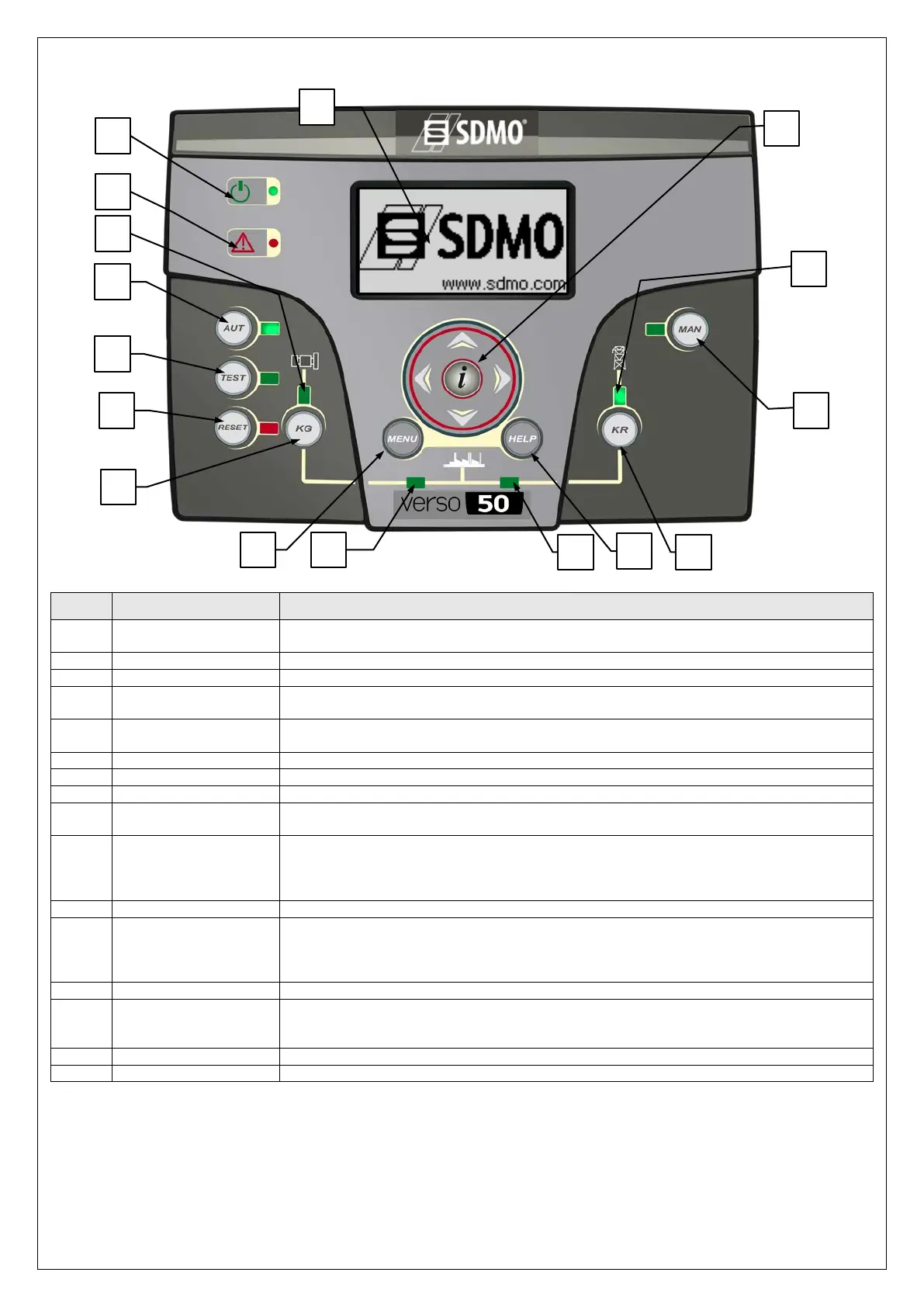
1- 7 Equipment Overview
POS. NAME DESCRIPTION
A Display
Backlighted display that shows all functions, measures and alarms about the generator and
the mains. Automatically the backlight turns off, and it turns on again when you press a button.
Button to select the automatic mode.
Button to select the test mode.
D RESET
To activate reset/OFF mode. In this operative mode the remote start output is deactivated and
the alarms are deleted. If the cause of the alarm persists, the alarm will appear again.
E KG
Key control to activate the remote start output (only in manual mode). In manual test mode,
this button permits to manage the generator contactor.
To enter the programmation menu. Inside the menus, it’s used as a button “back” or “esc”.
Led that indicates if KG is closed (led on) or open (led off).
Led that indicates if KR is closed (led on) or open (led off).
I Help
From the main page of the menu, it permits to go directly to the active alarms page, if at least
one alarm is present.
J KR
Key control to deactivate the remote start output (only in manual mode); keeping and
releasing quickly the
button, the remote start output is removed immediately, while keeping
pressed the button for 3 seconds, the remote start output is removed after the cooling time. In
manual test mode, this button permits to manage the mains contactor.
Button to select the manual mode.
L Navigation drive
Navigation drive composed by 4 arrows to scroll through the pages (left and right arrows) and
increase or
decrease the parameters inside the programmation menus. It contains also a
special button “i”, to select an e
lement on the screen or edit a parameter and confirm the new
value. See paragraph 2-1 for more informations about the navigation through the menus.
It shows if the mains is within limits (led on) or not (led off).
N Generator state led
It shows if the generator is within limits (led on) or not (led off). When the led is flashing, it
shows that the starting signal is active but the genset is not started yet or the genset voltage
values are not reached.
It turns on if an alarm enabled as global alarm 1 is present.
It turns on when the board is supplied.
B
A
D
E
K
F
J
I
L
M
N
O
P
H
G


 To Next Page