7.3
SECTION 7 • OPTIONS & ACCESSORIES
220 Select
A
U
T
O
M
A
T
IC
E
X
T
I
N
G
U
IS
H
IN
G
S
Y
S
T
E
M
L
IG
H
T
AN
C
H
O
R
N
A
V
C
O
C
K
P
IT
B
ILG
E
P
U
M
P
B
IL
G
E
B
L
O
W
E
R
H
O
R
N
L
IG
H
TS
A
C
C
Y
W
IPE
R
G
A
S
O
L
IN
E
V
A
P
O
R
S
C
A
N
E
X
P
L
O
D
E
R
E
S
U
L
T
IN
G
IN
IN
J
U
R
Y
O
R
D
E
A
T
H
! W
A
R
N
IN
G
T
H
R
U
-H
UL
L
E
X
H
A
US
T
SOURCE button - When pressed and released,
powers on the stereo system when it is off.
When pressed and released while the system
is on cycles between the system sources from
radio to satellite to CD player to auxiliary input
and back to radio. When pressed and held for
one (1) second turns the power off.
UP and DOWN arrow buttons - Control the volume.
LEFT arrow button -
• In radio or satellite mode - When pressed and
released cycles through the preset
channels. When pressed and held for two
(2) seconds in radio mode cycles between
AM, FM1, FM2 and FM3 bands; in satellite
mode cycles between SAT1, SAT2 and
SAT3 bands.
• In CD player mode - When pressed and
released skips to the next CD track. When
pressed and held for two (2) seconds
changes to the next CD in the changer.
RIGHT arrow button -
• In radio or satellite mode - When pressed and
released cycles through the preset
channels. When pressed and held has no
effect.
• In CD player mode - When pressed and
released skips to the previous CD track.
When pressed and held has no effect.
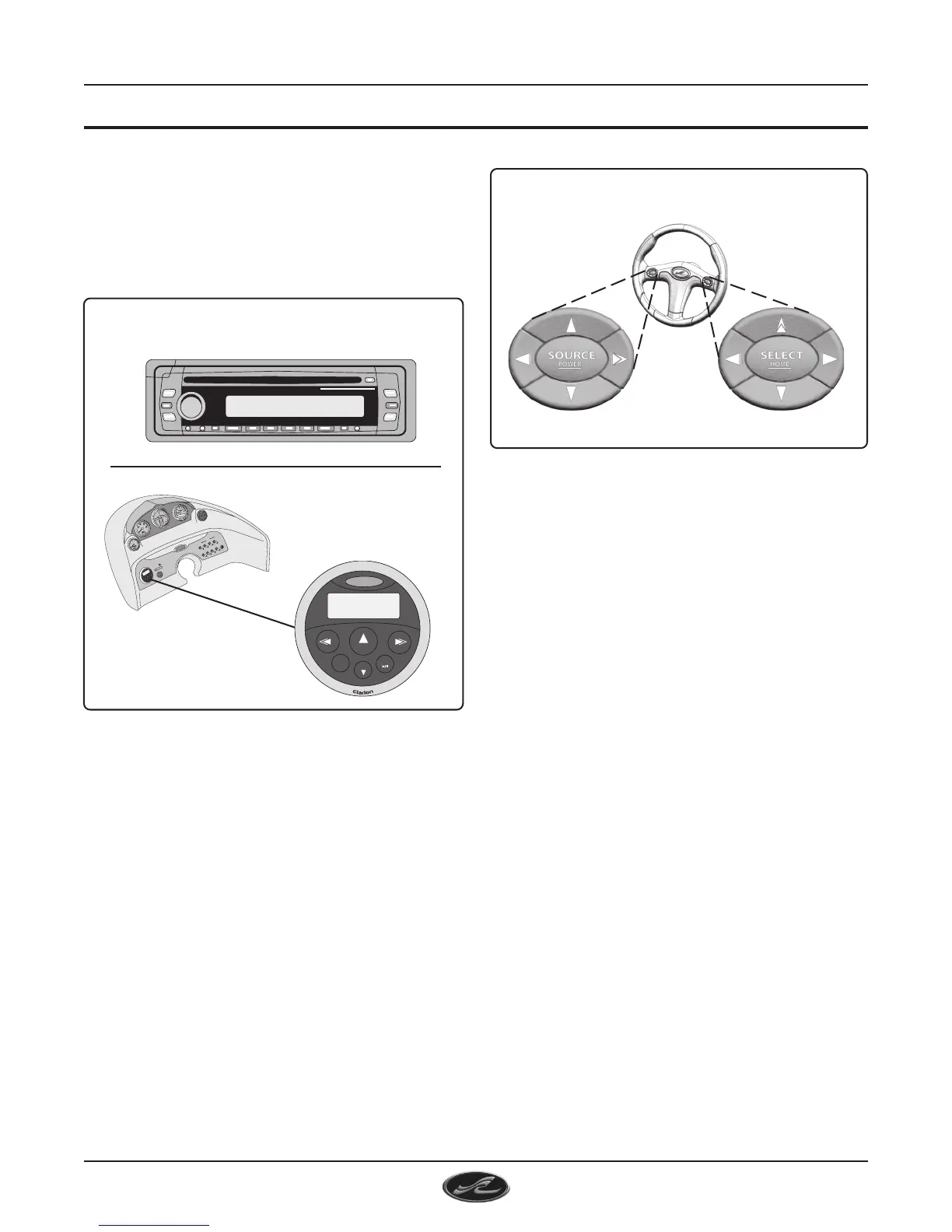
ENTERTAINMENT SYSTEM
(FIG.7.3.1)
AM/FM RADIO, SINGLE CD UNIT
cutout next to the control station. The receptacle is
a cigarette lighter type plug that may be used with
any 12 volt accessories using this type of plug.
6. ENTERTAINMENT SYSTEM
The entertaiment system on the 220 Select consists
of a 12V AM/FM radio, single CD unit located in the
glove box on the port dash. The system includes
four (4) waterproof speakers and a digital remote
control located at the control station.
7. STEERING WHEEL REMOTE CONTROLS
The remote controls on the steering wheel allow
the operator to control the stereo system and the
SmartCraft™ System View display without reaching
for the dash.
The SOURCE buttons group controls the stereo
system.
POWER
SOURCE
VOL
VOL
MUTE
BAND
DISC
STEERING WHEEL REMOTE CONTROLS
(FIG. 7.3.2)
SOURCE BUTTONS GROUP
(STEREO SYSTEM)
SELECT BUTTONS GROUP
(SMARTCRAFT SYSTEM VIEW)


 To Next Page