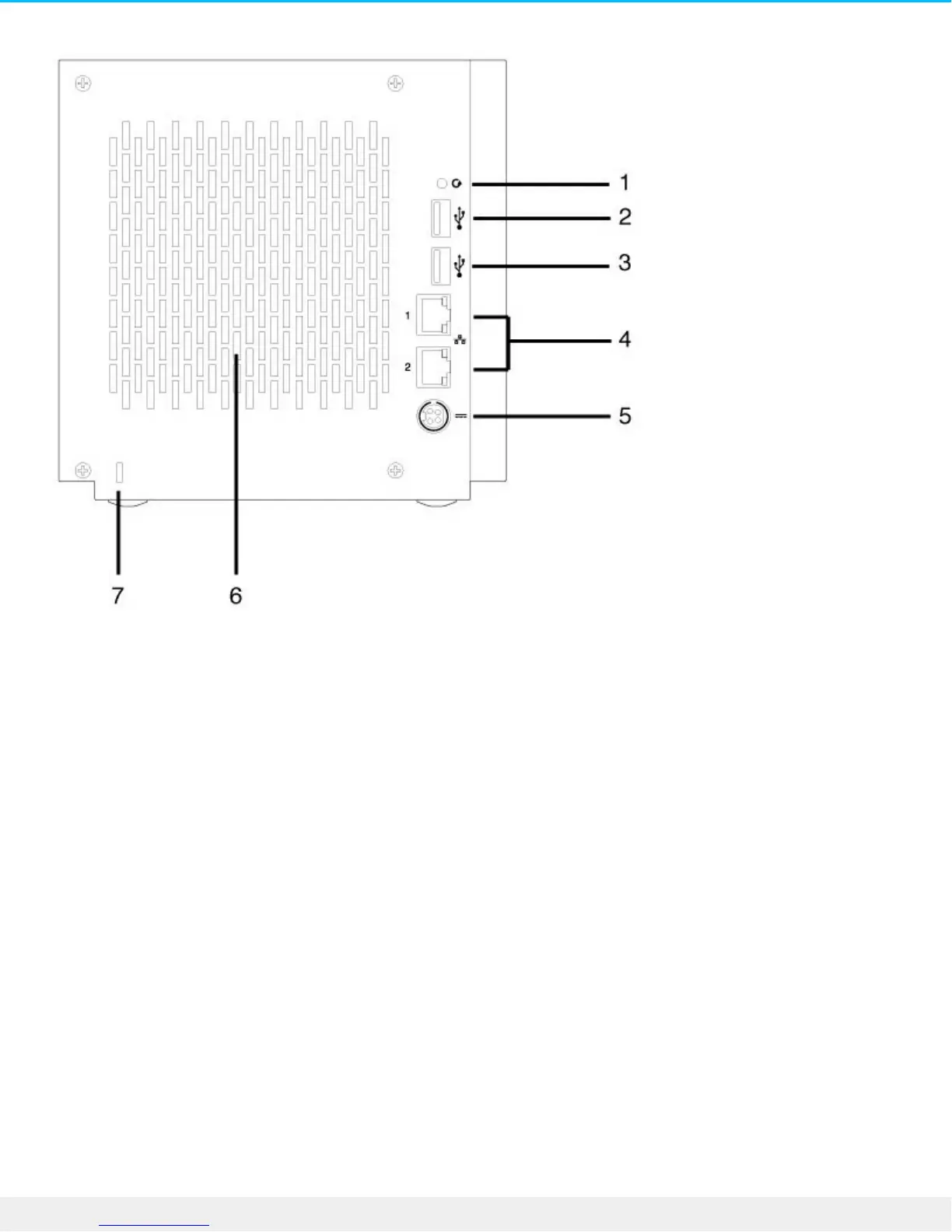
1. Recovery button: The recovery button is used to perform a NAS OS Rescue (see NAS OS Rescue) or
when first configuring a diskless NAS Pro (see Setup). Use a pointed instrument to gently push the button
within the cavity.
2. SuperSpeed USB 3.0 port: Connect a compatible USB storage device to the port.
3. Hi-Speed USB 2.0 port: Connect a compatible USB storage device to the port.
4. Gigabit Ethernet ports (x2): Connect the Ethernet cable from the device to your network. See Setup.
5. Power input: Plug in the AC adapter supplied with the NAS. See Setup.
6. Ventilation: Keeps your NAS Pro's power supply unit cool during operation. Be sure not to block the fan
exhaust when using the product.
7. Kensington lock: Secure the NAS Pro to a desk using a compatible cable.
NAS Pro 6-Bay











 To Next Page