Seats and storage compartments 147
Safety First Operating Instructions Practical Tips Technical Specifications
Removing and installing luggage compartment cover / net
partition
The luggage compartment cover / net partition can only be
removed when the rear backrests are folded forwards.
Removing luggage compartment cover / net partition
– Open the right-hand rear door.
– Fold down the backrests ⇒ page 149.
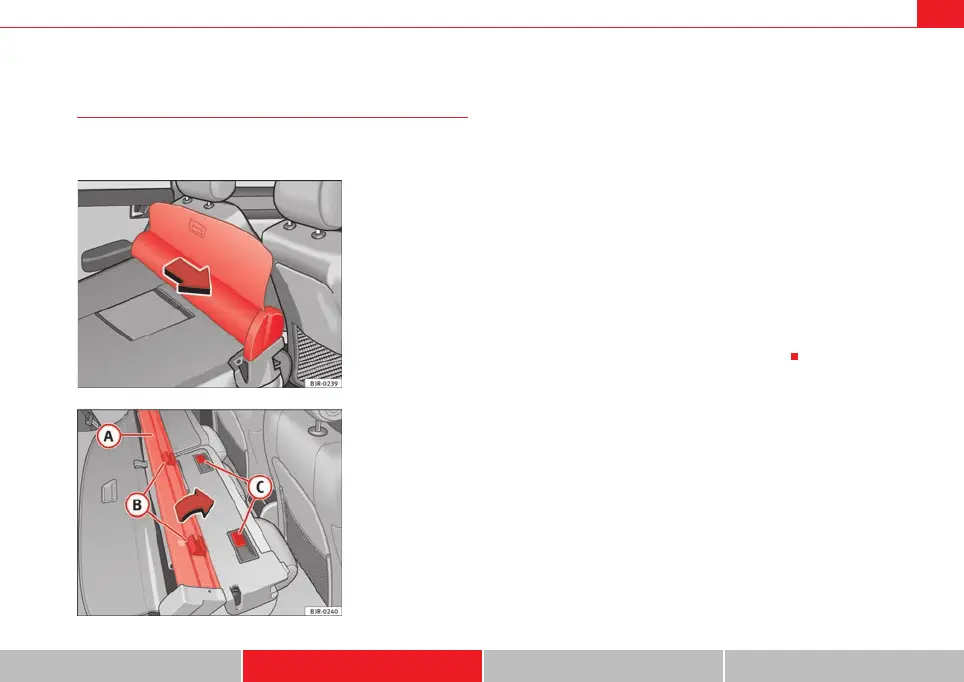
– Pull the net partition in the direction indicated ⇒ fig. 122 and lift
it out of the retaining rails.
Installing luggage compartment cover / net partition
– Open the right-hand rear door.
– Fold down the backrests ⇒ page 149.
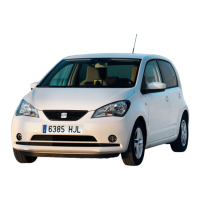
– Fit the net partition on the backrest so that the retainers
are located next to the retaining rails ⇒ fig. 123.
– Push the luggage compartment cover / net partition towards the
left-hand side of the vehicle as far as it will go.
Fig. 122 Removing
luggage compartment
cover / net partition
Fig. 123 Installing
luggage compartment
cover / net partition
A
A
B
C
ExeoST_EN.book Seite 147 Freitag, 3. September 2010 11:41 11



 To Next Page