30 Description of diagnostic indications
7) DESCRIPTION OF DIAGNOSTIC INDICATIONS
For the meaning and use of the various controls, please refer to the respective user manuals; only the diagnostic indications are
described in this section.
The Genesis 302-382 AC/DC series automatically compensates for the variations in power supply voltage, i.e. variations of ± 15%
with respect to the rated power supply voltage do not produce significant variations in the welding current.
7.1) External diagnostic indications
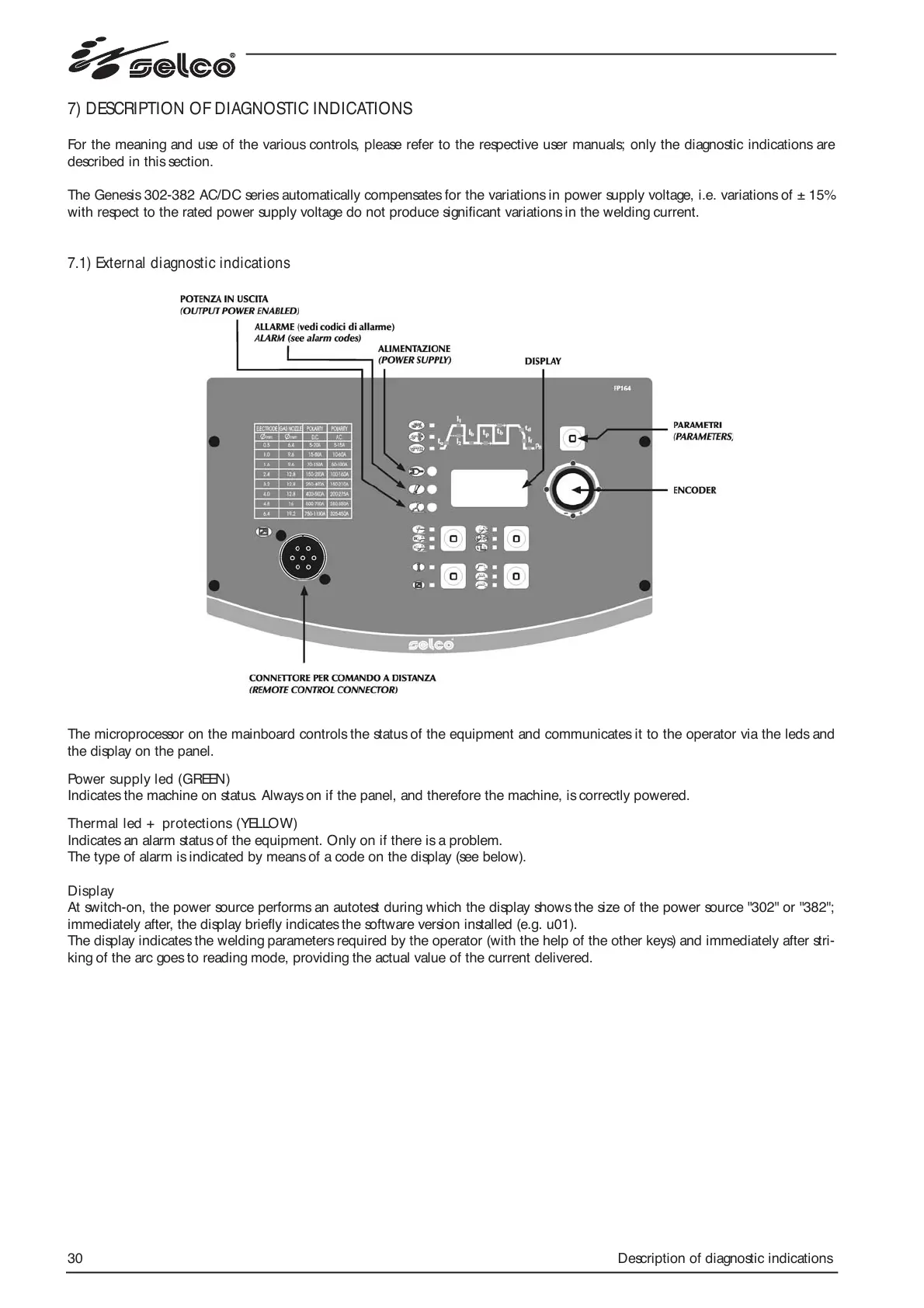
The microprocessor on the mainboard controls the status of the equipment and communicates it to the operator via the leds and
the display on the panel.
Power supply led (GREEN)
Indicates the machine on status. Always on if the panel, and therefore the machine, is correctly powered.
Thermal led + protections (YELLOW)
Indicates an alarm status of the equipment. Only on if there is a problem.
The type of alarm is indicated by means of a code on the display (see below).
Display
At switch-on, the power source performs an autotest during which the display shows the size of the power source "302" or "382";
immediately after, the display briefly indicates the software version installed (e.g. u01).
The display indicates the welding parameters required by the operator (with the help of the other keys) and immediately after stri-
king of the arc goes to reading mode, providing the actual value of the current delivered.




 To Next Page