The Sena Impulse is a motorcycle Bluetooth helmet with Mesh Intercom™ technology, designed to enhance communication and entertainment for riders. This quick start guide outlines the essential functions and operations of the device, from basic power control to advanced intercom and music features.
Function Description
The Impulse helmet integrates a comprehensive Bluetooth system directly into the helmet structure, providing seamless communication and audio experiences. Its primary function is to facilitate rider-to-rider communication through both Bluetooth Intercom and Sena's proprietary Mesh Intercom™ system. The Bluetooth system allows for pairing with up to three other riders for traditional intercom conversations, while the Mesh Intercom™ offers a more dynamic and flexible group communication experience.
Beyond communication, the Impulse serves as a personal entertainment hub. Riders can pair their mobile phones to the helmet to manage calls, activate voice assistants like Siri or Google Assistant, and control music playback. An integrated FM radio further expands entertainment options, allowing riders to tune into their favorite stations on the go.
The helmet also incorporates a range of safety and convenience features. It includes a shield visor that is Pinlock ready, an inner sun visor for glare reduction, and a breath guard. The chin guard lever allows for easy adjustment, and the chinstrap features a one-touch buckle for secure fastening. For maintenance and updates, the helmet is equipped with a magnetic DC power charging and firmware upgrade port, along with a pinhole fault reset button. A notable safety feature is the LED taillight, which can be controlled via the Sena Motorcycles App, offering modes like solid, night flash, and day flash to enhance rider visibility.
Usage Features
The Impulse helmet is designed for intuitive operation, with clearly marked buttons for various functions.
Basic Operations:
- Powering On/Off: The helmet can be powered on or off by pressing and holding the (+) button for 1 second.
- Volume Control: Volume up and down are controlled by single taps on the (+) and (-) buttons, respectively.
- Battery Level Check: The battery level is indicated by a series of blinking lights when the helmet is powered on.
Phone Features:
- Phone Pairing: Initial phone pairing is achieved by holding the center button for 1 second, which puts the device into "Phone Pairing" mode. Riders then select "Impulse" from their phone's Bluetooth device list.
- Answering/Ending Calls: A single tap on the center button answers a call, while holding it for 2 seconds ends a call.
- Rejecting Calls: Holding the center button for 2 seconds rejects an incoming call.
- Voice Assistant Activation: Activating Siri or Google Assistant is done by holding the center button for 3 seconds in stand-by mode.
Music Control:
- Play/Pause: Music playback can be paused or resumed by holding the center button for 1 second.
- Track Navigation: Holding the (+) button for 1 second skips to the next track, and holding the (-) button for 1 second goes back to the previous track.
Mesh Intercom™:
- Turning On/Off: Mesh Intercom™ is toggled on or off with a single tap on the Mesh Intercom button. When turned on, the helmet automatically connects to nearby Impulse users in Open Mesh (default channel 1).
- Channel Setting (Open Mesh): To enter channel setting, tap the Mesh Intercom button twice. Channels can be navigated by tapping the (+) or (-) buttons once, and saved by tapping the Mesh Intercom button once. The Sena Motorcycles App can also be used to change channels.
- Group Mesh Creation/Joining: Users can create or join a Group Mesh by holding the Mesh Intercom button for 5 seconds, entering "Mesh Grouping" mode.
- Mic Enable/Disable: The microphone can be enabled or disabled during Mesh Intercom communication by holding the Mesh Intercom button for 1 second.
- Reset Mesh: Holding the Mesh Intercom button for 8 seconds resets the Mesh Intercom, returning it to Open Mesh (default channel 1).
Bluetooth Intercom:
- Intercom Pairing (SIP): Smart Intercom Pairing (SIP) allows for quick pairing by scanning QR codes via the Sena Motorcycles App. This involves pairing the phone, opening the app, tapping the Smart Intercom Pairing Menu, and scanning a friend's QR code.
- Intercom Pairing (Button): Manual Bluetooth intercom pairing is initiated by holding the center button for 5 seconds. The helmet will automatically pair with another Bluetooth system in pairing mode.
- Two-way Intercom: Conversations with paired intercom friends are initiated and ended by tapping the center button: one tap for the first friend, two taps for the second, and three taps for the third.
FM Radio:
- FM Radio On/Off: Holding the (-) button for 1 second toggles the FM radio on or off.
- Start/Stop Scanning: Holding the (+) button for 1 second starts or stops scanning for FM stations.
- Seek Forward/Backward: Tapping the (+) or (-) buttons twice seeks forward or backward through stations.
- Navigating Preset Stations: Holding the center button for 1 second navigates through preset stations. The Sena Motorcycles App can be used to save current stations.
- Accessing Menu: The configuration menu is accessed by holding the (+) button for 10 seconds.
- Navigating Options: Options within the menu are navigated by tapping the (+) or (-) buttons once.
- Executing Options: A single tap on the center button executes a selected menu option.
Maintenance Features
The Sena Impulse helmet includes features to ensure its longevity and optimal performance.
- Firmware Upgrade: The helmet supports firmware upgrades, which can be performed automatically via Wi-Fi when connected to the Sena Motorcycles App. The magnetic DC power charging and firmware upgrade port is used for this purpose. A dedicated Firmware Upgrade Status LED indicates the progress of updates.
- Fault Reset: In case of a system malfunction, a pinhole fault reset button is provided. This reset will not restore the Bluetooth system to factory default settings but can help resolve minor issues.
- Factory Reset: For more significant troubleshooting, a factory reset can be performed through the configuration menu. This process involves accessing the configuration menu, navigating to "Factory Reset," and confirming the action. This will revert all settings to their original factory defaults.
- Sena Motorcycles App: The Sena Motorcycles App serves as a central hub for device configuration and maintenance. It allows users to manage device settings, change Mesh Intercom channels, save FM radio stations, and control the LED taillight modes (Solid, Night Flash, Day Flash, Off). The app also facilitates automatic firmware updates, ensuring the helmet always runs on the latest software.
- Customer Support: Sena provides customer support through their website, sena.com, and encourages users to follow their social media channels (Facebook, YouTube, Twitter, Instagram) for the latest information and helpful tips.

 Need help?
 General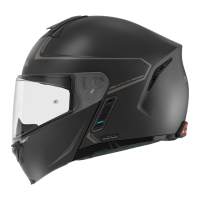

 To Next Page










