21
5. If the pairing process is not completed within three minutes, the
20S will return to stand-by mode.
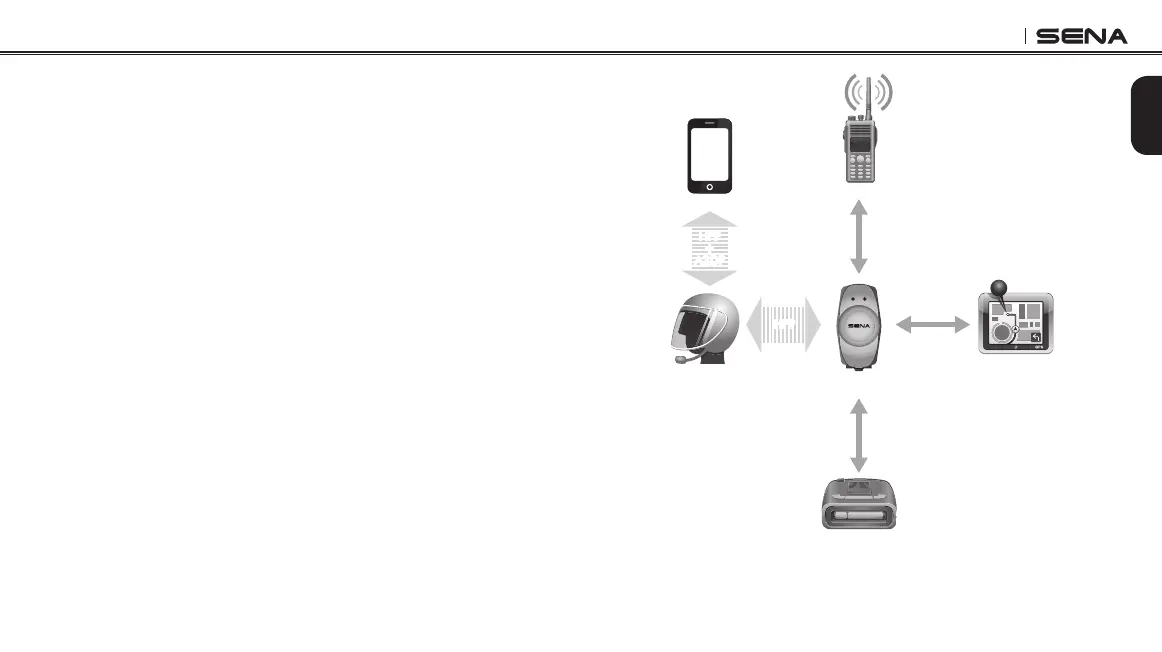
The incoming audio from the two-way radio via SR10 is heard in
the background while having an intercom conversation or a mobile
phone call. You can listen to music, answer a mobile call, have an
intercom conversation and use a two-way radio via the SR10 for group
communication as shown in the gure below. A GPS system or a
radar detector which has a headphone jack or audio line-out could
be connected to the SR10 by a wire. The GPS voice instruction or the
radar detector alarm is also heard in the background via the SR10
while having an intercom conversation or a phone call. Please refer to
the SR10 User's Guide for details.
Parallel Connection of SR10 and Mobile Phone
by Bluetooth Second Mobile Phone Pairing
Smart Phone
Two-way Radio
20S
GPS
Sena SR10
Radar Detector
HFP
+
A2DP
Mobile Phone
Pairing
Second Mobile
Phone Pairing
HFP
Wired
Connection
Wired
Connection
Wired
Connection



 To Next Page