3
Panel Controls (Keypad)
Radio preset
Press each number button 1 ~ 6 more than 2
secondstostorecurrentstation,pressbriey
to recall stored station.
Disc playback
Pressnumberbutton1topause,pressagain
to resume play.
Press number button 2 to intro play track on
thedisc for10secondseach,press againto
intro play track in current folder for 10 seconds
each, pressagain toend scan and play the
selected track.
Press number button 3 to repeatedly play
thecurrent track, press again to repeatedly
playalltracksincurrentfolder,pressagainto
resume normal play.
Press number button 4 to randomly play the
currenttrack,pressagaintorandomlyplayall
tracksincurrentfolder,pressagaintoresume
normal play.
Press number button 5 or 6 to previous or next
folder.(iftherearemorethan1folders)
Press and hold 5 or 6 more than 2 seconds to
goto -10 down or +10 up track.
Panel Controls (Other Instructions)
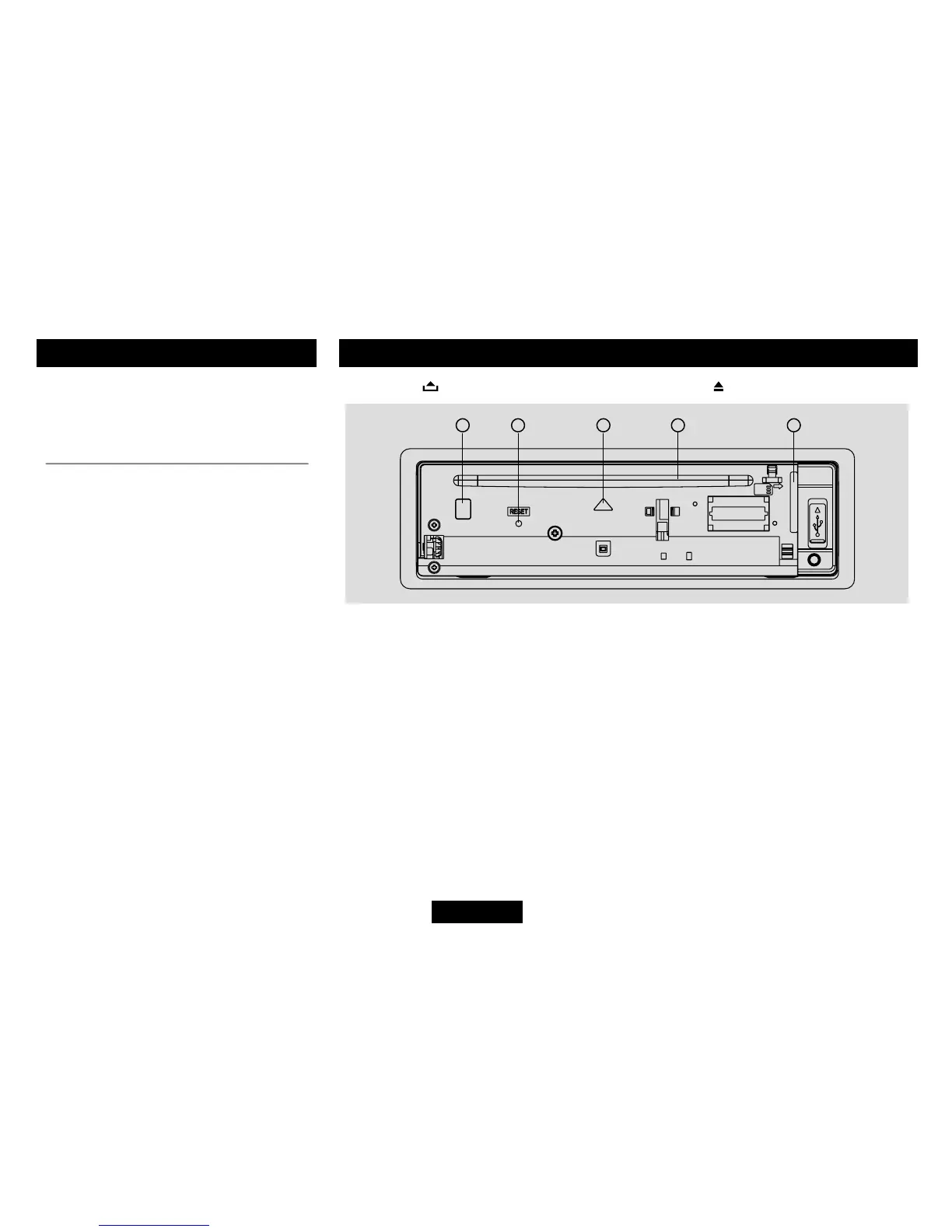
Press the button to open the panel and press to eject the disc.
1.Disceject(ifthereisadiscintheunit)
2.Resethole(Note:PressingtheRESETholewillerasetheclocksettingandstoredstations.)
3.Panelstatusindication:Lightsupwhenyouipdownthepanel;twinkleswhenyouremovethe
panel.
4.Slot,Insertthedisc
5. SD/MMC card slot


 To Next Page