2
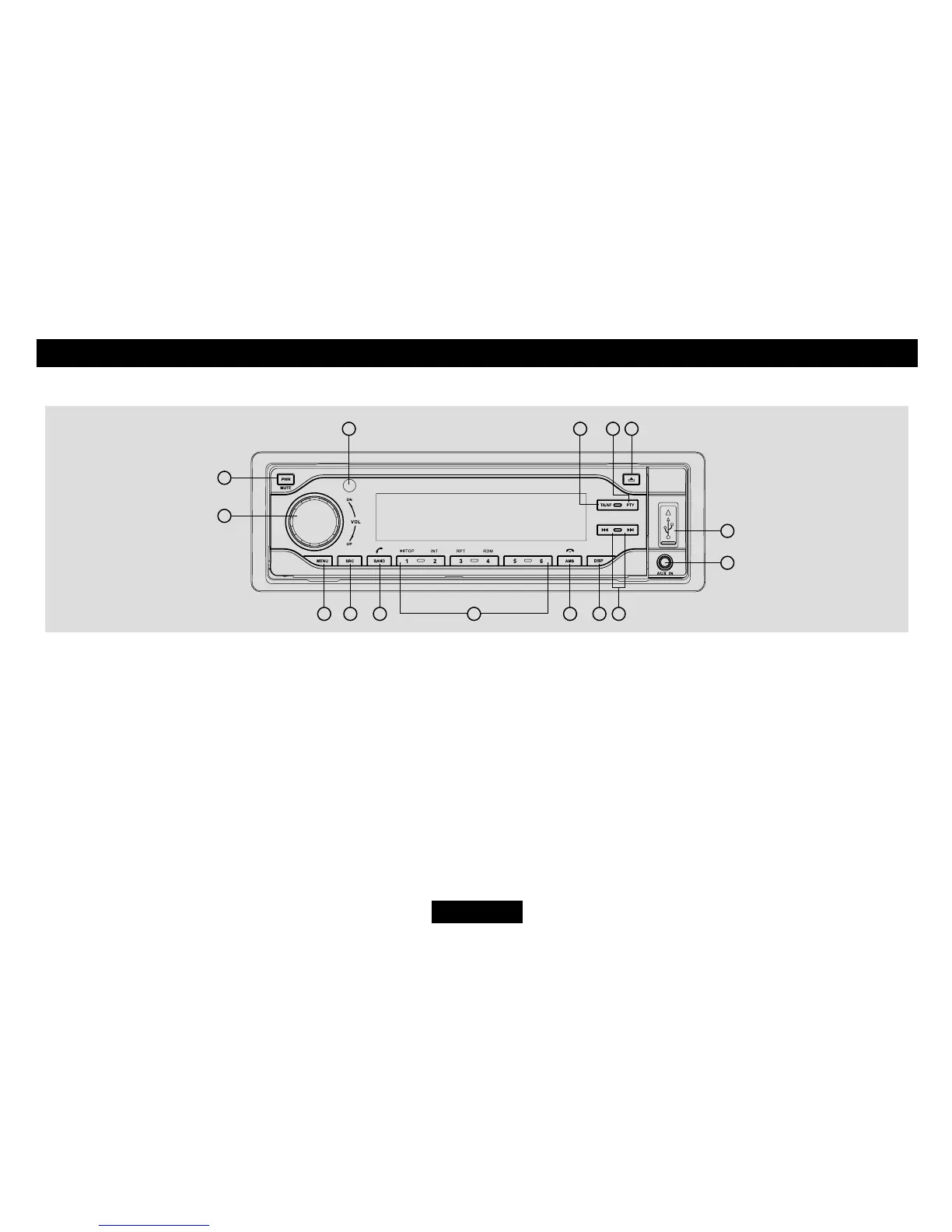
Panel Controls
Press PWR button to turn on the unit.
1. - Mute
- Press more than 2 seconds to power off.
2. - Rotate to adjust volume.
3. - P r e s s t o s e l e c t V O L U M E / B A S S /
TREBLE/BALANCE/FADER,rotatethe
knob to adjust.
- Long press to enter system menu.
4. - Radio
-Discplay(whendiscisin)
-SD/MMCcard(whenSD/MMCinserted)
-USB-drive(whenUSBinserted)
- Aux-in
- BT MUSIC
- Long press to disconnect /reconnect
- Track skip/seek
10. - Aux-in jack
11. - USB connector
12. - Panel open
13. - Press to enter RDS PTY mode and use
number button 1~6 to select RDS PTY
stations.
14. - Press to turn RDS AF on/off.
- Long press to turn RDS TA on/off.
15. - Remote sensor
bluetooth phone.
5. - Radio band switch
- Dial/Receive call
- Long press to re-dial.
-Whiletalking,presstotransferthecall.
6: -Number1~6(Keypad)
7. - Radio preset scan
-Radioautopreset(longpress)
- MP3/ WMA search
- Call off / cancel
8. - Display switch
-Timeadjust(longpress)
9. Radio tune


 To Next Page