4
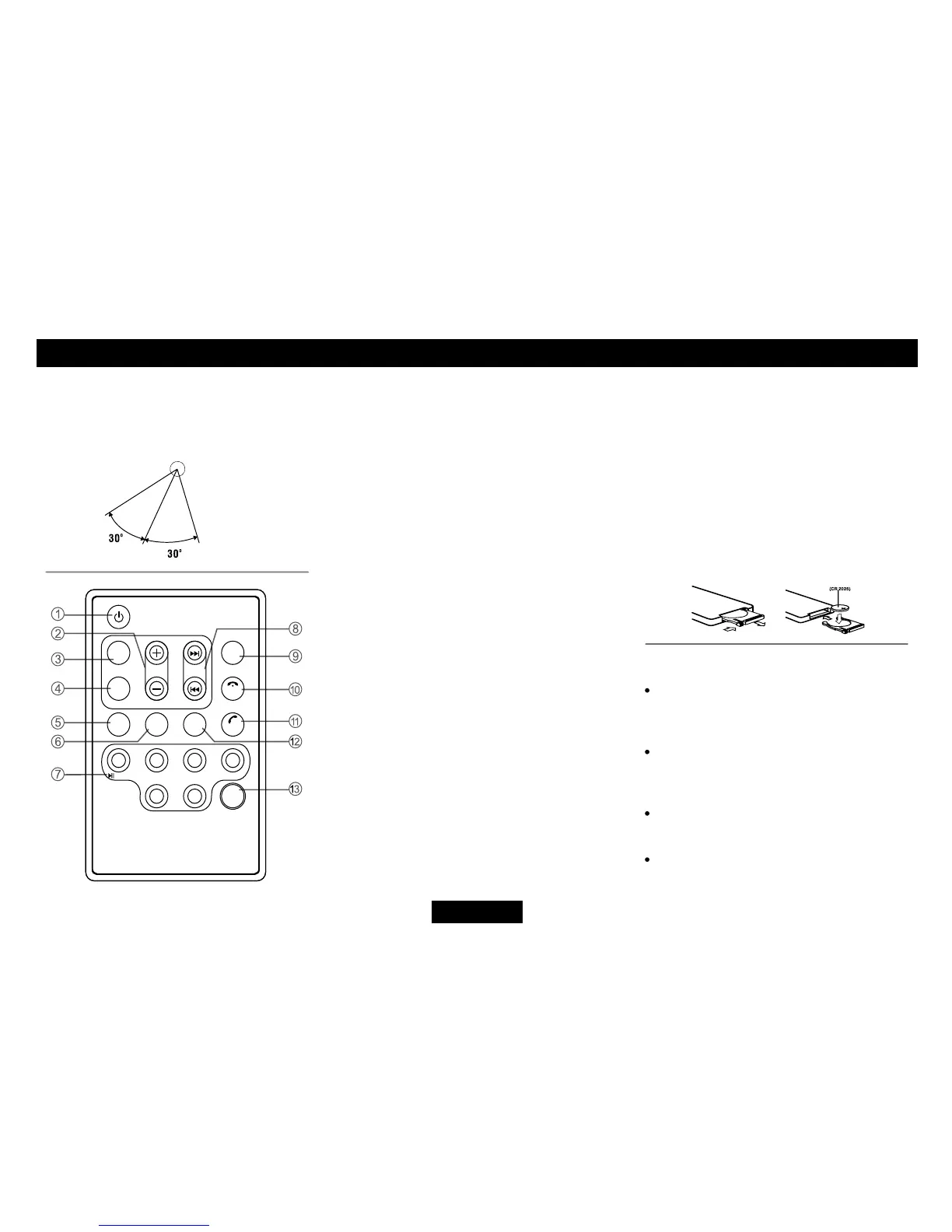
1. - Power on/off
2. - Volume
3. - Mute
4. -Press to select VOL/BAS/TRE/BAL/FAD,
use volume button to adjust level.
- Press and hold it to enter Menu mode.
5. -Trafcannouncementsidentication
6. - Alternative frequency
-REGon/off(longpress)
7. - Disc Playback
Button 1: - Play/Pause
-Topplay(pressmorethan2sec)
Button2:-Introplay(10sec)
Button 3: - Track repeat play
Button 4: - Track random play
Button 5: - MP3 folder down
- Track -10 down
Button 6: - MP3 folder up
- Track +10 up
- Radio Preset
Press to listen to a preset station.
Press and hold to store station.
8. - Radio tune/Track seek
9. - Select playback source
10. - AMS: Radio preset scan/Radio auto preset
-SEARCH:MP3track/le/charactersearch
- Call off / cancel
11. - Radio band switch
- Dial/Receive call
- Long press to re-dial.
-Whiletalking,presstotransferthecall.
12. - Program type
13. - Display switch
REMOTE CONTROLS
Rep lacin g the lithium bat tery of
remote control unit.
When the range of the operation of the card
remote control becomes short or no functions
while operating. Replace the battery with a
new lithium battery. Make sure the battery
Polarity replacement is correct.
1. Pull out the battery holder while pressing
the stopper.
2. Insert the button-type battery with the
stamped(+)markfacingupward.
Insert the battery holder into the remote
control.
WARNING:
Store the battery in place where children
cannot reach. If a child accidentally
swallowed the battery, consult a doctor
immediately.
Do not recharge, short, disassemble or
heat the battery or dispose it in a fire.
Doing this may cause the battery to give
offheat,crackorstartare.
Do not leave the battery with other
metallic materials or poke the battery with
tweezersorsimilartools.
Whenthrowingawayorsavingthebattery,
wrap it in tape and insulate.


 To Next Page