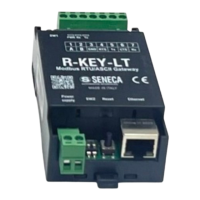
The SENECA R-KEY-LT is a 1-port Modbus RTU/ASCII Gateway designed for seamless communication between Modbus TCP-IP and Modbus RTU/ASCII serial devices. It features a robust design with an internal web server for configuration and real-time value monitoring, making it a versatile solution for industrial communication needs.
Function Description:
The R-KEY-LT acts as a bridge, enabling Modbus TCP-IP masters to communicate with Modbus RTU/ASCII serial slaves, and vice versa. It supports two primary operating modes:
- Modbus Ethernet to Serial: In this mode, a Modbus TCP-IP master connects to the R-KEY-LT via Ethernet, and the R-KEY-LT translates these requests to one or more Modbus RTU/ASCII serial slaves connected to its serial port. This conversion happens in real-time, eliminating the need for complex register configuration. It supports up to 8 Modbus TCP-IP clients simultaneously.
- Modbus Serial to Ethernet: Here, a Modbus serial master connects to the R-KEY-LT's serial port, and the gateway translates serial Modbus requests to one or more Modbus TCP-IP servers connected via Ethernet. Similar to the Ethernet-to-Serial mode, the conversion is real-time, requiring only serial port configuration and definition of the Modbus TCP-IP server's station address range.
The device is capable of extending RS485 networks over Ethernet or Wi-Fi infrastructure by using two R-KEY-LT devices: one configured in Serial to Ethernet mode and the other in Ethernet to Serial mode. This allows for flexible network expansion and integration of geographically dispersed Modbus devices.
Important Technical Specifications:
- Serial Port: 1 x RS485-RS232 serial port.
- Ethernet Port: 1 x Fast Ethernet 10-100 Mbits with auto TX/RX.
- Power Supply: 10-40 Vdc or 19-28 Vac (50-60 Hz).
- Max Absorption: 1 W.
- Dimensions: 110 x 53 x 32 mm (compact size).
- Protection Degree: IP20 (Black, PA6 box).
- Serial Protocols: Modbus RTU/ASCII Slave/Master.
- Baud Rate: Configurable from 1200 baud up to 115200 baud.
- Parity: Configurable (None/Odd/Even).
- Stop Bit: Configurable (1 or 2).
- Data Bit: Configurable (7 or 8).
- Ethernet Protocols: Modbus TCP-IP Client/Server.
- Operating Temperature: -20°C to +70°C.
- Storage Temperature: -20°C to +85°C.
- Humidity: 30-90% non-condensing.
- Modbus Slave Devices: Supports up to 247 Modbus serial slave devices.
- Standards: EN 61000-6-4 (Emission, industrial environmental), EN 61000-6-2 (Immunity, industrial environmental), EN 61010-1 (Safety).
Usage Features:
- Simple Configuration: The device can be easily configured through its internal web server, accessible via a standard web browser.
- Discovery Tools: Seneca Discovery Device tools are available to search for and configure devices on the network without requiring changes to the PC's IP configuration.
- IP Configuration: Supports DHCP, Static IP, and Factory Default settings, configurable via DIP switches (SW2). A fault IP address (169.254.x.y) is automatically assigned if DHCP is configured but no DHCP server is active after 5 minutes.
- RS485 BUS Polarizer: Available via DIP switches (SW1) for enhanced bus stability.
- Multiple Client Support: In Modbus Ethernet to Serial mode, it can communicate with up to 8 Modbus TCP-IP clients.
- Multiple Server Support: In Modbus Serial to Ethernet mode, it can connect to one or more Modbus TCP-IP servers (up to 10 R-KEY-LT devices in Ethernet to Serial mode).
- Quick Installation: Designed for quick installation on DIN 46277 rail.
- User Authentication: The web server supports user name and password authentication to restrict access, enhancing security.
- IP Change from Discovery: Allows users to change IP configuration from the Seneca Discovery Device software.
Maintenance Features:
- Debug LEDs: PWR, RX, and TX LEDs provide visual feedback on the device's status, including power, IP address acquisition (DHCP), and serial port data transmission/reception.
- Traffic Monitor: An internal web server feature that displays real-time serial packet traffic in hexadecimal format, useful for line debugging and identifying Modbus communication issues (e.g., wrong responses or incorrect baud rates).
- Firmware Update: Firmware can be updated via the internal web server, allowing for feature enhancements and bug fixes. It is recommended to save the current configuration before performing a firmware update.
- Configuration Save/Load: The web server allows users to export (save) and import (load) device configurations, simplifying deployment and backup.
- Factory Default Reset: The device can be reset to factory default settings (DHCP IP, admin/admin web server access) using DIP switches (SW2) or the "FACTORY DEFAULT" button in the web server.
- Reboot Functionality: DIP switch configurations are active only after a reboot, which can be performed by power cycling the device or pressing the "Reset" button for approximately 5 seconds until all LEDs are ON.
The R-KEY-LT is a reliable and user-friendly gateway, designed to facilitate robust and flexible Modbus communication in industrial environments.

 Need help?

 To Next Page

 General