23
Adjusting settings via the operating menu
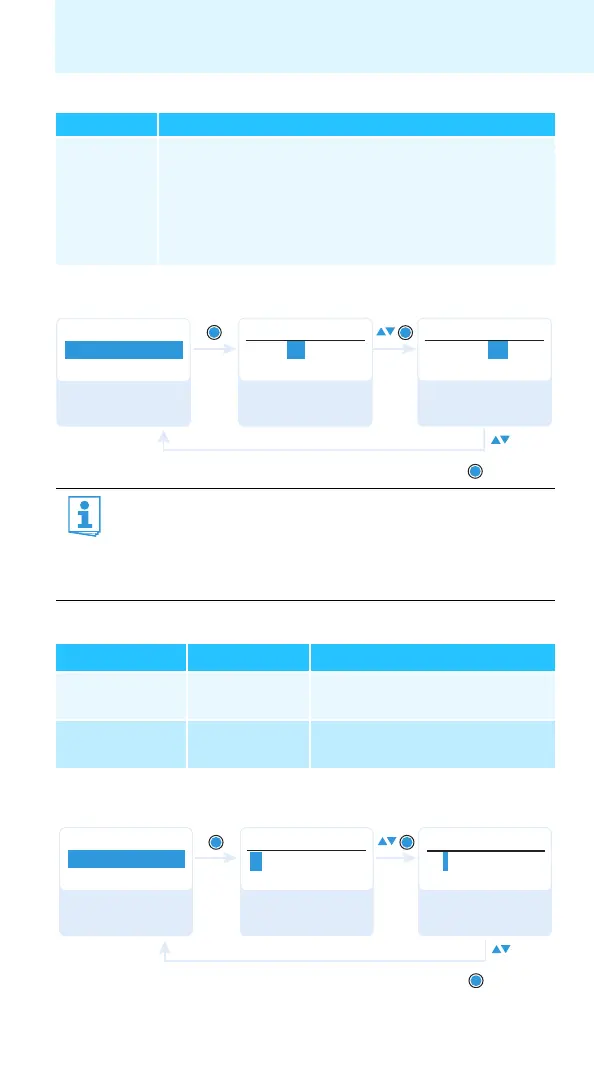
Selecting the frequency bank and the channel – “Frequency Preset”
Overview of the frequency banks and channels:
Entering a name – “Name”
Scan New List Automatically scans for unused receiving frequencies
(frequency preset scan)
If receiving frequencies are used, they will be locked; if
receiving frequencies are unused, they will be released.
After the frequency preset scan, you can select an unused
frequency preset.
When setting up multi-channel systems, please observe the
following:
Only the factory-preset receiving frequencies within one
frequency bank (“1” to “20”) are intermodulation-free. It is vital
to observe the notes on frequency selection on page 30.
Frequency bank Channels Type
“1” to “20” up to 64 per
frequency bank
System bank:
frequencies are factory-preset
“U1” to “U6” up to 64 per
frequency bank
User bank:
frequencies are freely selectable
Menu item Function of the menu item
Menu
B.Ch: 1. 1
Frequency Preset
B.Ch:
Frequency Preset
B.Ch:
Frequency Preset
“Stored”
SET
SET
SET
863.100MHz
1. 1
6. 3
824.500MHz
Call up “Frequency
Preset”
Select the frequency
bank and confirm
Select the channel;
store the setting
Menu
Lichael
Name
Name
Name
L ichael
Mi chael
“Stored”
Call up “Name” Enter a character
and confirm
Enter a character;
store the setting







 To Next Page