29
Additional technical information
Changing the operating mode
The transmitter can be set to a different operating mode. This is useful
when the sound of your sound source is very low and the transmitter
therefore does not always switch on automatically.
Particularities of operating mode 2:
In operating mode 2, the transmitter is not switched on by the sound
signal from the sound source.
To switch the transmitter on:
왘 Take the receiver out of the charging compartment.
To switch the transmitter off:
왘 Place the receiver into the charging compartment.
If – in operating mode 2 – you want to use a second receiver and charge
its rechargeable battery during operation:
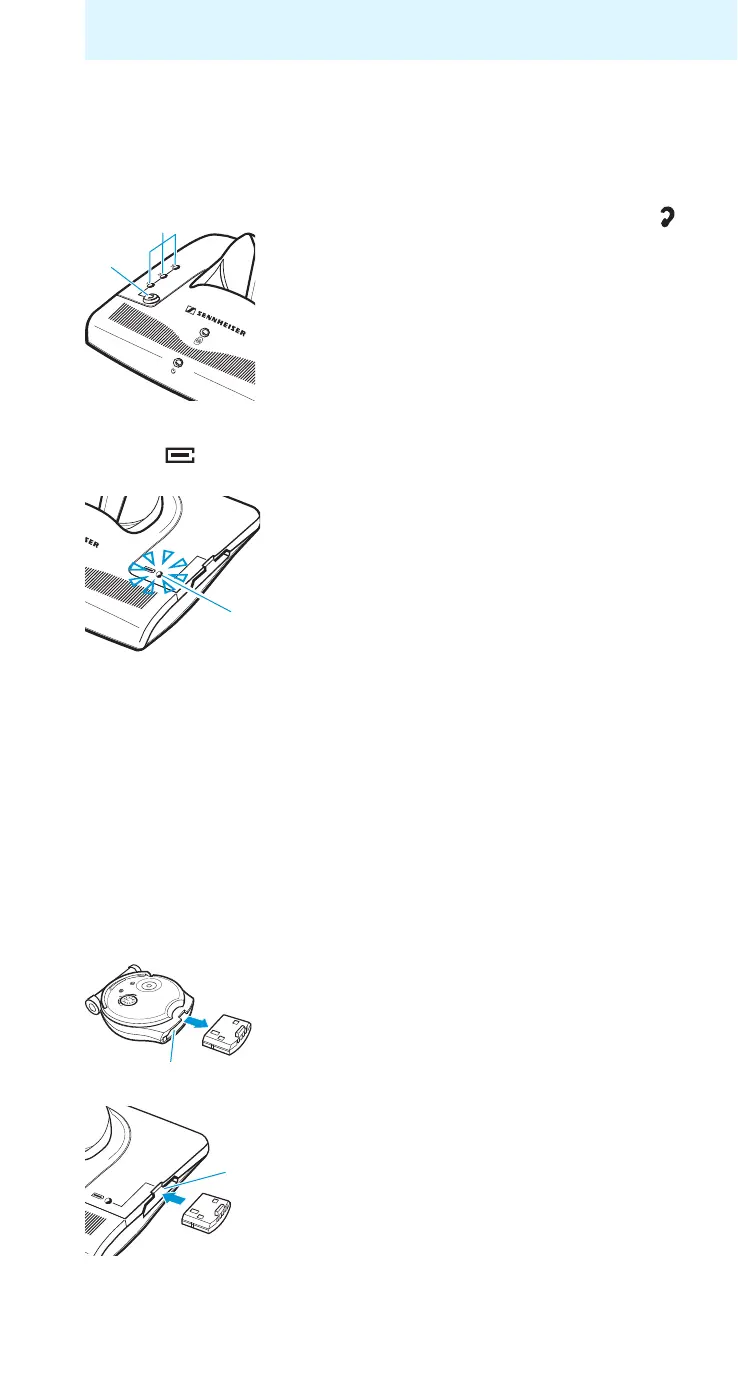
왘 Press the “speech intelligibility” button
C
for approx. 5 seconds.
The indicator
D goes off. The charging indi-
cator for the spare rechargeable battery
0
flashes several times:
red: operating mode 2
green: operating mode 1 (factory-preset)
If the operating mode was changed success-
fully, the charging indicator for the spare
rechargeable battery
0 goes off and the
indicator
D lights up again.
왘 Pull the battery out of the receiver’s battery
compartment
6.
왘 Slide the battery into the transmitter’s
charging compartment
9 as far as it will go.










 To Next Page