Using the Set 880
28 | Set 880
Activating/deactivating the speech
intelligibility function
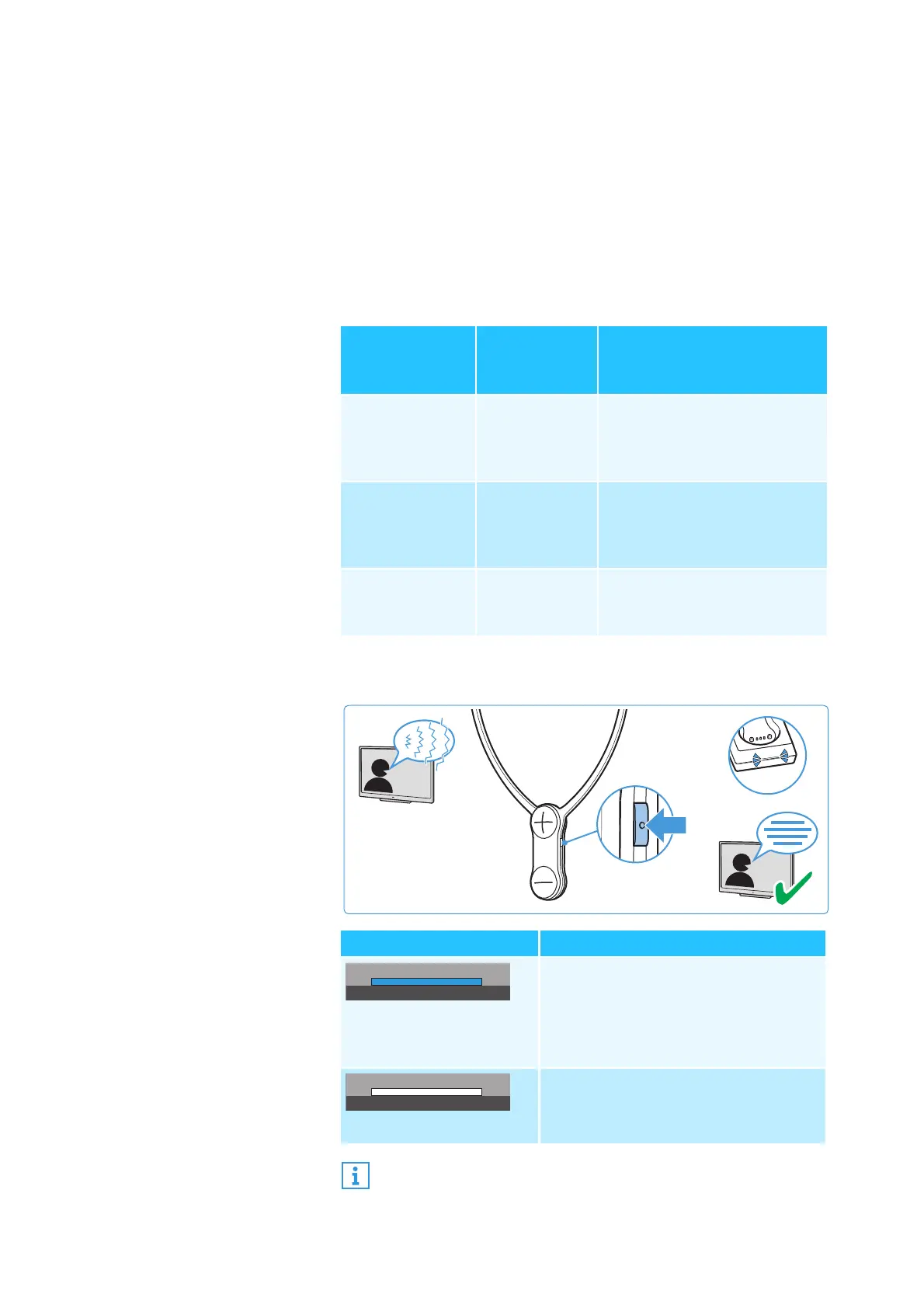
When speech is mixed with annoying background noise,
speech may be difficult to understand.
The speech intelligibility function automatically detects and
reduces annoying background noise. The audio signal is per
-
manently analyzed and adjusted accordingly so speech is fore-
grounded and easier to understand.
Application examples
b Press the
Speech intelligibility
button to activate or deacti-
vate the function.
Application
Speech
intelligibility
function
Advantage
TV motion
pictures, TV
series or audio
books
activated Dialogs muffled by
background music and
noise are easier to
understand.
Sportscasts activated The presentation muffled
by background noise in the
stadium is easier to
understand.
Music deactivated No speech, the speech
intelligibility function is not
needed.
Transmitter status LED Speech intelligibility function
lights up blue
activated;
Annoying background noise is
effectively reduced, speech
becomes clearer and easier to
understand.
lights up white
deactivated
The
speech intelligibility
function can also be used in
addition to one of the hearing profiles 1-5.






 To Next Page